
Microsoft SharePoint File Sharing & Collaboration Software Integration

Simplify your file sharing process, manage your digital assets, and collaborate on important documents with the Microsoft SharePoint and Wrike integration.
TRUSTED BY 20,000+ HAPPY CUSTOMERS WORLDWIDE
Experience productive file collaboration with SharePoint & Wrike
Great collaboration is achieved by creating a streamlined digital work experience and having access to the important resources you need to do your best work. The SharePoint and Wrike integration facilitates practical collaboration on shared assets.
Attach SharePoint files and folders to Wrike
Use our new “Attach from SharePoint” to attach files or folders to Wrike tasks and projects.
Easily browse your shared sites and folders
Have full access to the sites, folders, and files shared with you or created by you in SharePoint.
Collaborate on your essential digital assets
Take advantage of Wrike’s proofing and approvals features to review, edit, and approve your SharePoint files.
Take control of your files with powerful sharing and collaboration
Available for all Wrike users.
Attach SharePoint assets to Wrike in three clicks
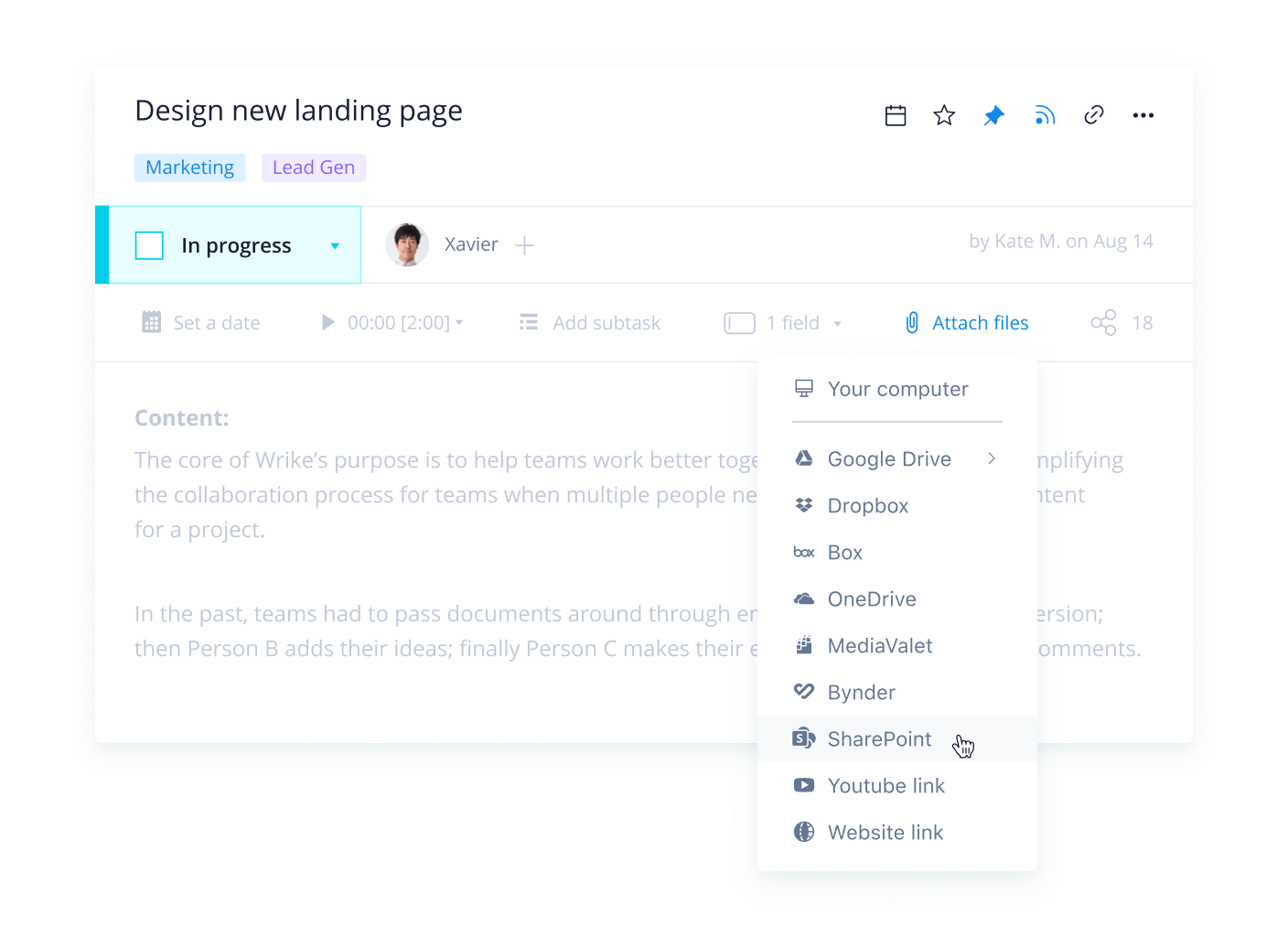
In a Wrike task, project, or folder panel, you’ll see an “Attach from SharePoint'' option in the “Attach files” drop-down menu. Edits or changes update in SharePoint in real time, so you can always be confident that you’re accessing the most up-to-date version of your files.
Instant access to your SharePoint sites, folders, and files
Navigate your sites and your “Following sites'' from the navigation bar within the “Attach from SharePoint” browsing pane. Avoid blockers and inefficiencies by quickly locating the files and folders you’d like to attach to your task or project in Wrike.
FAQ
Yes! The MS SharePoint integration is available on all active Wrike accounts. You must provide credentials and be logged in to SharePoint to start using the features. The integration must also be enabled in “Admin settings” by account admins, and Enterprise admins can limit access to the integrations as required through account settings.
Yes! Any sites, folders, or files that have been shared with you or created by you in SharePoint are browsable through the “Attach from SharePoint” selection within Wrike tasks and projects. You can switch between “All sites” and “Following sites” in the selector panel to easily find your files.
The “Attach from SharePoint” feature creates an active link to the file or folder hosted in SharePoint. You can open SharePoint links in a new tab and preview the current version in its Sharepoint location. Enjoy easy access to the working file for any edits, comments, or changes required.
Once you’re logged in to SharePoint, you’ll be able to use Wrike’s proofing and approvals features. These features are currently available for PDFs and images attached to Wrike tasks from SharePoint.
If you don’t have the proofing feature as an add-on or as part of Wrike for Marketers, you’ll be able to preview SharePoint images and PDF files within your tasks and projects. Currently, guest reviewers are not supported for proofing and approvals of SharePoint documents in Wrike.
The SharePoint integration supports practical collaboration on shared files within Wrike. You can now attach SharePoint hosted documents and folders to Wrike and deliver consistently branded assets through Wrike’s proofing and approvals features.
Check out our Help Center for more information on how to use our attachments and proofing features.
based on 13,000+ reviews from
Discover Wrike’s integration solutions
Use our smart search assistant to explore how Wrike’s integrations can optimize your productivity.
Wrike enhances its website search experience using Google's Vertex AI Search and Conversation generative AI service. Users are cautioned that generative AI might produce inappropriate, inaccurate, offensive, or unintended results, and are advised against submitting explicit, harmful, offensive, or illegal content as search input. Neither Wrike nor Google uses your search inputs to train its machine learning models or for advertising purposes, but search activities may be collected and/or stored via cookies in accordance with our Privacy Policy if you previously registered on our website. These cookies can be deleted through your browser settings. Wrike's search service is not designed to be used in connection with your personal data or any sensitive data of any kind, which users must refrain from inputting.


