Gantt chart software: manage projects without barriers
Wrike’s Gantt chart software manages impactful work from beginning to end and helps users create workflows without limits.
TRUSTED BY 20,000+ HAPPY CUSTOMERS WORLDWIDE
Get 360° visibility with Wrike Gantt сharts
Wrike’s Gantt chart software lets you oversee, adjust, and communicate project details, tasks, and timelines. Discover our powerful online Gantt chart software with a free trial.
DEPENDENCIES AND MILESTONES
Create dependencies and milestones
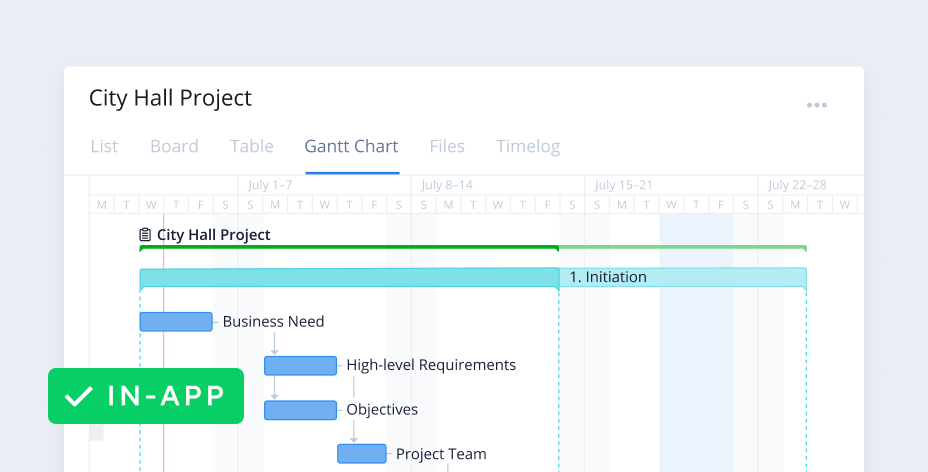
Wrike Gantt chart tools allow you to create task dependencies, which will be automatically scheduled after the related task. Visualizing milestones gives you a better understanding of your project’s progress. Milestones are perfect for marking major events in your project, such as the end of a project phase, important decision points in a project management, or critical events.
DRAG & DROP
Reschedule tasks in bulk
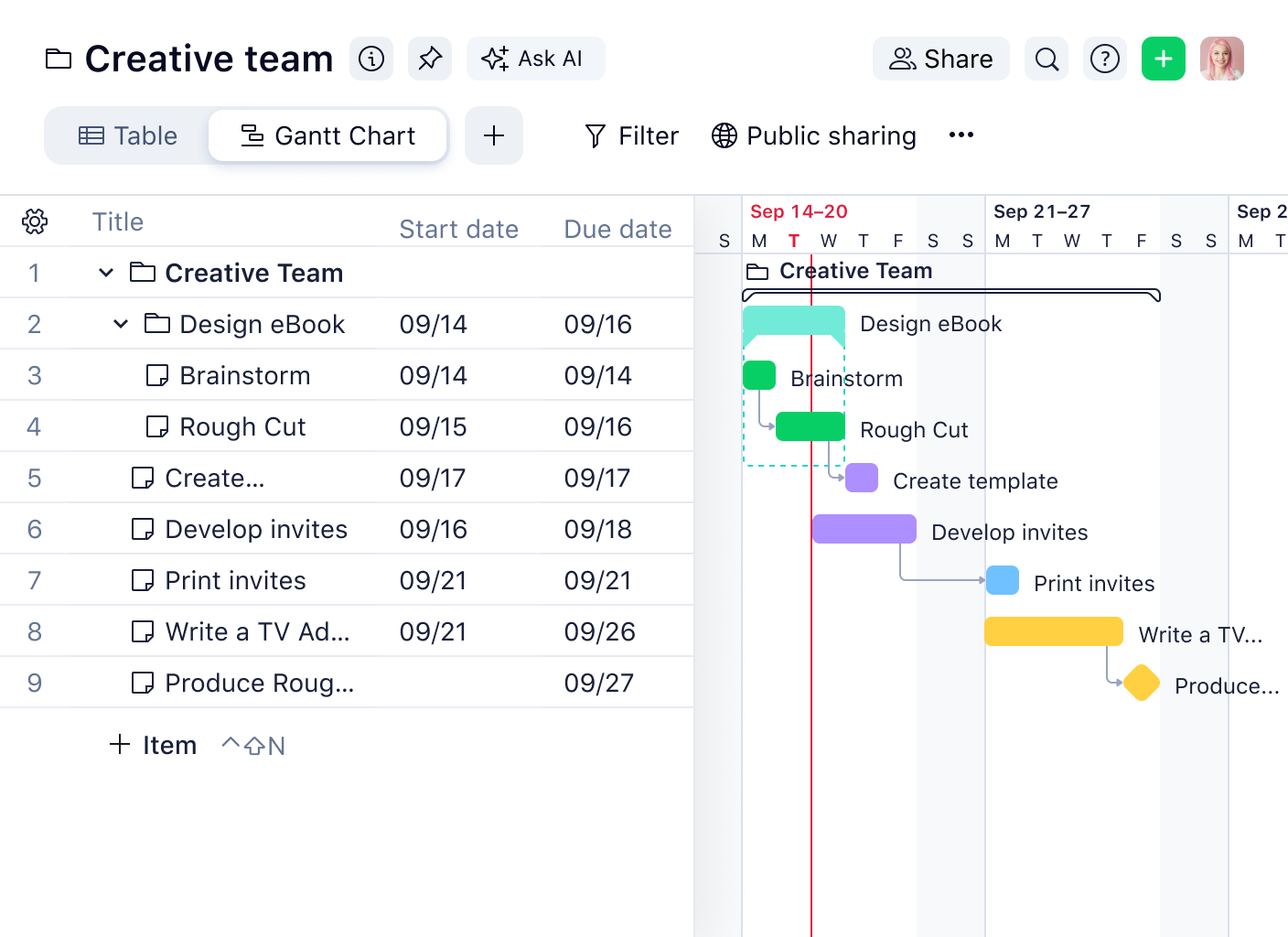
Need to adjust your Gantt chart? Easily change dates and deadlines, drag and drop tasks, and reschedule tasks in bulk. When you reschedule a task with dependencies, all dependent active tasks are instantly rescheduled on the project timeline. Our project scheduler’s timeline automatically adjusts around your changes and shares new details with your team in real time.
COLLABORATION
Share and communicate easily
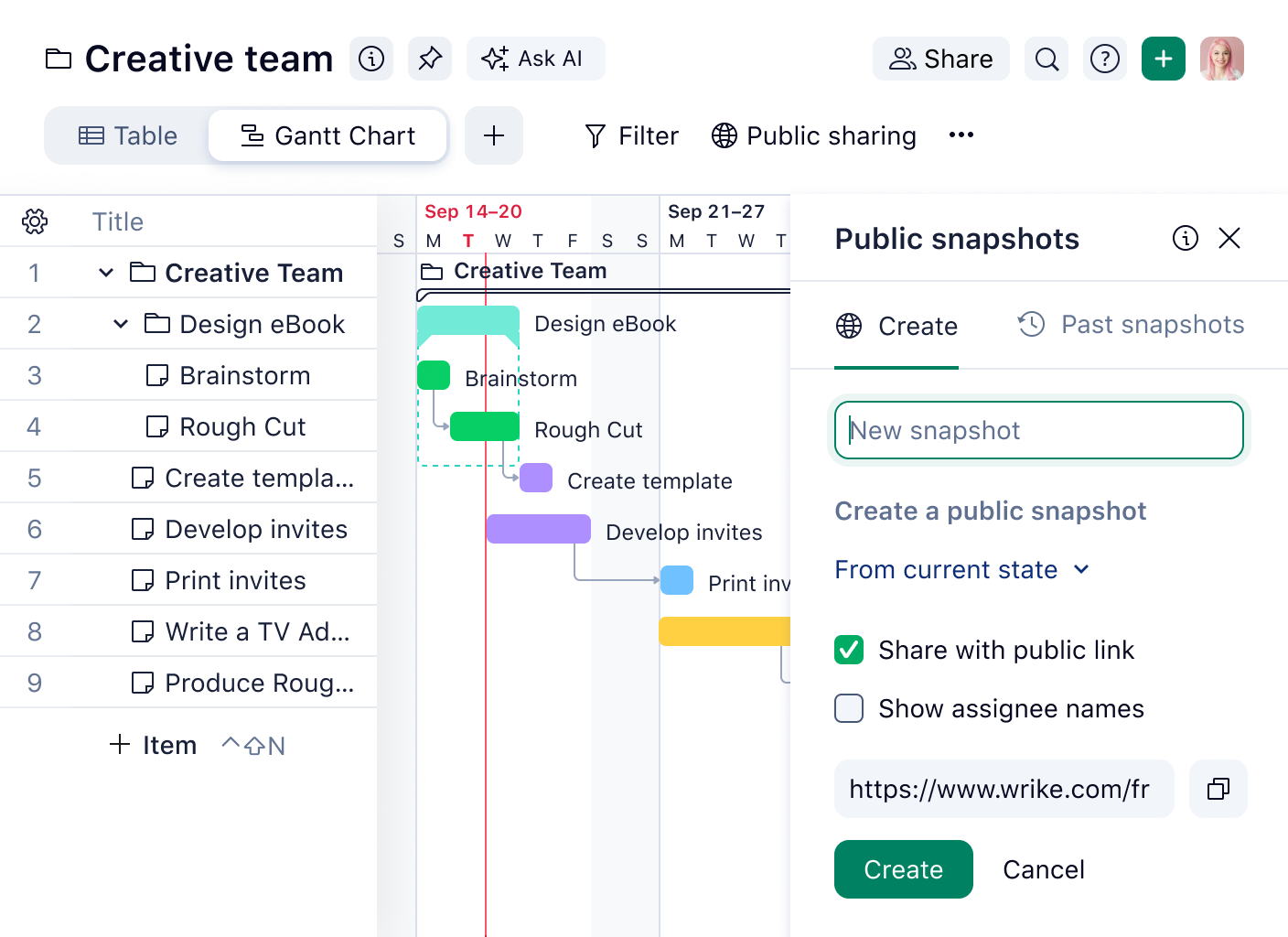
Wrike’s Gantt chart software makes it easy to share work with anyone inside or outside your organization via secure public links or snapshots of your current timeline. Use grouping to quickly organize your view, and when you adjust assignees, dates, or project duration, your team members will know straight away. Need a hard copy of your online Gantt chart? No problem — simply print it out!
IMPORT FILES
Import all your data
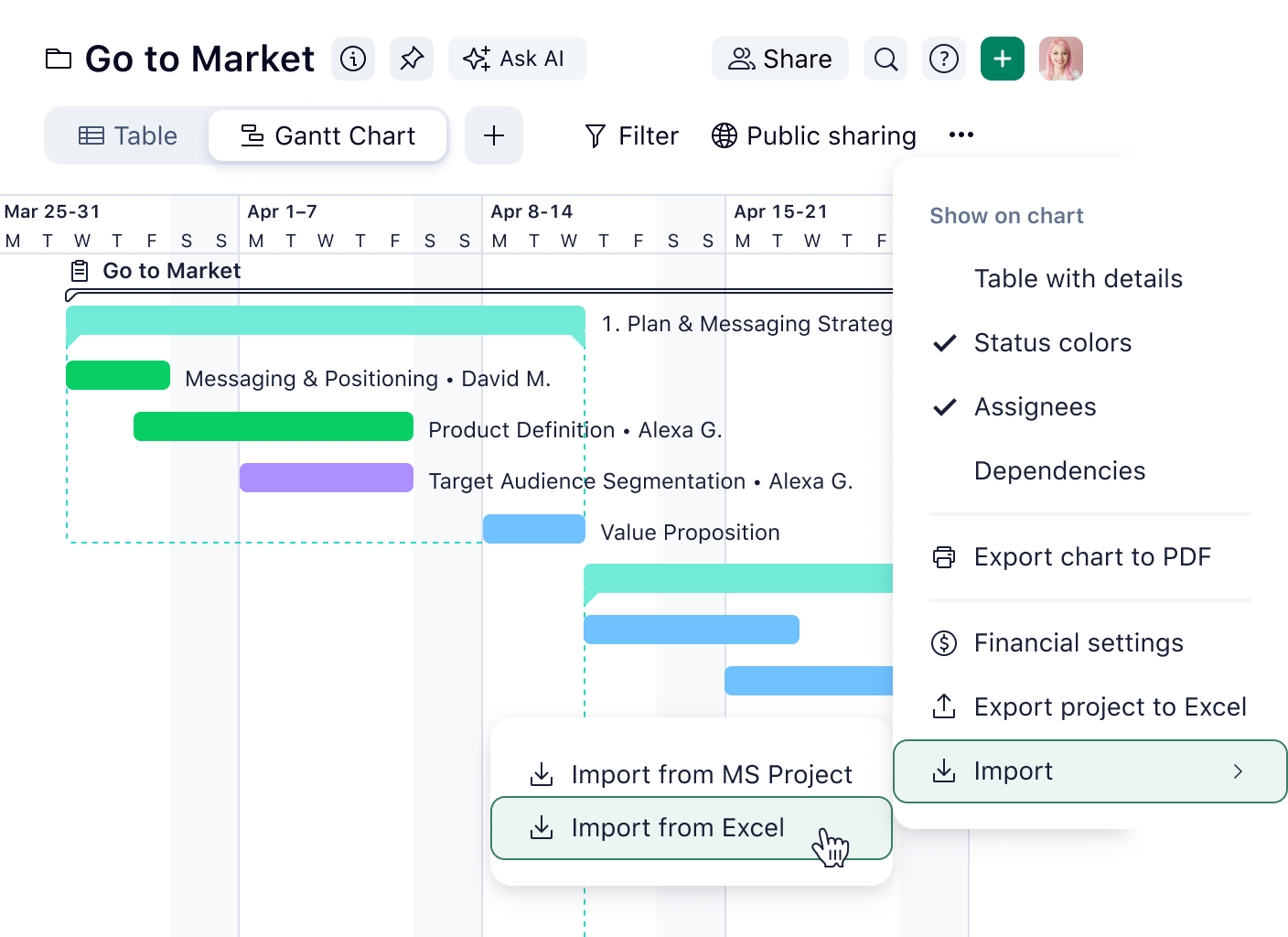
With Wrike’s Gantt charts, there’s no need to manually copy information from spreadsheets and other project management applications. Import files and all your durations, dependencies, and responsible parties will automatically be carried over to our Gantt chart software.
Work flows simply with Wrike’s Gantt chart software
Use our Gantt chart creator to break down the barriers that hinder modern work and create new pathways to success. Bringing your Gantt chart online makes your day easier to plan.
Visualize plans with timelines
With our drag-and-drop builder, project managers can visualize progress and dependencies. Our simple user interface allows you to use critical path analysis to spot bottlenecks.
Manage multiple projects
Wrike’s Gantt chart software allows you to control multiple project plans from one platform, using critical path analysis, snapshots, and baselining.
Import Microsoft Project files
Add .MPP, .MPX, and .XML tasks to Wrike. All your durations, dependencies, and responsible parties will be carried over to your Gantt chart.

Catch up on our most exciting product updates in 2025!
2025 was another landmark year for Wrike, with some of our most exciting releases yet.
“With Wrike’s timeline view [Gantt chart], the entire planning process can be visualized and adjusted. It’s easy to see how tasks are related to one another. TeamViewer’s marketing squad finds this incredibly useful: depicting the dependencies and status gives you a good overview of what needs to be done and what’s going to happen.”
“The timeline view in Wrike was always really great because you could visualize it, you could simply drag and drop, you could slide the dates over, and you could create dependencies in a graphical way, as opposed to having to go through a bunch of UI. Just being able to literally grab the arrow and drag it was always really helpful.”
Phillip Hoffman, Senior Program Manager
“We work faster, update key dates for deliverables much more quickly, and eliminate human error. We’ve likely saved around 200 or more hours per year in our launch prep.”

Brynne Roberts, Director of Creative Operations
Power up with our prebuilt Gantt chart templates
Project management
Project schedule template
Use Wrike’s Gantt chart template for project scheduling to break large projects into actionable items, assign due dates, and track team progress. Start with a tailored workflow, create custom statuses, and more.
Project management
Project risk analysis template
When handling multiple projects, it can be difficult to prioritize problems as they arise. Use Wrike’s template with your Gantt chart to gauge, classify, communicate, and mitigate risks before they affect your project plan.
Project management
Complex project with phases
Complex projects need an effective, phased approach. This Gantt chart template breaks complex projects into manageable phases, allowing you to assign due dates to tasks and track progress on a visual timeline.
Project management
Daily task tracker
With so many tasks to juggle, it can be hard to achieve everything. With the daily activities tracker from Wrike, you can set achievable goals that can be ticked off throughout the day.
Project management
Project schedule template
Use Wrike’s Gantt chart template for project scheduling to break large projects into actionable items, assign due dates, and track team progress. Start with a tailored workflow, create custom statuses, and more.
Project management
Project risk analysis template
When handling multiple projects, it can be difficult to prioritize problems as they arise. Use Wrike’s template with your Gantt chart to gauge, classify, communicate, and mitigate risks before they affect your project plan.
Explore all of Wrike’s modern work solutions
Wrike’s Gantt charts will supercharge your project planning, but did you know Wrike offers more project management tools to keep work flowing easily? Here are just a few.
Feature
Time tracking
Wrike has a built-in time tracker included on every task, so project managers can monitor the time each task takes or manually input the total time spent once finished.
Feature
Kanban boards
Wrike’s online Kanban boards help teams clarify priorities, achieve better results, and improve productivity in less time. You can also use Kanban to enable Agile and double your project management productivity.
feature
Project calendar
Use our project calendar to check deadlines, project timelines, workload clashes, and potential bottlenecks. It also syncs when details are updated, no matter where changes take place.
Projects managed easier with Wrike’s Gantt chart software
Wrike is an intelligent work management platform for any workflow. Its Gantt chart software can be adapted to your organization’s needs, from sign-on to successful outcomes.
based on 13,000+ reviews from
FAQ
A Gantt chart shows activities, tasks, or events displayed against time. Gantt charts allow you to see what activities are involved in your project, when they begin and end, how long they’re scheduled to last, where they overlap with each other, as well as the project start and end dates.
Wrike Forbes ranked Wrike highest in a recent review of Gantt chart software, at 4.7 out of 5 stars. “Overall, it checks all the boxes when it comes to desirable features while being a good value for the money,” the reviewers said.
Zoho Zoho Projects software includes Gantt charts with chronological, milestone, and project timeline views to help you better plan, track, and deliver projects.
Toggl Plan Visually engaging and simple to use, Toggl Plan Gantt chart software features attractive timelines with color coding, built-in filters, and drag-and-drop functionality.
Agantty The clue is in the name with Agantty, which is a free project management solution featuring dashboards, templates, and — you guessed it — Gantt charts.
TeamGantt While built around Gantt charts, TeamGantt software includes other great features, such as resource management, drag-and-drop functionality, and time tracking tools.
OpenProject Offering open source project management software, OpenProject features Gantt charts, Kanban boards, and list views, as well as time tracking tools and customizable templates.
GanttPro Designed to visualize project management through Gantt charts, Gantt Pro features include the ability to prioritize projects, set dependencies, and drag and drop tasks across timelines.
ClickUp The Gantt chart software from ClickUp includes features like the ability to track time, automate workflows, and facilitate any style of project management, including Agile and Waterfall methodologies.
Monday.com One of the more popular work management platforms, Monday.com’s Gantt chart software includes features such as dependencies, drag-and-drop functionality, multiple assignees, and automated tasks.
RedBooth Redbooth offers free Gantt chart software, called ‘Timeline View’. Its features allow users to easily add tasks, drag and drop to change dates, create task dependencies, and set filters to visualize and prioritize what matters most.
Smartsheet Many of us have traditionally used sheets in Excel or Google Sheets to manage our schedules and projects. Smartsheet has built on this idea, offering Gantt chart software that includes dashboards, templates, and the ability to automate some functions.
For more information on how Wrike beats the competition when it comes to Gantt charts, check out this article: What’s the best Gantt chart maker?
Yes, our Gantt charts let you create task dependencies. These tasks will be automatically scheduled after the related task.
Yes, our Gantt charts will adjust automatically whenever a task’s details are changed, such as due date or duration.
Yes, you can easily create subtasks that automatically appear in your Gantt chart. Visit the Wrike Help Center to learn how.
Yes, our online Gantt charts can be shared both internally and externally, exported as attachable digital files, or printed.
Yes, but it’s a much more complicated process to create them. It’s easier to use Wrike to create your Gantt chart.
Yes, Wrike’s Gantt charts are useful for project management because they can help teams plan and monitor project timelines more efficiently.
Learn more about Wrike features
Explore features designed to boost productivity and simplify complexities with our intelligent search assistant.
Wrike enhances its website search experience using Google's Vertex AI Search and Conversation generative AI service. Users are cautioned that generative AI might produce inappropriate, inaccurate, offensive, or unintended results, and are advised against submitting explicit, harmful, offensive, or illegal content as search input. Neither Wrike nor Google uses your search inputs to train its machine learning models or for advertising purposes, but search activities may be collected and/or stored via cookies in accordance with our Privacy Policy if you previously registered on our website. These cookies can be deleted through your browser settings. Wrike's search service is not designed to be used in connection with your personal data or any sensitive data of any kind, which users must refrain from inputting.