

Key takeaways:
- What is project cost management software? Project cost management software lets teams plan budgets, track labor and expenses, and monitor financial performance across projects so they can control costs and avoid overruns.
- How do different project cost management tools compare? Project cost management tools generally fall into two categories: unified platforms and specialized tools. Unified platforms bring budgeting, cost tracking, forecasting, and reporting into a single system, while specialized tools focus on a single function, such as accounting or time tracking.
- Why is unified project cost management software essential? Unified project cost management software combines financial tracking and core project management into one platform. It centralizes financial tasks and resource planning alongside project execution, so managers have better visibility and teams can make faster, more informed decisions as priorities change.
- What challenges arise from using multiple tools for project cost management? Scattered data, duplicate features, and inefficient cost management become significant hurdles as projects scale.
- What are the best project cost management software options? Wrike is the best overall project cost management software, while other popular choices include Clockify, Harvest, Access, Procore, and Microsoft Project.
Project cost management software comes to the rescue when you’re struggling with challenges like:
- Projects going over budget because you don’t have clarity on project spend
- Teams not getting the resources they need
- Managers not having visibility on costs (and so missing opportunities to make efficiencies)
But when organizations come to buy a project cost management tool, they often make the same mistake: they choose different software to handle specific tasks. This results in multiple platforms being in play: one for time tracking, another for invoicing, and another for financial reporting. That’s on top of all the other tools being used for project management, collaboration, file storage, and more.
While this might initially make sense, the real struggle comes as you scale. You’ll find data and critical information are scattered across various tools — and collaboration will suffer as a result.
In this guide, we’ll look at six of the best project cost management software tools, comparing how they approach cost tracking, budgeting, and financial visibility for different use cases.
We’ll start by exploring Wrike in detail — including real-world examples of the software in practice — before comparing it with five alternatives for more specific needs.
The full list of project cost management software tools includes:
- Wrike: Unified project cost management
- Clockify: Simple or free time tracking
- Access: Accounting-focused project cost management
- Harvest: Project-based time tracking, expense management, and invoicing
- Procore: Cost management software for complex construction projects
- Microsoft Planner: Traditional project planning with built-in cost tracking
Why it pays to manage all your project costs in a single tool
When you look for project cost management software, you’ll notice there are lots of different kinds of tools out there. These are typically designed to handle different aspects of your projects’ finances:
- Project budget and resource planning
- Time tracking, expenses, and payroll management
- Invoicing and billing
- Accounting or financial reporting
Of course, you could use an entirely separate platform for each individual function. But while dedicated tools can be useful if you have highly specific needs, this doesn’t make sense for most organizations. Let’s dive into why:
- Chances are you have too many tools already: Most businesses are already swamped with sprawling software solutions. Adding more tools makes it even harder for you to keep track of all your data, particularly if those tools don’t integrate well with each other.
- With multiple tools, you’ll end up paying for duplicate features: It’s unlikely that your specialist time tracking tool will only do time tracking. As such, you’ll end up paying for multiple tools that do similar things (but likely not everything you need).
- The more tools you have, the less efficient your cost management will be: You’ll be flicking between multiple tools to track staff hours, create and share invoices, and dig into your financial reports.
- Most specific finance tools aren’t a good fit for project managers: The risk of using basic cost management tools is that they divorce your financial information from the rest of your project management functionality. But in reality, that all belongs in the same place.
For instance, Siemens Smart Infrastructure had been struggling with a huge range of different tools to manage projects and related costs.
“Previously, people used a variety of input tools with differing standards, reliability, and data security,” said Hannes Leitner, Process Owner, Project Execution, at Siemens. “We knew we needed to find a better way to drive efficiency and reach our operational goals.”
So, Hannes and his team at Siemens chose to work with Wrike, to connect their budgeting to their cost tracking, collaboration tools, and more. As a result, they’ve managed to reduce labor hours and increase productivity by 10%.
The 6 best project cost management software tools
The way your team works will determine which project cost management software is best suited for you. For example, some tools focus on end-to-end cost visibility, while others are built for specific needs like time tracking, invoicing, accounting, or industry-specific workflows.
Below, we’ve rounded up six of the best project cost management software tools, highlighting what each one does best and the types of teams they’re designed for.
1. Wrike: Centralized cost management across projects
Wrike’s project and cost management software is trusted by over 20,000 organizations across the world, including scaling businesses and large enterprises.
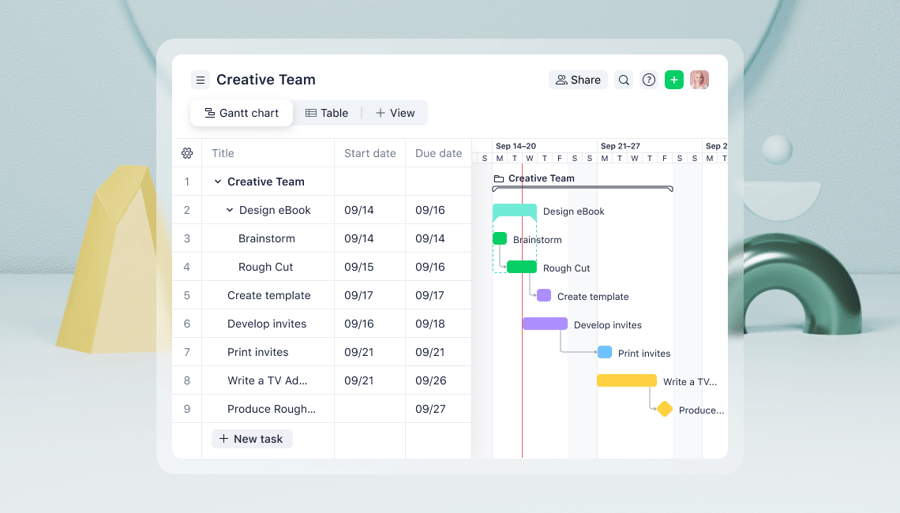
What sets Wrike apart from other cost management solutions is that it brings your finances into the heart of where you manage your projects. This way, you can streamline your tech stack and get extra clarity on your project costs.
Meticulously plan and track budgets, resources, and risk
Your budget is the backbone of a successful project — and effective project cost management begins here.
For teams that need end-to-end visibility into project costs, planning budgets in spreadsheets can quickly become limiting. Excel sheets get cluttered at scale, and you have to manually update them to reflect actual costs and expenditures as projects progress.
On the other hand, Wrike makes it easy for you to meticulously plan and monitor your budgets, so you can easily allocate resources and spot any projects at risk.
- Estimate financials across all your projects, all in one place: Choose from a range of financial fields, such as bill rate and estimated hours, to plan costs across every project in your project portfolio. This portfolio-level view helps teams set budgets in the context of all your work with clear audit trails, rather than managing projects in isolation.
- Allocate resources to the highest-priority projects: Wrike’s resource management tools let you plan exactly what your teams need and when, so they can get work done without disruption. Prioritizing projects centrally allows managers to better understand where resources are most constrained.
- Track project risk and forecast risk with AI: Projects sometimes get disrupted or delayed due to poor preparation or unforeseen changes. That’s why it’s a good idea, at the planning and budgeting stage, to assess which projects face the highest risks. Wrike’s AI can do this for you, using data from similar projects to help you intervene before disruption happens.

Easily track staff and freelancer time in one system
One of the most important functions of a cost control tool is time tracking. As projects get more complex and involve personnel across different departments and geographies, it’s essential to understand how much time your teams are spending on different pieces of work.
Of course, it doesn’t make a lot of sense to have this information siloed in a tool that’s separate from the rest of your financial information. That’s why Wrike brings everything into one system so you can get a complete view of labor hours for each project across your whole organization.
With Wrike, you can:
- Encourage team members to submit hours with automated timesheets: Timesheets are automatically populated with an individual colleague’s allocated tasks. Then, when team members track time in Wrike, their timesheet is automatically updated. It makes it easy for everyone to keep track of costs.
- Improve your forecasting by getting accurate data on hours spent: With Wrike’s robust time tracking tools, managers and team members know exactly how much time is spent on each task. This way, you can forecast costs more accurately when planning future budgets.
- Integrate your timesheets with accounting software and reports: You can use Wrike’s timesheets to automatically create invoices, produce reports, or update your accounts through our platform’s 400+ integrations. Plus, if you need something more, you can build integrations yourself with our powerful API. This allows teams to keep Wrike as a central source of truth while extending it with specialized financial tools where needed.

Goodwood, the British estate hosting luxury sporting events, uses Wrike to manage its frequent world-class events.
[With Wrike] everything is just so much slicker; there’s more structure and a defined process, so everyone is on the same page. Being able to collaborate with people across the organization is fantastic.
Lara Wilson, Designer

One thing that has helped colleagues is their ability to log time against jobs and projects. “It’s a way to keep track of what resources we’re giving to each department. It just makes everything a lot simpler,” Lara explains.
Monitor your financial data more efficiently with simple dashboards
While a robust financial plan is a critical part of any project, specific projects may not always go perfectly. You may have to wrestle with the threat of scope creep, cost overruns, and unexpected resource needs.
To maintain profitability, you’ll need to continually track project costs throughout the whole project lifecycle. Wrike makes that easy, helping you complete your projects, no matter the obstacles you face.
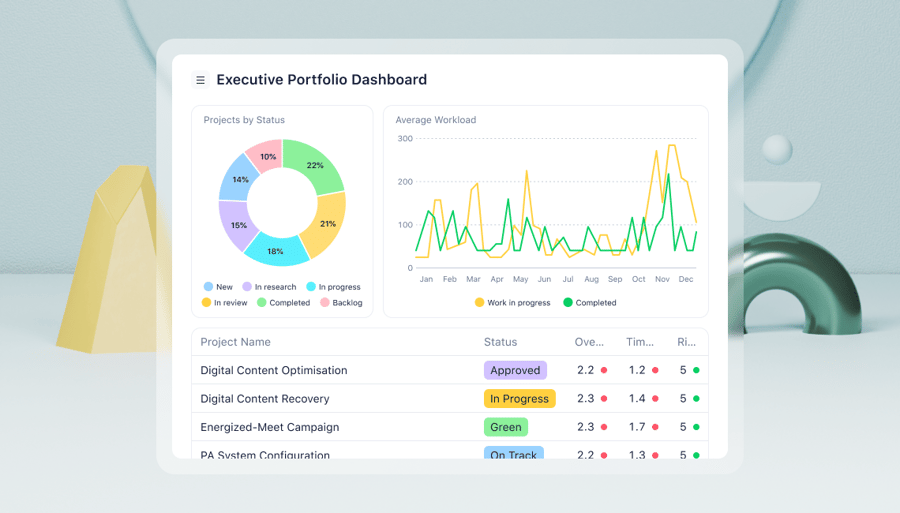
- See key financial metrics in real time on your Wrike dashboard: Your dashboard is a completely customizable space where you can see the critical information you need, whether that’s to-do lists, budget data, or your teams’ work hours. It’s easy to access exactly what you need at a glance, all in a single system, for faster decision-making.
- Leverage prebuilt reports to see quick insights, or build custom reports for more specific data: Wrike lets you create beautiful, detailed reports in a matter of seconds, keeping stakeholders aligned with up-to-date financial information. Use the prebuilt templates or create your own with the data you need.
- Access more advanced analytics with a business intelligence (BI) integration: Need more data? Simply connect Wrike to your BI software and dig deeper into the metrics you need.

Wrike is excellent for helping teams track financial performance while also reducing the number of inefficiencies tied to project administration. For instance, PR agency Tipton Communications saved 10% on billable hours by moving project and cost management to Wrike.
“I estimate that, before we adopted Wrike, we were losing somewhere between 5% and 10% of billable hours to unnecessary project administration: chasing project statuses, getting people to fill out forms, looking for documents, etc,” says Dan Tipton, the agency’s president and CEO.
With Wrike, we were able to minimize the working hours we spent trying to sort out project responsibilities and deadlines and ensure we were all working with the same material.
Dan Tipton, President and CEO

2. Clockify: Simple, free time tracking software
Clockify is one of the best-known tools for freelancers and small businesses that need a simple time tracking solution. That means that it’s not a complete project cost management tool. Instead, it’s designed exclusively to help you, your teams, and freelancers track and manage their hours, rather than handle broader financial workflows like cash flow management.
To this end, it has a simple calendar timesheet view, where all staff members can enter their hours, clock in and out, and report on total hours. This functionality is free. But if you want to connect your timesheets to invoicing, payroll, or your larger project budgets, you’ll need to upgrade.
Pricing
- Free plans are available
- Paid plans start at $5.49 per seat per month (billed annually)
3. Access: Dedicated project accounting software
Access is an accounting software that’s built for project-based organizations. It helps you track sales and expenses, keep your project accounts up to date, comply with local tax and financial regulations, and support day-to-day financial management.
Besides its fundamental accounting and expense tracking features, it does have some useful, easy-to-use cost estimation and budget management tools too. For instance, you can set alerts throughout your project to assess how actual costs match your forecasts.
There’s one thing to be aware of, though. While it does have some limited task management and automation features, it’s built primarily for accounting teams, not for project managers.
Pricing
- Custom pricing available only via a personalized quote, depending on team size
4. Harvest: Timesheet, expenses, and invoicing tools
Harvest is essentially a time tracking tool that directly links your timesheets to your invoice management system. It’s built to help you manage your expenses and labor costs while reducing data entry.
Where it differs from tools such as Clockify is that it’s built for project managers. Thanks to its dedicated project structure, it’s slightly more suited to project-based work. For instance, you can set up different types of projects (e.g., fixed-fee or non-billable projects) or report on individual projects. You can also easily integrate your timesheets into your cost management tools.
The automated invoicing tool is useful, too. As Harvest is built around separate projects, you can automatically generate invoices from those billed hours and add any work that is billed by task.
Pricing
- Free plans are available; a 30-day free trial for paid users
- Paid plans start at $11 per seat per month (billed annually)
5. Procore: Cost management for construction projects
When it comes to cost management, construction teams have very specific needs. That’s because construction, architecture, and civil engineering projects typically have much more complex workflows than the average office-based projects.
Procore is built to handle those specific needs. For instance, it offers an app that gives teams access to real-time data for cost forecasting, labor expense tracking, and regulatory compliance — alongside project planning. It also gives you a single place to manage your contracts and commitments.
While it’s useful for managing costs, though, some reviewers suggest that Procore is less effective as a complete project management tool.
Pricing
- Custom plans only, depending on company size and feature requirements
6. Microsoft Planner: Project planning with cost tracking features
Microsoft Planner is a traditional project management tool with built-in support for cost planning and tracking, including budgeting, resource-based cost controls, and planned-vs-actual cost analysis at the task and resource level. It can also serve as cost-tracking software for teams that rely on detailed project plans and structured schedules to manage project financials.
Project managers can assign costs to resources, track labor expenses, set baseline budgets, and analyze cost variances as projects progress. This provides visibility into project performance and how costs align with planned work and timelines throughout the project lifecycle.
However, Microsoft Planner is not a dedicated end-to-end project cost management platform. It does not include native time tracking, invoicing, or real-time financial optimization features, and teams typically need to rely on additional Microsoft tools or third-party integrations to support these tasks. But those already using Microsoft tools will find it easy to use, and onboarding will be seamless.
Pricing
- Limited features available for free users
- Paid plans start at $10.00 per user per month (billed annually)
Use Wrike to put accurate cost management at the heart of your project management
In this guide, we’ve shared why it’s so important to have a single tool to manage your project costs. While it’s tempting to choose separate platforms for different specific business processes, the result is often siloed data, cluttered workspaces, and frustrated teams.
Instead, use Wrike. Our project cost management software gives you clarity on your project finances, while connecting your budgets and costs to the rest of your project management. This way, it becomes a single source of truth for all your projects.
Book a demo and find out how it works for yourself.
Frequently asked questions (FAQs) about project cost management software
1. What is project cost management software, and how does it work?
Project cost management software helps teams handle various financial tasks, including planning budgets, monitoring financial performance, and tracking expenses throughout a project’s lifecycle. It works by centralizing cost data, tracking spend against budgets, and generating detailed reports that teams can use to prevent overruns.
2. What are the key features of project cost management software?
Project cost management software typically includes tools or features for budget creation, real-time cost tracking, time and expense management, forecasting, and reporting. Many tools also integrate with accounting, ERP, payroll, or CRM systems to ensure project costs stay accurate and aligned with financial records.
3. What are the benefits of using project cost management software?
With project cost management software, teams can increase visibility into budgets and spending with real-time updates. It helps catch cost overruns early, reduces reliance on manual tracking, improves forecasting accuracy, and aligns project managers and finance teams around a single source of financial truth.
4. How do I choose the right project cost management software?
The right software depends on how your projects are structured and how costs are tracked. There isn’t necessarily a one-size-fits-all solution, but a unified platform that centralizes budgets, tracks costs in real time, and connects financial data directly to project execution is often the best option for most organizations, so they can handle everything within one system.
5. What are common challenges with project cost management software?
Project cost management software can break down when cost data is stored across too many systems, tools are too complex or difficult for team members to adopt, or data updates lag behind actual work, which only decreases real-time visibility. When this happens, teams go back to using manual workarounds, and it’s harder to control costs as project scope changes.