


If you’ve spent any time around Scrum teams, you’ve probably heard the phrase “ceremonies” so often that it starts to sound universal. Then Kanban shows up, and people copy-paste the language and talk about “Kanban ceremonies” as if they’re the same thing.
Kanban doesn’t actually run on “ceremonies” the way Scrum does. It runs on cadences. These are recurring feedback loops that keep work moving, make performance visible, and help teams adjust in real time instead of waiting for the next sprint to roll around.
The focus is less “What did we finish last sprint?” and more “How is the system behaving right now, and what do we need to change so work moves better tomorrow?”
In this guide, we’ll break down each core Kanban cadence, providing specifics such as frequency, duration, and purpose. You’ll also see how to run cadences inside Wrike, so they’re easy to maintain, and your team can adopt a Kanban methodology effortlessly.
Kanban cadences vs. Scrum ceremonies
Kanban and Scrum both rely on regular touchpoints to keep teams aligned, but they approach them in different ways. Scrum centers on fixed, time-boxed events within a sprint. Kanban uses flexible cadences tuned to flow, demand, and context rather than a set two-week drumbeat.
Topic | Kanban cadences | Scrum ceremonies |
Purpose | Continually manage flow, improve the system, and respond to changing demand. | Plan, execute, and review work within fixed-length sprints. |
Meeting frequency | Set on a per-cadence basis (e.g., daily, weekly, monthly) based on actual workflow needs. | Tied to sprint length (e.g., every sprint or every day within a sprint). |
Key meetings | Replenishment, delivery planning, daily Kanban, delivery review, operations review, and risk review. | Scrum meetings include sprint planning, daily stand-up meetings, sprint reviews, and sprint retrospectives. |
Typical outcomes | Adjusted work in progress (WIP), updated policies, smoother flow, clearer priorities. | Committed sprint backlog, demoed work, feedback for next sprint, and improvements. |
The 7 Kanban ceremonies at a glance
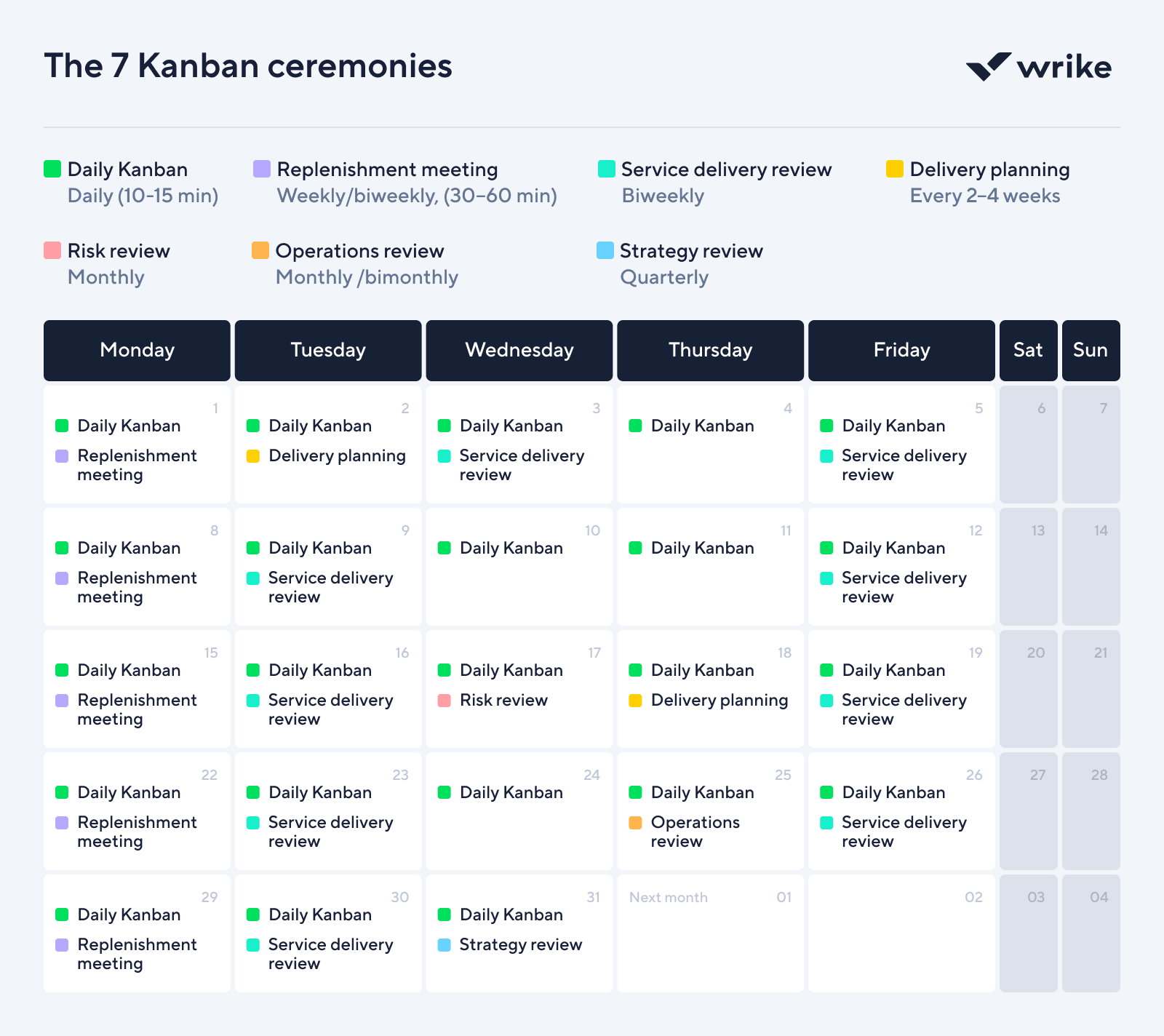
If you’ve ever wondered, “Which meetings do we actually need?” this is the Kanban answer. These seven cadences cover day-to-day flow, service performance, and big-picture direction without turning your calendar into a graveyard of status calls.
Daily Kanban (daily standup)
- Starting cadence: Daily, 10–15 minutes.
- Purpose: Coordinate flow at the board and surface blockers fast. The team looks at the work, not the people, and focuses on what needs to move next.
Replenishment (work commitment) meeting
- Starting cadence: Weekly or biweekly, 30–60 minutes.
- Purpose: Decide which work enters the system next based on clear policies, capacity, and risk. It’s where you protect the board from becoming a wish list.
Delivery planning
- Starting cadence: Every 2–4 weeks.
- Purpose: Plan near-term deliveries or releases and line up key dependencies. Use it to make sure you can actually ship what’s on the horizon, not just talk about it.
Service delivery review (SDR)
- Starting cadence: Biweekly.
- Purpose: Check how well the service is performing using metrics like lead time, on-time delivery, and predictability. This is where you ask, “Are we reliable?” and back it up with data.
Risk review
- Starting cadence: Monthly.
- Purpose: Surface and address systemic risks that slow flow or threaten outcomes. Instead of treating every issue as a one-off, you look for patterns and fix root causes.
Operations review
- Starting cadence: Monthly or bimonthly.
- Purpose: Balance demand and capability across teams and services. It’s the place to spot overload, negotiate capacity, and smooth work across the wider system.
Strategy review
- Starting cadence: Quarterly.
Purpose: Align portfolio bets and major initiatives with market signals and what your services can realistically deliver. This keeps your Kanban system connected to real business strategy, not just today’s queue.
How to run each ceremony in Wrike
Meetings are a lot easier when the board does half the talking for you. In Wrike, each Kanban cadence begins with live data on your Kanban boards and dashboards.
Operations review
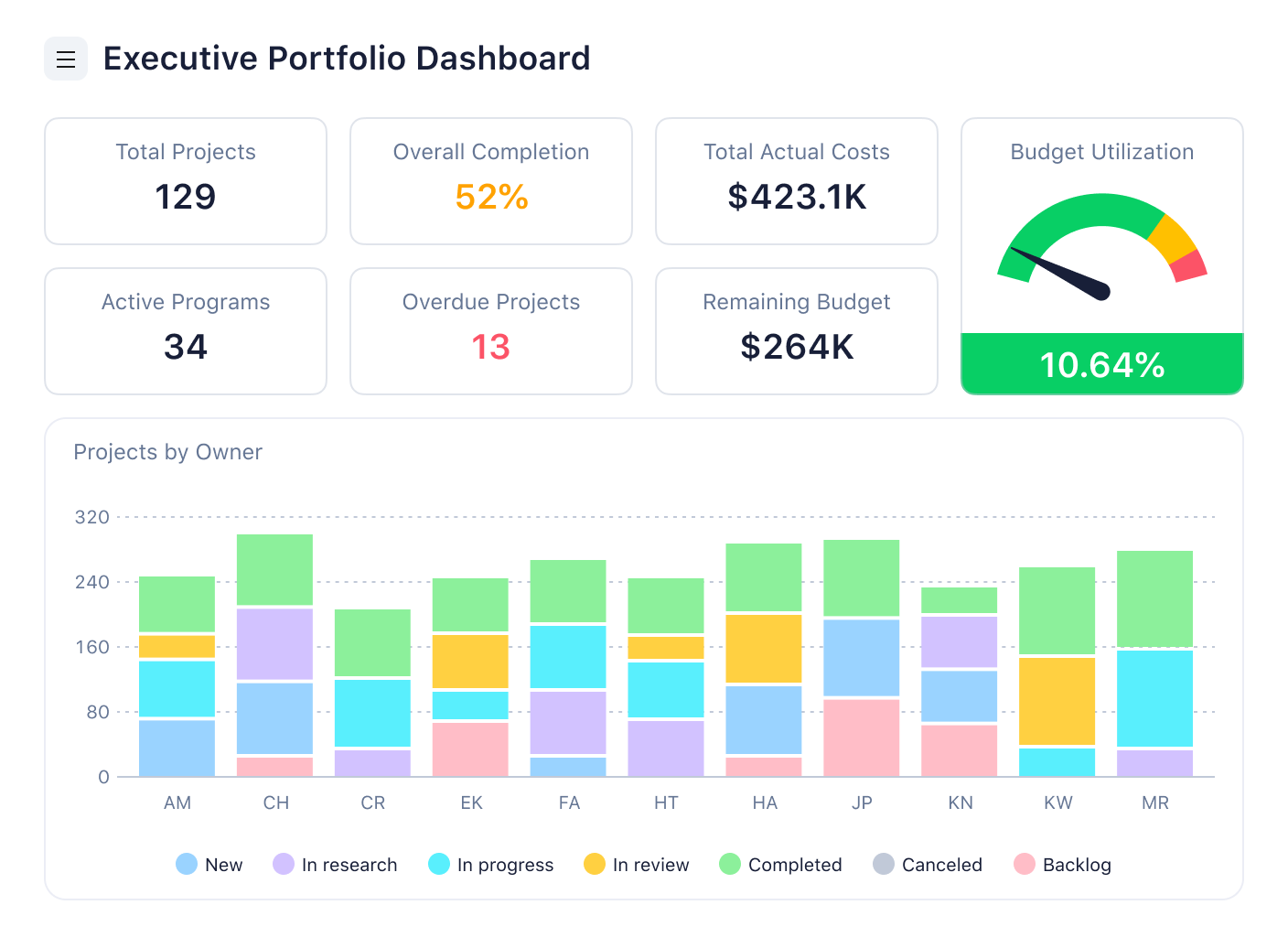
An operations review typically runs on a monthly cadence because you’re looking for patterns that only emerge over longer stretches of work. The purpose of the session is to step back from individual boards and examine the health of the entire delivery system.
Wrike supports that cadence by giving everyone a shared, always-up-to-date view of the system before the meeting even begins. Portfolio dashboards display lead-time trends, WIP levels, blocker frequency, and cross-team dependencies in one place, making it easy to identify where the system is under strain.
Risk review
A risk review is where you stop treating issues as isolated incidents and start seeing the system behind them. It works best on a regular cadence, often monthly, when there is enough data to see recurring failure modes rather than single bad days.
In Wrike, you can tag risks directly in the work by using custom fields for risk level and type. Reports then collect high-risk items, repeatedly blocked tasks, and escalations into a single view that you review with delivery leaders and product owners.
When patterns appear, you can move into Table view to group similar items, use comments to agree on root causes, and immediately spin off mitigation work as linked tasks. A dedicated “Risk actions” dashboard keeps those follow-ups visible so the review leads to fewer surprises later, not just another list of worries.
Service delivery review
If you’re asking, “How well is this service performing for the people who rely on it?”, then you’re not just checking whether tickets are closed, but whether the flow feels predictable and reliable over time.
Wrike gives you the data you need in one place. Lead time, on-time completion, throughput, and aging work can all be surfaced in reports and dashboards that team members can review together.
When something looks off, you can open tasks straight from the chart or table, look at what actually happened, and capture improvement ideas as new tasks or workflow changes. Adjusting statuses or refining policies in Wrike becomes part of the same loop, so each review feeds directly back into how work moves on the board.
Replenishment meeting
Replenishment is the process of determining what items enter the system next. When done well, it turns an overwhelming backlog into a clear set of commitments that align with capacity and policy.
In Wrike, the backlog is stored in a backlog box, often organized using custom fields. During replenishment, the product or request owner sits down with the delivery lead and walks through the top of that list.
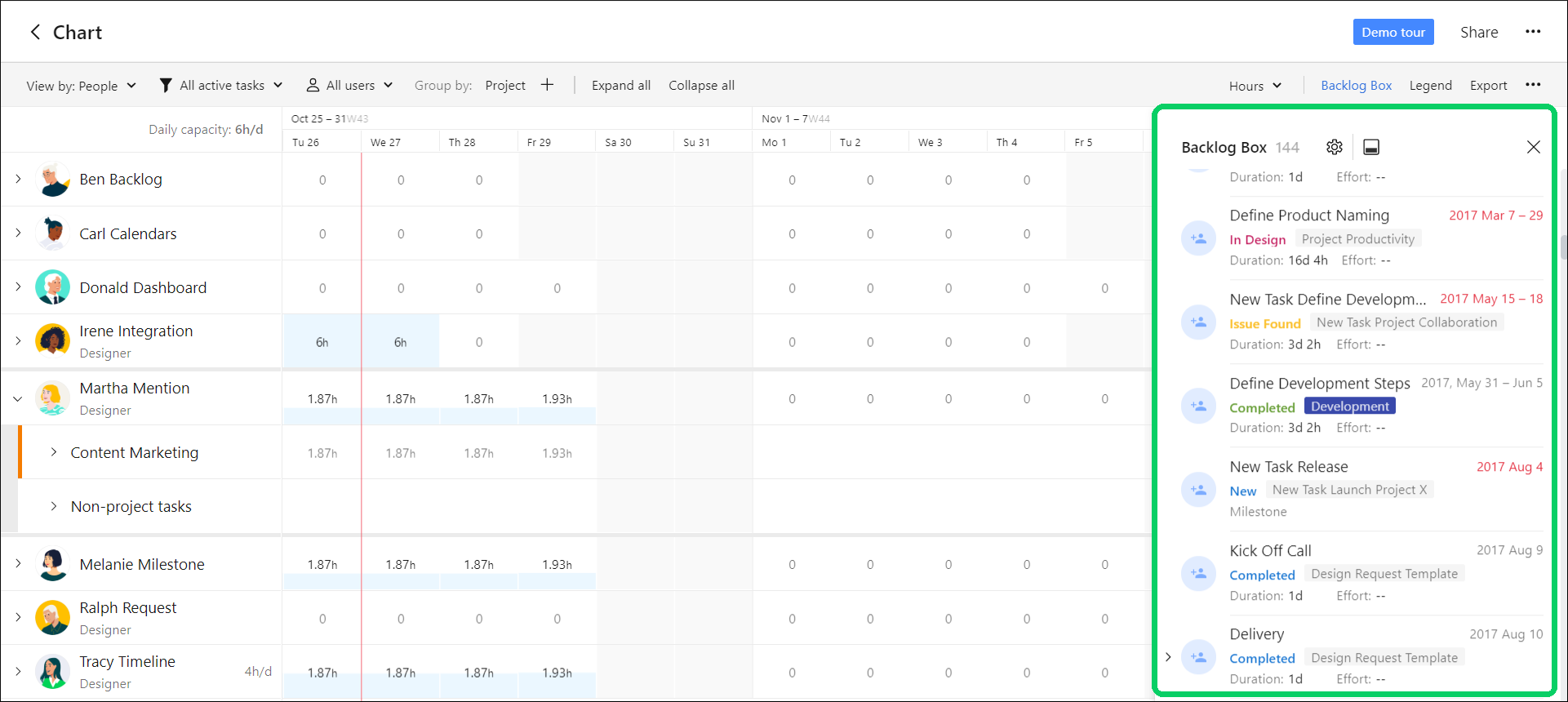
Selected items move into active statuses so they appear on the board, and any clarifications land in task descriptions or comments while the context is still fresh. When the meeting ends, your Kanban board already reflects the decisions you made, so the team doesn’t need a separate recap to know what to pull next.
Kanban meeting
Think of the daily Kanban meeting as your team’s quick “reality check” with the board. The goal is simple: use one live view to see what’s flowing, what’s stuck, and what needs a decision.
In Wrike, most teams run this cadence straight from their Board view in a shared project or space. You can filter active work and blocked items, then sort or group by assignee, priority, or custom fields so the discussion follows how you actually manage work.
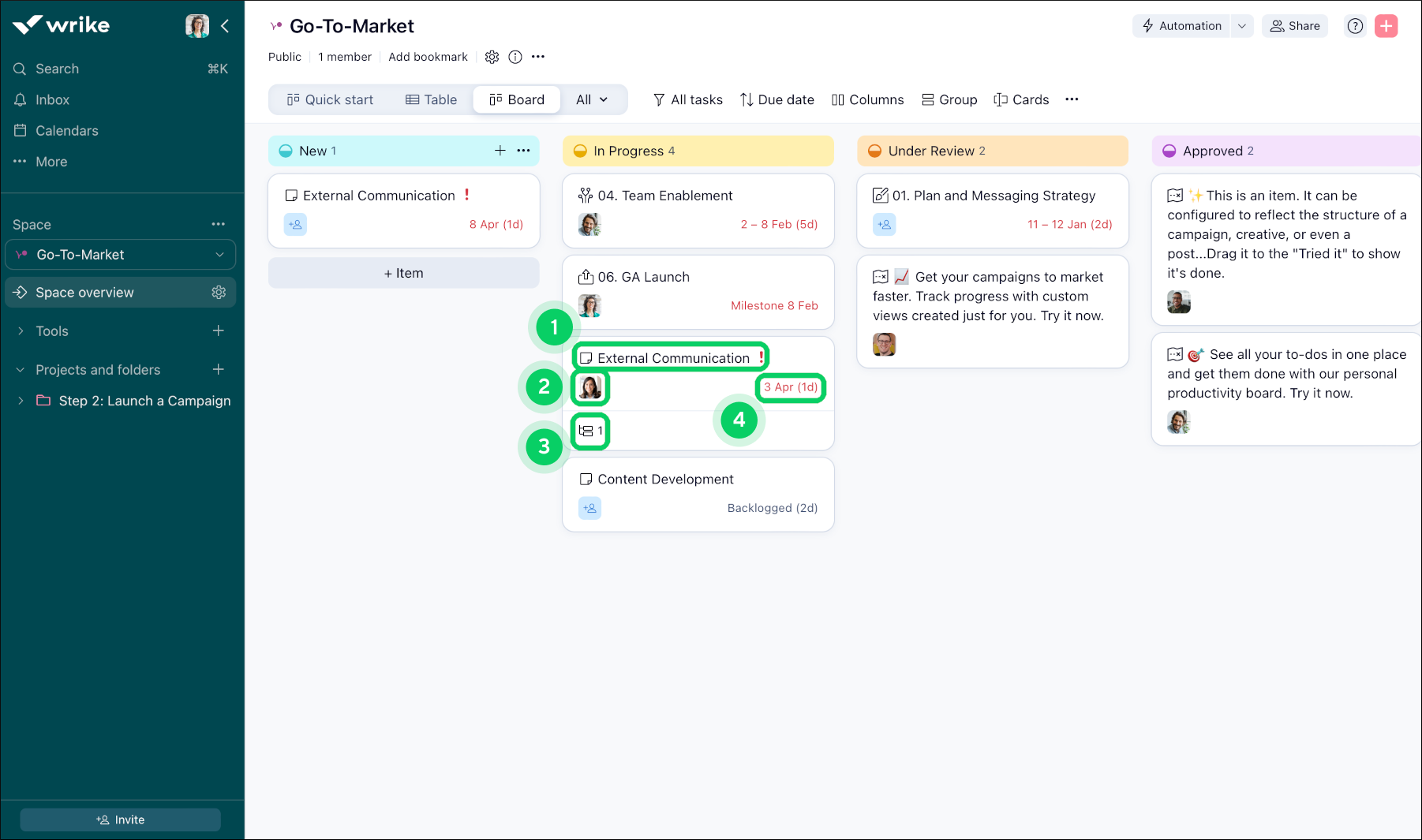
Instead of going person by person, you can move column by column and use inline status changes, drag-and-drop functionality, and quick @mentions to update the board while you talk. That way, when the meeting ends, the board, assignments, and dates are already up to date; there is no gap between the conversation and the source of truth.
Delivery planning meeting
Delivery planning is where you decide how work will reach users and when that will realistically happen. Most teams don’t need it every week, but a focused session every 2–4 weeks helps you shape near-term releases and avoid last-minute scrambles.
Delivery planning in Wrike is about connecting the flow on your board to real release dates. You take the work that is in progress or nearly ready and decide how and when it will be delivered to customers. Teams usually start with a Gantt chart or Table view for the relevant project or release.

This helps teams focus on work that is close to done or tagged for an upcoming release, and use predecessors to spot any blocking dependencies. During the meeting, update due dates, confirm owners, and note key release details so that the agreed-upon plan is already reflected in Wrike when you’re finished.
Meeting frequency and duration guidelines
Kanban works best when your cadences match how much change your system can actually absorb. Too few meetings and problems pile up quietly. Too many and nobody wants to show up.
Here’s a simple starting point by team maturity:
Cadence | New to Kanban | Growing practice | Mature Kanban team |
Daily Kanban | Daily, 15 minutes | Daily, 10–15 minutes | Daily, 10 minutes |
Replenishment | Weekly, 45–60 minutes | Weekly or biweekly, 30–45 minutes | Biweekly, 30 minutes |
Service delivery review | Monthly, 45–60 minutes | Biweekly, 45 minutes | Biweekly, 30–45 minutes |
Risk review | Monthly, 45–60 minutes | Monthly, 45 minutes | Every 6–8 weeks, 45 min |
Operations review | Every 6–8 weeks, 60 min | Monthly, 60 minutes | Monthly, 60 minutes |
Strategy review | Quarterly, 60–90 minutes | Quarterly, 60–90 minutes | Quarterly, 60 minutes |
Kanban University stresses that what really matters is why you meet and whether the rhythm fits your context, so watch your board and your conversations and then tweak frequency and duration until the cadences help work flow instead of just filling the calendar.
The seven core Kanban cadences are daily Kanban, replenishment (work commitment), delivery planning, service delivery review, risk review, operations review, and strategy review. Together, they oversee day-to-day operations, service performance, cross-team coordination, and long-term strategy.
Scrum events (sometimes referred to as ceremonies) are tied to fixed-length sprints, whereas Kanban cadences are flexible rhythms designed around flow, demand, and context. Kanban focuses on managing work as it moves continuously rather than planning and reviewing in sprint-sized blocks.
Most teams begin with a daily Kanban meeting, followed by weekly or biweekly replenishment, biweekly service reviews, monthly risk and operations reviews, and a quarterly strategy review. From there, you should adjust the frequency based on where work is slowing down or where conversations are clearly missing.
