

Wrike logo.
    • For teams

      • Marketing

        Streamline proofing and reporting for seamless campaigns.

      • Creative & Design

        Create high-quality assets and get them approved in record time.

      • Product

        Accelerate your product process, from idea to delivery.

      • Client Services

        Exceed clients’ expectations with expert resources.

      • PMO

        Align strategy with execution and deliver results.

      • IT

        Execute initiatives, optimize workflows, and automate requests.

      • Operations

        Make work flow seamlessly with intuitive management tools.

      • HR

        Manage teams effortlessly with customizable HR features.

      • Legal

        Organize every file, case, and due date in one secure space.

      • Finance

        Centralize all financial tasks, from budgeting to invoicing.

      • See all teams

    • Workflows

      • Campaign Management

        Make marketing magic with end-to-end campaign management.

      • Agency Management

        Take full control of your agency management processes.

      • Client Service Delivery

        Get ahead of the competition with faster client services.

      • Product Lifecycle

        Watch your product lifecycle flow, from concept to customer.

      • Project Portfolio Management

        Manage your complete portfolio, from strategy to results.

      • Creative Production & Content

        Create, collaborate, proof, and approve all in one place.

      • Workflow Management

        Use custom statuses and automate your team workflows.

      • Project Management

        Plan Agile projects, track deadlines, and deliver results.

      • See all workflows

    • For industries

      • Technology

        Build solutions that matter, and deliver faster.

      • Manufacturing

        Enhance operations, accelerate production, and empower teams.

      • Professional Services

        Organize clients, streamline projects, and automate workflows.

      • Finance

        Deliver better, faster financials with automations.

      • Healthcare

        Collaborate cross-functionally in a secure setting.

      • Education

        Unite multiple disparate teams, departments, and colleges.

      • Construction

        Streamline building projects, from scoping to invoicing.

      • Media & Entertainment

        Choose one powerful platform for fast-paced work.

      • See all industries

    • Explore Wrike

      • Take a Product Tour

      • Book a Demo

      • ROI Calculator

      • Customer Stories

      • Start with Templates

    • Features

      • Dashboards

        Fuel better, faster, data-driven decisions with powerful analytics.

      • AI

        Learn about powerful AI and automations with Work Intelligence®.

      • Wrike Whiteboard

        Turn inspiration into execution with powerful visualization tools.

      • Gantt Charts

        Interactive project scheduling across teams.

      • Automation

        Define and trigger automated workflows to eliminate manual efforts.

      • Proofing

        Streamlined proofing and collaboration in one place.

      • Project Resource Planning

        Plan and allocate resources for timely delivery.

      • Project Views

        Get the full picture with customizable, intuitive project views.

      • Kanban Boards

        Instantly view project progress and create customized workflows.

      • Dynamic Request Forms

        Custom forms powered by conditional logic.

      • Approvals

        Keep approvers in the loop from start to finish.

      • Custom Item Types

        Tailor work items to fit your specific workplace.

      • See all features

    • Platform

      • Book a Demo

      • Start with Templates

      • Wrike AI

      • Integrations

      • Security

      • Mobile & Desktop Apps

    • Workflow-Powered Collaboration

      Sync with multiple teams to keep work flowing across your organization.

    • Industry-Leading Security

      We're dedicated to safeguarding data beyond industry standards and ensuring secure collaboration.

    • Pioneering AI and Innovation

      Put the power of data and AI to work for your organization.

    • Invested in Customer Success

      We support customers at every step of their journey from pre-sales to onboarding with 24/7 support.

    • Boundless Configuration

      Customize your workspace to suit the unique needs of every team in your organization.

    • Effortless Scalability

      Add new teams or adjust to rapid growth seamlessly with Wrike’s scalable platform.

    Why Wrike beats the competition

    Find out why 20,000+ of the world’s top companies choose Wrike to manage their workflows

    View comparison
    • Go deeper

      • Resource Hub

        Top assets on productivity, collaboration, and more.

      • Wrike Blog

        Latest news and best practices on project management.

      • Educational Guides

        Guides and tools to unlock better work management.

      • Webinars

        Join our live or on-demand sessions to do your best work.

      • Customer Stories

        Explore Wrike’s case studies for key insights on customer success.

      • Developers

        Connect and build integrations with easy-to-use APIs.

    • Upskill and Connect

      • Training & Certifications

      • Help Center

      • Wrike's Community

      • Premium Support Packages

      • Wrike Professional Services

      • Partners

    Catch up on our most exciting product updates in 2025!

    2025 was another landmark year for Wrike, with some of our most exciting releases yet.

    Watch the video
  • Enterprise
  • Pricing
Contact Sales
    Language selector dropdown with globe icon and list of available languages.
    English
    Dansk
    Deutsch
    Español
    Français
    Bahasa Indonesia
    Italiano
    Bahasa Melayu
    Nederlands
    Norsk
    Polski
    Português (BR)
    Svenska
    Русский
    日本語
    한국어
    中文 (简体)
    中文 (繁體)
Log in
Wrike logo.
Wrike logo.
  • Guide overview
    • Project Management Basics
      • What is a project?
      • What is project management?
      • What are the stages of project management?
      • Why is project management important?
      • What do project managers do?
      • Project manager certifications
    • Project Management Methodologies
      • A. The traditional, sequential methodologies
      • B. The Agile family
      • C. The change management methodologies
      • D. The process-based methodologies
      • E. Other methodologies
      • F. The PMBOK “method”
    • Project Life Cycle
      • What is the project lifecycle?
      • The 5 phases of a project lifecycle
    • Best Project Management Software
      • Here’s a list of the project management software we review fully in this guide:
      • The best 15 project management software platforms in 2026
      • 1. Wrike: Best task management software for cross-functional collaboration
      • 2. Asana: Best task management software for attractive visuals
      • 3. Monday.com: Best task management software for use case templates
      • 4. Adobe Workfront: Best task management software for Adobe integration
      • 5. Smartsheet: Best task management software for spreadsheet-style functionality
      • 6. ClickUp: Best task management software for mind mapping
      • 7. Airtable: Best task management software for data-centric teams
      • 8. Jira: Best task management software for development teams
      • 9. Trello: Best task management software for simple projects
      • 10. Notion: Best task management software for document storage
      • 11. Hive: Best task management software for user-led feedback
      • 12. Zoho Projects: Best task management software for the real estate industry
      • 13. Teamwork: Best task management software for teams looking to get started quickly
      • 14. Basecamp: Best task management software for small businesses and teams
      • 15. GanttPro: Best task management software for specialist Gantt charts
      • 1. MeisterTask
      • 2. Microsoft Project 
      • 3. ProWorkflow
      • 4. TeamGantt
      • 5. Accelo
      • 6. ProjectManager
      • 7. Planview AdaptiveWork
      • 8. Scoro
      • 9. Confluence
      • 10. LiquidPlanner
    • Team Collaboration Tips
      • The importance of collaboration in project management
      • How to set up a project team
      • What makes a successful project team
      • How to make the project kickoff meeting a success
      • Tips for effective team management
      • How to create a collaborative work environment
      • Project management collaboration tips and techniques
      • Tips for remote collaboration and virtual meetings
    • Agile Basics
    • Agile Project Management Tools
      • How we evaluate and choose the top tools
      • The best Agile project management tools comparison chart
      • What are the 11 best Agile project management tools?
      • 1. Wrike
      • 2. Asana
      • 3. Monday.com
      • 4. ClickUp
      • 5. Smartsheet
      • 6. Adobe Workfront
      • 7. Jira [Atlassian] Work Management 
      • 8. Microsoft Project
      • 9. Teamwork
      • 10. Zoho Sprints
      • 11. ProofHub
      • How to pick the best Agile project management tool
      • Features to look for in Agile project management tools
      • Benefits of using Agile project management tools
      • How can an Agile project management tool help your company?
      • FAQs
    • Project Management Frameworks
      • A. What is a project management framework?
      • B. What do Agile frameworks have in common?
      • C. The Scrum framework
      • D. Other popular Agile project management methods
      • E. Agile epics defined
      • F. Project manager best practices for choosing the right framework
      • G. Free Agile project management tools
    • Resources
      • Project management training
      • Project management books
      • Leadership inspiration
    • Glossary
    • FAQ
      • Advanced Terminology
      • Agile Project Management
      • Basic Terminology
      • Methodologies
      • PM Software Features
      • PMI
      • Professional Development
      • Tools
    1. Home
    2. Project Management Guide
    3. FAQ
    4. Basic Terminology

    What is project management?

    4 min readLAST UPDATED ON JAN 29, 2026
    Artem Gurnov
    Artem Gurnov Director of Account Development, Wrike
    See Wrike for PMO

    Work has a bad habit of expanding in all directions at once, and despite our best efforts, deadlines, priorities, and decisions can slip through the cracks. Project management exists to impose order on that complexity. It defines goals, sequences work, and assigns ownership so progress is intentional rather than accidental.

    The approach you choose determines how decisions get made. It affects what teams plan in advance, what they revisit weekly, and what gets flagged early instead of discovered late. A strong framework turns planning into an ongoing discipline rather than a one-time exercise.

    Let’s break down how projects are kept from quietly unraveling, who actually owns the work versus who signs off on it, and why different approaches exist.

    What is project management?

    Project management, according to the Guide to the Project Management Body of Knowledge (PMBOK Guide), is the application of skills, tools, and techniques to project activities in order to meet project requirements. It is the act of managing all aspects of a project, from the team to the tasks to the tools. 

    Plus, when it works, teams finish sooner and control scope without sacrificing quality. Just as important, they see tradeoffs early, while there’s still time to adjust course.

    What does project management involve?

    At a high level, project management brings structure to a defined piece of work. It starts by clarifying the goal and the constraints around it, then shaping the work into something that can be planned, tracked, and completed. This creates a shared understanding of what success looks like before execution begins.

    As the project unfolds, that structure supports ongoing decision making. Progress becomes visible, risks are identified earlier, and adjustments can be made without losing sight of the objective. Instead of reacting to issues in isolation, teams manage the project as a connected system.

    Why project management is important

    Project management matters because it gives teams leverage over complexity. People depend on each other’s output. Decisions arrive late or change midstream, so project management creates a system for coordinating that motion.

    Key benefits include:

    • Improved delivery predictability: Timelines are grounded in real dependencies and capacity, which makes outcomes easier to anticipate and less vulnerable to surprise delays.
    • Cost and schedule control: Budget and timing remain visible throughout the project, so teams can adjust before small issues turn into overruns.
    • Risk reduction: Potential problems surface while there are still options, not after constraints have hardened.
    • Better communication: Clear ownership and shared visibility reduce confusion, duplicated effort, and last-minute escalations.
    • Alignment with business goals: Day-to-day decisions stay connected to broader priorities, not just task completion.

    When project management is absent or inconsistent, the effects can show up fast. Deadlines slip, costs rise without warning, and teams absorb the impact through overtime and employee burnout rather than through better planning.

    Key roles in project management

    Before timelines or methodologies come into play, projects need people who know what they’re responsible for. When those roles are clear, decisions move faster and accountability sticks. When they aren’t, even simple questions can hinder progress.
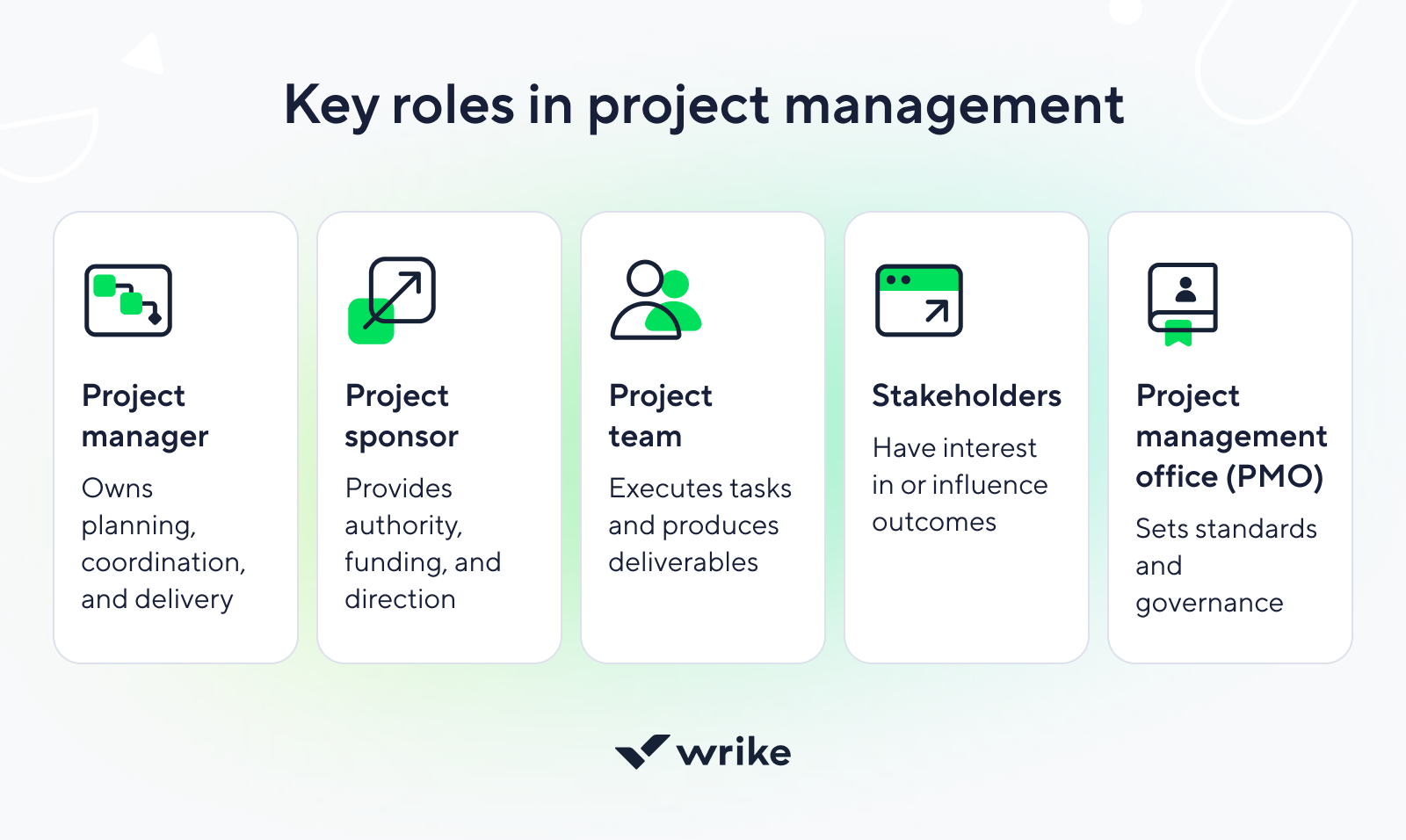
    Key project management roles diagram outlining essential stakeholders and responsibilities.Key project management roles diagram outlining essential stakeholders and responsibilities.

    1. Project manager

    The project manager is responsible for delivering the work. This role plans and coordinates activities, tracks progress, and flags risks or issues early. Responsibility is broad, but formal authority over resources and priorities may be limited.

    2. Project sponsor

    The sponsor provides executive direction and backing. This role owns the business outcome, approves major changes, and resolves escalations that the team cannot address. Authority is high, even if day-to-day involvement is limited.

    3. Project team

    The project team delivers the work itself. Team members are accountable for their tasks and outputs, while overall scope, sequencing, and tradeoff decisions usually sit elsewhere.

    4. Stakeholders

    Stakeholders have an interest in the project or are affected by its outcome. They contribute input and feedback and may approve deliverables, but they are not responsible for execution.

    5. Project management offices (PMO)

    A PMO operates at an organizational level. It provides standards, tools, and oversight to improve consistency across projects, without managing individual deliverables directly.

    Types of project management

    Not all projects behave the same way, so they aren’t managed the same way either. Some work benefits from detailed planning upfront, while other efforts need room to adapt as requirements evolve. Different project management approaches exist to match these realities.

    At a high level, each project management approach reflects a tradeoff between structure and flexibility. The right fit depends on factors such as uncertainty, risk, regulatory constraints, and how much change is expected once work begins. Choosing an approach is less about labels and more about the level of stability or adaptability the project demands.

    Who uses project management?

    Project management isn’t limited to a single role or industry. It’s used wherever work has a clear goal and dependencies that need coordination. From small teams planning short initiatives to large organizations running complex programs, the need is the same.

    You’ll find project management in marketing, engineering, creative fields, product development operations, IT, construction, healthcare, education, and beyond. Even individuals use project management principles to plan research, events, or long-term initiatives when structure matters more than spontaneity.

    FAQs

    Project management focuses on temporary work with a defined goal and endpoint, while operations management supports ongoing activities that keep the business running.

    Software isn’t required, but it becomes essential as soon as projects involve multiple people, dependencies, or changing timelines that are hard to track manually.

    No. Project management is the broader discipline, while Agile and Scrum are specific frameworks used to plan and execute work within that discipline.

    As early as possible. Defining goals, constraints, and responsibilities upfront reduces rework and makes later decisions easier to manage.

    • Product
      • Product tour
      • Pricing
      • Templates
      • Apps & Integrations
      • Task Management
      • Gantt Charts
      • Wrike Status
      • Security
      • Wrike API
      • Compare
      • Features
    • Solutions
      • Enterprise
      • Marketing
      • Creative
      • Project Management
      • Product Development
      • Business Operations
      • Professional Services
      • IT Management
      • Students
      • All Teams
      • All Use Cases
    • Resources
      • Help Center
      • Community
      • Blog
      • Webinars
      • Interactive Training
      • Support Packages
      • Find a Reseller
      • Google Project Management Tools
      • CA Notice at Collection
    • Company
      • About Us
      • Leadership
      • Careers
      • Our Customers
      • Events
      • Newsroom
      • Partner Program
      • Collaborate - User Conference
      • Wrike Engineering
      • Contact Us
    • Guides
      • Project Management Guide
      • Professional Services Guide
      • Workflow Guide
      • Kanban Guide
      • Agile Guide
      • Scrum Guide
      • Marketing Project Management Guide
      • Collaborative Work Management Guide
      • Digital Marketing Guide
      • Go-to-Market Guide
      • Remote Work Guide
      • Return to Work Guide
      • Product Management Guide
      • Goal Setting Guide
    • Latest in Wrike Blog
      • Video: Wrike’s top 10 product releases of 2025
      • Free Gantt chart templates for project planning
      • Resource leveling in Gantt charts: A how-to guide
      • 5 Gantt chart examples for project management
      • 21 best paid and free Gantt chart software tools for 2026
      • Life after Microsoft Project: Why Wrike is your future home for project management
      • 15 best enterprise collaboration software platforms (by use case)

    Subscribe to Wrike news and updates

    Stay informed with the latest news and updates by subscribing to our marketing emails.
    Logo AICPALogo BSILogo CSA STAR

    Enterprise-Grade Security.
    Uptime Over 99.9%

    ©2006-2026 Wrike, Inc. All rights reserved. Patented. Privacy Policy. Terms of Service. Cookie Preferences. Your Privacy Choices

    ICP备案/许可证号: 京ICP备16031568号-2

    Wrike logo