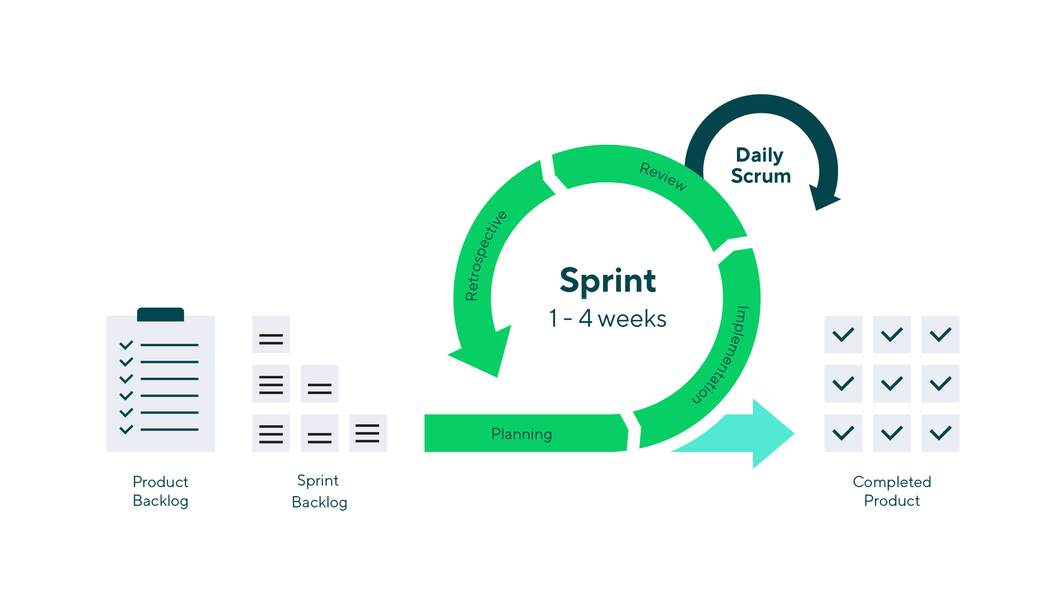
Scrum is one of the most popular Agile frameworks that helps teams deliver high-quality results through short iterative work cycles called sprints. At the center of this framework are Scrum artifacts, the tools that give structure, visibility, and alignment throughout a project. These artifacts serve as the single source of truth for what needs to be done, what is in progress, and what has been completed.
Whether you are new to Scrum or improving your Agile process, understanding these artifacts and how to manage them effectively is key to keeping your team focused and accountable.
Key takeaways
- What are Scrum artifacts? Scrum artifacts are essential tools, such as the product backlog, sprint backlog, and product increment, that support teams in managing projects effectively within the Scrum framework.
- What is the product backlog? The product backlog is an ordered list of project features and requirements, continuously updated to reflect priorities and changes, often represented through user stories.
- What is the sprint backlog? The sprint backlog focuses on tasks for the current sprint, containing detailed user stories and a release plan that is updated regularly to reflect ongoing changes.
- What is the product increment? The product increment is the deliverable version of the product at the end of each sprint, integrating completed features and reflecting the latest requirements.
- What are some tips for managing Scrum artifacts? Utilize burndown charts and Kanban boards, adopt a release plan, regularly groom backlogs, refine items as they rise in priority, and clarify the definition of done for transparency.
Scrum is a popular Agile project management methodology that can help your team effectively complete projects, especially when quick turnarounds and multiple deliveries are required. One of the foundations of the Scrum framework is its three artifacts. These three artifacts of Scrum help capture and share vital project information with project teams.
Read on for a detailed look at the three different artifacts in Scrum and some essential tips for managing them throughout your next project.
A little background on Scrum
Scrum is an Agile project management framework that embraces an iterative approach to project management.
Teams new to Scrum may find it difficult to adopt because the framework has many unique roles, elements, and terms. For instance, a Scrum master, rather than a project manager, leads Scrum teams. The Scrum master’s main job is to support the team’s autonomy and remove obstacles the team encounters.
Despite its unique aspects, Scrum shares many similarities with other Agile frameworks. Projects are broken down into sprints that typically last one to four weeks, and each sprint ends with the delivery of a workable version of the final project deliverable. Scrum masters host daily stand-ups throughout each sprint to keep the team focused and on the same page.

3. Product increment
The product increment is often thought of as the most critical of the three artifacts in Scrum. It’s the version of the product that will be delivered at the end of each sprint.
While the sprint backlog outlines what must be completed within a sprint, the product increment details the outcome of all that work. The increment is a prototype, draft, or working version of the final product expected by the customer.
At the end of the initial sprint, your team will deliver product version one, including all of that sprint’s goals. At the end of the second sprint, version two will be delivered. Version two of the product increment should include all of the features and requirements already delivered in version one and any changes, new features, and requirements added in the second sprint.
Each product increment should include the features of the current sprint and fully integrate all backlog items completed to date, from all past sprints.
Commitment: Definition of done
Each increment must meet the team’s “definition of done” (DoD), a shared quality standard that ensures work is complete and potentially shippable. The DoD removes ambiguity, ensuring everyone knows what “finished” really means.
Other commonly used Scrum artifactsThe official Scrum Guide (2020) defines three artifacts: the product backlog, sprint backlog, and product increment — each with a clear commitment (product goal, sprint goal, and definition of done). However, in practice, many teams and training resources extend this list to include additional artifacts. These extra artifacts aren’t formally required but are widely used to improve visibility, alignment, and accountability in projects.
- Sprint goal
- Definition of done
- Product vision
- Burndown chart
Sprint goal
While technically the commitment attached to the sprint backlog, many Scrum teams treat the sprint goal as its own artifact. It summarizes why the sprint is valuable and provides a single point of focus for the team. For example, instead of simply pulling backlog items, the sprint goal could be “Enable new users to register and log in,” which unifies developers, testers, and designers around the same purpose.
Definition of done (DoD)
The definition of done is another commitment that often gets elevated to “artifact” status. It is a documented agreement on what quality means for the team. For instance, an increment may only be “done” if it’s fully coded, peer-reviewed, tested, documented, and integrated. By treating the DoD as a visible artifact, teams reduce misunderstandings and ensure every increment is truly shippable.
Product vision
Although not included in the Scrum Guide, many organizations maintain a product vision to keep the team aligned on the big picture. Where the product goal is more tactical and nearer-term, the product vision answers: Why are we building this product at all? Who will it serve, and what value will it deliver? This high-level artifact helps connect daily Scrum work to longer-term business objectives.
Burndown chart
The burndown chart is often mentioned alongside Scrum artifacts, though it isn’t formally classified as one in the Scrum Guide. Instead, it’s a supporting tool that visualizes work remaining over time. Its role is to enhance transparency by giving teams and stakeholders a quick, shared reference point. While not essential to Scrum itself, many teams adopt it because it pairs naturally with the product backlog and sprint backlog to show progress at a glance.
Tips for managing Scrum artifacts
Here are five tips for managing your artifacts in Scrum:
Use Kanban boards
Kanban boards aren’t just for Kanban anymore. They can be a great way to track and manage your Scrum sprint backlog to increase visibility and quickly drag and drop cards as priorities and statuses change.
Wrike in action: Wrike’s customizable Kanban board lets you drag and drop tasks across workflow stages, giving Scrum teams full visibility and flexibility during sprints.
Adopt a release plan
Scrum for Dummies emphasizes the importance of having a timetable for the completion of project goals. A release plan can help keep your team on track and ensure sprints and overall project requirements are completed efficiently.
Wrike in action: With Wrike’s interactive Gantt charts, you can map release timelines, set dependencies, and maintain visibility across multiple sprints to stay on schedule.
Groom your backlogs regularly
The whole team should regularly review the backlogs, provide feedback, and communicate changes to keep everyone on the same page and ensure no key features are missed.
Wrike in action: Wrike’s collaborative task comments, real-time updates, and shared dashboards make backlog refinement easy, ensuring every team member stays aligned on evolving priorities.
Refine as you progress
Don’t waste too much time trying to overly define items lower on the product backlog list. Put your effort into detailing the current sprint backlog and product increment. The rest can be flushed out as it moves up the priority list.
Wrike in action: Wrike’s custom fields and flexible task dependencies allow teams to adjust priorities and refine work in progress seamlessly while preserving visibility into the larger project scope.
Have a clear definition of “done”
Every stakeholder should understand what is required for a product increment and sprint to be “done.” Document and share acceptance criteria, so there is no doubt whether something is complete before moving off the backlog.
Wrike in action: Teams can store their definition of done using Wrike’s task templates or custom fields, ensuring every sprint starts with consistent expectations and ends with quality results.
Scrum involves completing a list of tasks (your sprint backlog) within a short period (sprint) without losing sight of your overall project goals and requirements (the product backlog). Juggling all of this effectively requires a great deal of transparency, frequent communication, and confidence that all artifacts are up-to-date and correct.
Wrike’s project management features can help boost communication and collaboration, while also ensuring everyone involved is working off the correct version of the artifacts. Our dynamic dashboards, multiple views (including Kanban boards), and real-time reports all provide you with all the tools you need to stay on top of your artifacts and successfully complete your project. Sign up for a free trial today and discover how Wrike can streamline your next Scrum project.
From framework to action: Manage Scrum artifacts with WrikeScrum artifacts give teams the structure to plan, track, and deliver high-quality work — but their real value depends on how effectively they’re managed. Wrike makes it easy to bring transparency and alignment to every sprint. With customizable Scrum boards, real-time progress tracking, and automated reporting, your team can keep product and sprint backlogs up to date and ensure each increment meets its definition of “done.” Turn Scrum theory into a seamless, collaborative workflow — start your free Wrike trial today.
Scrum artifact FAQs
Successful Scrum teams keep their artifacts visible, current, and aligned with goals. Using a collaborative work management tool like Wrike makes this easier — teams can update the product backlog, track sprint progress with boards and dashboards, and document increments in one shared workspace for full transparency.
The most effective Scrum teams track sprint progress daily using visual tools such as Kanban boards or burndown charts. In Wrike, teams can create custom dashboards to monitor velocity and task completion in real time, helping them identify bottlenecks early and keep sprints on target.
Alignment comes from visibility and communication. Wrike provides real-time task updates, comments, and shared dashboards so everyone, from developers to product owners, can see priorities, dependencies, and blockers as they happen, reducing confusion and last-minute surprises.
Teams can standardize their definition of done by using consistent task templates, checklists, and approval workflows. Wrike supports this by letting teams embed quality criteria directly into tasks and automate handoffs, ensuring every increment meets agreed-upon standards before it’s marked complete.
Scrum is built around three roles, five events, and three artifacts that create structure and transparency in Agile projects. The three roles are the product owner who manages priorities and vision, the Scrum master who facilitates the process and removes roadblocks, and the developers who deliver the work. The four events include sprint planning, daily Scrum, sprint review and sprint retrospective to keep teams focused and improving. The three artifacts are the product backlog, sprint backlog, and product increment, which represent planned work, active tasks, and completed deliverables.
Scrum officially defines three core artifacts: the product backlog, sprint backlog, and product increment. However, many teams also recognize four additional artifacts — the product goal, sprint, definition of done, and burndown chart — that support transparency and alignment. Altogether, these seven artifacts help teams plan, track, and deliver work more effectively within the Scrum framework.
The four Scrum events, also called ceremonies, are:
- Sprint planning — the team defines what will be delivered during the upcoming sprint and how the work will be achieved.
- Daily Scrum — a short daily meeting where team members discuss progress, upcoming work, and any blockers.
- Sprint review — held at the end of the sprint to inspect the completed work and gather feedback from stakeholders.
- Sprint retrospective — the team reflects on the sprint to identify what went well, what didn’t, and how to improve in the next cycle.
The sprint itself is sometimes referred to as a fifth event, encompassing all four, but officially, these are the four events.
The four Agile values, outlined in the Agile Manifesto, are:
- Individuals and interactions over processes and tools — teamwork and communication matter more than rigid systems.
- Working software over comprehensive documentation — delivering functional results takes priority over excessive paperwork.
- Customer collaboration over contract negotiation — engaging with customers ensures the final product meets real needs.
- Responding to change over following a plan — flexibility and adaptability are valued more than sticking to a fixed roadmap.
Agile is a project management philosophy that emphasizes flexibility, collaboration, and iterative progress toward goals. It’s based on the Agile Manifesto, which values individuals and interactions, working software, customer collaboration, and responding to change.
Scrum, on the other hand, is a specific framework within Agile. It provides a structured way to apply Agile principles using defined roles (product owner, Scrum master, developers), events (like sprints and daily stand-ups), and artifacts (such as the product backlog).
In short, Agile is the mindset, and Scrum is one of the most common methods used to implement it.