Planning, executing, and tracking digital marketing campaigns can be difficult. How do you juggle multiple campaigns for different clients? How do you know if your messaging resonates with your target market and your buyer persona? And how can you show these results to your clients?
This marketing campaign planning template has all the tools you need to create impactful campaigns and succeed in your marketing strategy. Use Wrike to:
Explore Wrike’s unique campaign management features and find out how they can benefit your team.
Streamline incoming requests
Create custom request forms to manage incoming tasks. Organize each request into a detailed task that gets assigned instantly to the right person. Add custom fields to ensure marketers or designers get all the info the need.
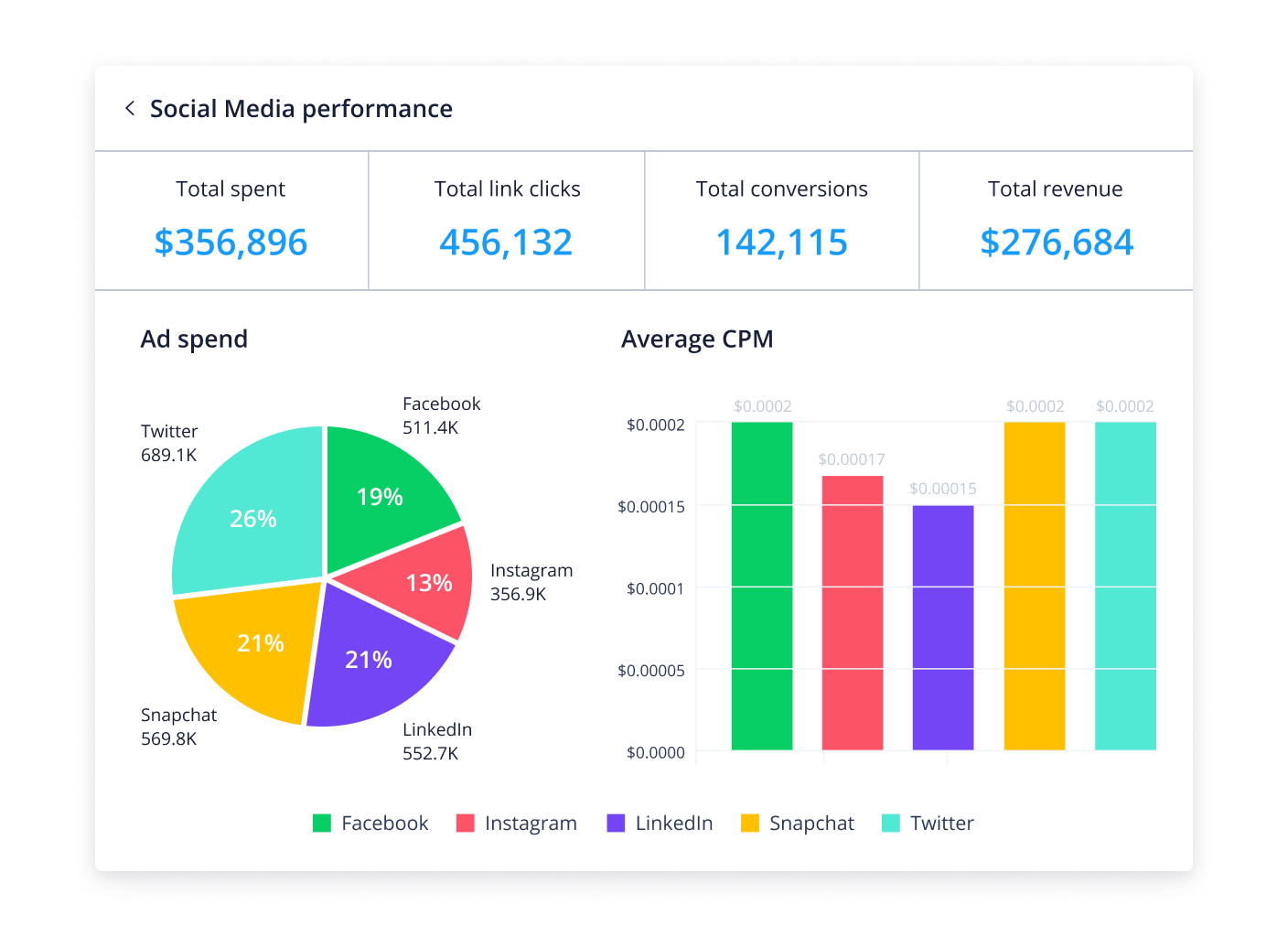
View real-time performance reports
Get an instant overview of your campaign performance with Wrike’s shareable reports. Analyze ad spend across various channels, monitor link clicks and conversions, and keep track of overall costs.
Combine key marketing metrics
Measure your campaign’s impact with metrics. Use Wrike’s first-of-its-kind performance aggregator across 50+ tools to combine all insights in one simple interface. Assess actual ROI to determine the effectiveness of each campaign.
Rapid online proofing
Speed up your marketing team’s processes with Wrike’s smart proofing software. Add feedback directly to visual assets, @mention colleagues to make changes quickly and seamlessly, and store your final versions in one place.
Gantt chart view Get a visual breakdown of your entire campaign timeline, including key milestones and task dependencies. Never miss a campaign deadline again. Read more about Gantt charts.
Campaign tracker dashboard Track campaign requests, active campaigns, critical milestones, and overdue tasks — all on one board. Explore the functionality of Wrike’s project dashboards.
Productivity dashboard View all your to-dos in one place — and get them done. Wrike’s personal productivity board shows all your tasks, including those due soon and pending approval.
Request form Launch new campaigns in seconds. Submit this request form to automatically create a new project in your Campaign Requests folder. Discover more about our request forms.
Custom workflows Wrike’s marketing campaign template includes two pre-built workflows so you can reflect the unique statuses of your tasks and projects. Experience the power of custom workflows.
Campaign calendar Multiple campaigns running at the same time? Monitor all active campaigns with this calendar, from brand launches to holiday sales. Find out more about Wrike’s calendars.
Custom item types Get campaigns to market faster with custom item types. This template comes with six item types, including Campaign Brief and Campaign Launch. Learn more about custom item types.
Proofing and approval tools Accelerate reviews and approvals with Wrike. Add feedback to campaign assets and invite external clients to approve. Explore our proofing and approval software.
How to use Wrike’s marketing plan template
Our marketing campaign management template can help you kick-start your projects in no time. Use it as a reference to learn how Wrike works or to launch your first campaign today. Wrike has plenty of features to help you get started.
The marketing campaign management template allows users to plan campaigns, launch them successfully, and track performance using high-level calendars and dashboards.
Use the pre-configured dashboard in this marketing campaign plan template to get an overview of all the tasks within the project. To digest tasks better, simply organize your project into phases, build out your to-do list, and add assignees.
Get started by entering your business email and organizing your campaign with your pre-configured dashboard.
Yes, this template is free to use as part of Wrike’s two-week trial. Simply enter your business email to begin organizing your marketing campaigns at no cost.
Whether you are marketing a product or service, this template can be used for a variety of marketing strategies. Email, social media, paid search, and content marketing are all integral components of this strategy. The key to success is to make sure the right marketing channels are used for your buyer personas.
Outline specific goals for your marketing plan. Specific goals yield better performance and direction than even general goals
Audit marketing activities to determine the success or failure of previous initiatives
Conduct market research to determine the current market as well as your positioning around your target market
Research, analyze, and subsequently determine the target audience for your marketing plan
Decide on a budget and timeline for the marketing plan
Choose the marketing activities needed to achieve your goals. What channels should you invest in? What will your marketing team need to do in order to succeed?
Create a marketing plan calendar for implementation. Assign key tasks to team members in order to create an element of accountability in this process
Determine the process and timeline for re-evaluation, analysis, and adjustments to the marketing plan
You might be interested in these templates
Marketing Calendar
Plan a comprehensive marketing activity schedule with this marketing calendar template. Keep your tasks and team organized with Wrike
Go-to-Market
A go-to-market project template designed for launching marketing initiatives. Break down GTM into phases, assign due dates to tasks, and track progress on a visual timeline
Marketing Promotion
Recharge your marketing campaigns with this promotional planning template. Give your product or service the best chance of success with Wrike
Marketing Calendar
Plan a comprehensive marketing activity schedule with this marketing calendar template. Keep your tasks and team organized with Wrike
Go-to-Market
A go-to-market project template designed for launching marketing initiatives. Break down GTM into phases, assign due dates to tasks, and track progress on a visual timeline
How to install this template in your account
You can only access this template when you create a new space. You can access the use case templates gallery through the space creation wizard. When you opt to create a new space, the template gallery opens by default.
Click the “+” button in the upper-right corner of your workspace.
Select “Space.”
On the page that opens, hover over the use case you want and click “Preview.” Look for the “Campaign Management” template in the list (use the search bar if needed).
Now, you can see more information about the use case. Click “Select” to create a space.
Yes, there are.
To use this template, you need to have at least the Business plan or up. Check our plans here.
You must have the required permission to create a public space in your account.
If the template contains account-level custom fields, custom item types, workflows, request forms, or automation, you must have the permission required to create those items.
This template is only available when the workspace language is set to English.
Check the prerequisites above. If you don’t match one of the prerequisites, talk to your space admin or your account owner. If you match all the prerequisites and you still can’t see the “Campaign Management“ template, feel free to reach out to the Wrike support team.
Unlock the power of Wrike’s templates
Use our smart search tool to explore versatile templates, designed for easy customization and streamlined project management.
Wrike enhances its website search experience using Google's Vertex AI Search and Conversation generative AI service. Users are cautioned that generative AI might produce inappropriate, inaccurate, offensive, or unintended results, and are advised against submitting explicit, harmful, offensive, or illegal content as search input. Neither Wrike nor Google uses your search inputs to train its machine learning models or for advertising purposes, but search activities may be collected and/or stored via cookies in accordance with our Privacy Policy if you previously registered on our website. These cookies can be deleted through your browser settings. Wrike's search service is not designed to be used in connection with your personal data or any sensitive data of any kind, which users must refrain from inputting.