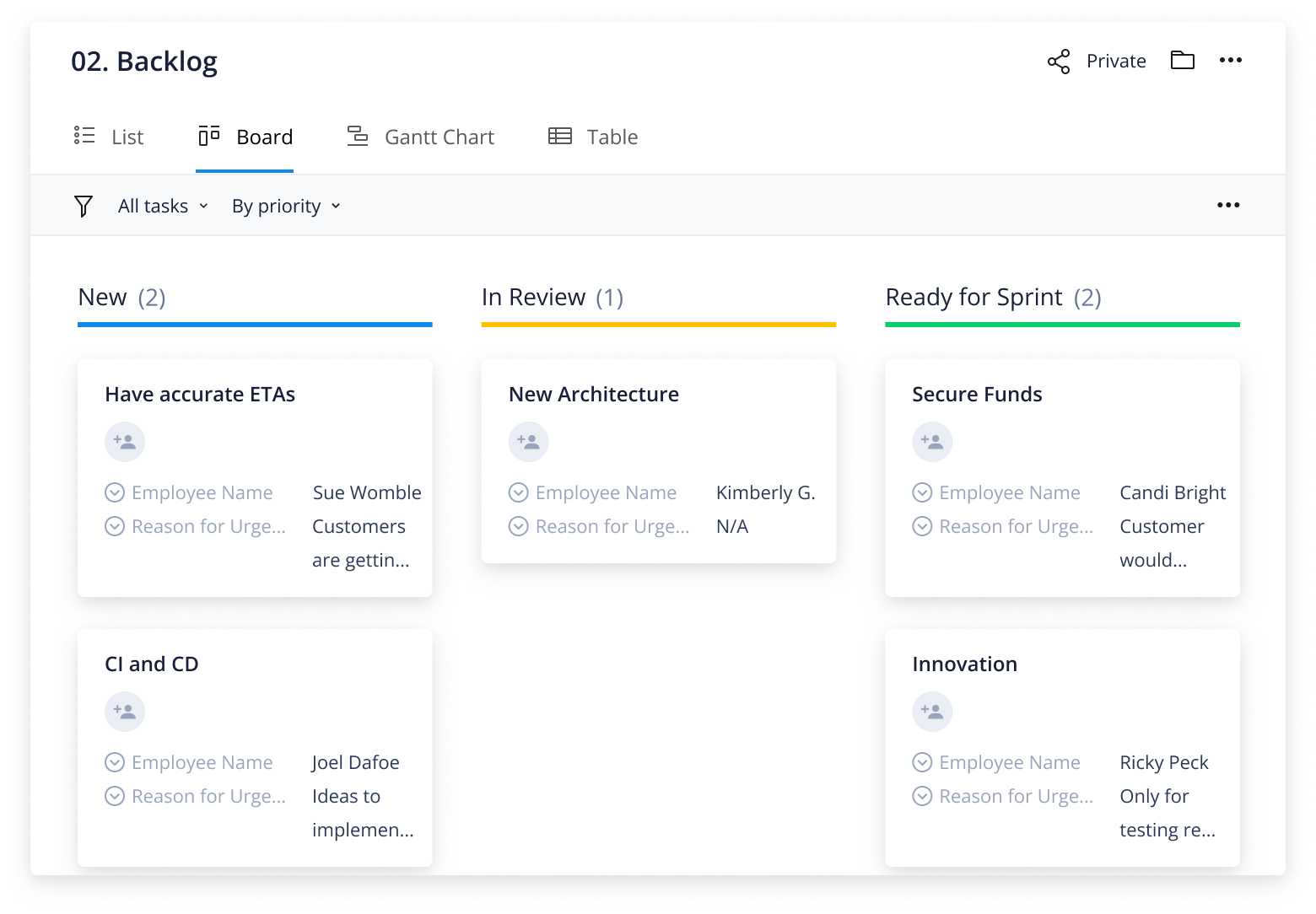
The product backlog template allows you to create an actionable list of ideas and tasks that supports the development of your products. It helps your team plan and prioritize all ideas and make product roadmaps that capture customer and company-wide needs.
The template is perfect for product teams who need to:
Track product suggestions
Build product roadmaps
Monitor project progress for products
Try Wrike’s agile product backlog template now.
Prioritize product updates according to importance with Wrike’s backlog example
Use the backlog template to create a practical product roadmap and associated tasks and projects
Attach necessary resources to each product project to complete tasks efficiently
Why you need the product backlog template
Store every idea
A product backlog template serves as a secure space for all product ideas from customers, the product team, and teams across your organization. Anyone working on your products can simply access the backlog to see suggestions, what is currently being worked on, and what tasks are upcoming.
Prioritize tasks
Your product development team has to manage a large backlog of ideas and translate them into actionable tasks. As these can’t all be completed at once, you need to decide which tasks take priority. Use color coding and scheduling in your Scrum backlog template to assign precise dates for each task so you and your team know where to focus.
Review performance
While the primary purpose of your backlog template is to store and categorize ideas and tasks, it also works as a fantastic platform for reviewing team and product performance. You can assess whether developers are working towards goals and implementing feedback to ensure each product is reaching optimal potential.
How to make the most of the product backlog template
The backlog template is designed with product development teams in mind, enabling them to monitor suggestions and ideas while streamlining product-related processes.
This can be achieved through several powerful Wrike features included in this template.
Capture all product ideas and suggestions through customizable request forms
Organize the product roadmap by storing tasks in dynamic folders and projects
Instantly view all active and future work with high-level dashboards capturing all projects
Wrike’s product backlog template is primarily a way to store all product suggestions to ensure constant enhancements. However, it can also be used as an end-to-end product development workflow.
Step 1: Store product ideas and suggestions
Constantly improve and enhance products by tracking all suggestions through a customizable request form.
See all product ideas from customers and teams across your organization in one place.
Step 2: Launch product projects
Build a detailed product roadmap based on actionable feedback.
Launch projects into your product team’s workflows and build out tasks and folders for each phase of product development.
Step 3: Track work and progress
Get instant visibility into ongoing product projects and how they are progressing.
Instantly see product tasks and projects in the pipeline and track status in real time.
Ready to explore Wrike features for product teams?
Push your product development processes even further with these powerful Wrike features:
Pre-built and ready to launch in Wrike, the product backlog template allows teams to have a tracking system for product ideas and a customizable launchpad for all product projects.
Yes! The backlog template creates a framework for organizing product ideas and launching projects into your team’s workflows. However, the real beauty of this template is that it is totally customizable, so you can create processes for your team that really work.
The product backlog template automatically builds a dynamic request form in Wrike designed to capture all product ideas and suggestions. Completely customizable, this form can be shared with all teams across your organization so you can streamline how you capture product suggestions.
Just enter your business email on this page to access the template and follow the instructions. Get instant access to the pre-built features in Wrike and hit the ground running.
Yes, the product backlog template is free. If you’re already a Wrike Business, Wrike Enterprise, or Wrike Pinnacle customer, you can take advantage of this template right within your existing workspace. If you don’t have a Wrike subscription, simply enter your business email to get your free trial and start organizing your product ideas and projects at no cost.
How to install this template in your account
You can only access this template when you create a new space. You can access the use case templates gallery through the space creation wizard. When you opt to create a new space, the template gallery opens by default.
Click the “+” button in the upper-right corner of your workspace.
Select “Space.”
On the page that opens, hover over the use case you want and click “Preview.” Look for the “Backlog management” template in the list (use the search bar if needed).
Now, you can see more information about the use case. Click “Select” to create a space.
Yes, there are.
To use this template, you need to have at least the Business plan or up. Check our plans here.
You must have the required permission to create a public space in your account.
If the template contains account-level custom fields, custom item types, workflows, request forms, or automation, you must have the permission required to create those items.
This template is only available when the workspace language is set to English.
Check the prerequisites above. If you don’t match one of the prerequisites, talk to your space admin or your account owner. If you match all the prerequisites and you still can’t see the “Backlog management“ template, feel free to reach out to the Wrike support team.
Unlock the power of Wrike’s templates
Use our smart search tool to explore versatile templates, designed for easy customization and streamlined project management.
Wrike enhances its website search experience using Google's Vertex AI Search and Conversation generative AI service. Users are cautioned that generative AI might produce inappropriate, inaccurate, offensive, or unintended results, and are advised against submitting explicit, harmful, offensive, or illegal content as search input. Neither Wrike nor Google uses your search inputs to train its machine learning models or for advertising purposes, but search activities may be collected and/or stored via cookies in accordance with our Privacy Policy if you previously registered on our website. These cookies can be deleted through your browser settings. Wrike's search service is not designed to be used in connection with your personal data or any sensitive data of any kind, which users must refrain from inputting.