

Key takeaways:
-
Resource management software gives you a real-time view of capacity and demand across active and upcoming projects, so you can spot bottlenecks and rebalance work before it’s too late.
-
The best platforms combine time tracking, skill matching, and reporting to guide smarter task delegation and keep projects on track.
-
As teams grow, spreadsheets and basic task tools break down. Dedicated resource management software solves the visibility, over-allocation, and audit trail gaps they leave behind.
In our experience, most teams don’t go shopping for resource management software until something has already gone wrong, like work being delivered late, a key person burning out, or an element of the project going over budget.
That’s because many teams still rely on spreadsheets or basic task management apps for resource management, which lack:
- Real-time visibility into the team’s capacity for changes or new work, as they can’t accurately measure the amount of work assigned to each team member and how long it will take.
- A centralized system to flag over-allocation before it becomes a problem, because delegation, communication, and project overviews are handled in separate platforms.
- An audit trail to show how resources were actually used, so getting to the root of problems becomes incredibly time-consuming.
This guide breaks down the best resource management software on the market. We’ll show what each platform does well, who it’s best suited to, and where it can fall short, so you can save time as you shortlist the tools that might fit your team.
Here’s a quick rundown of the tools we’ll cover.
|
Tool name |
Best for |
Resource scheduling |
Capacity planning |
Time tracking |
Starting price |
|
Wrike |
Mid-size to large enterprises in a range of industries |
Yes |
Yes (Business tier) |
Yes |
$10/user/month |
|
monday.com |
SMBs and mid-size teams |
Yes |
Yes (Pro tier) |
Yes (Pro tier) |
$9/user/month |
|
Small teams |
Yes |
Yes (Advanced tier) |
Yes (Advanced tier) |
$10.99/user/month |
|
|
Float |
Small agencies, consultancies, and professional services teams |
Yes |
Yes |
Yes (pro tier) |
$7/user/month |
|
Resource Guru |
Small and medium teams at agencies and consultancies |
Yes |
Yes |
Yes |
$4.16/user/month |
|
ClickUp |
Teams of all sizes looking for unified work and resource management |
Yes |
Yes (Business tier) |
Yes |
$7/user/month |
|
Teamwork.com |
Client service organizations |
Yes |
Yes (Accelerate tier) |
Yes |
$9.99/user/month |
|
Smartsheet |
SMBs to enterprise teams, with spreadsheet-heavy workflows |
Yes |
Via Resource Management add-on |
Via Resource Management add-on |
$9/user/month |
|
Microsoft Project |
Large enterprises and PMOs |
Yes |
Yes (plan 5) |
Yes (plan 3+) |
$10/user/month |
|
Kantata |
Mid–to large-sized businesses in need of dedicated resource scheduling |
Yes |
Yes |
Yes |
Quote-based |
|
Jira Advanced Roadmaps |
Agile teams and organizations on Atlassian |
Yes |
Yes |
Limited |
$7.17/user/month |
|
Hub Planner |
Small and mid-size businesses |
Yes |
Yes |
Yes (premium tier) |
$7/resource/month |
|
Adobe Workfront |
Large enterprises |
Yes |
Yes |
Yes |
Quote-based |
What separates the best resource management software from generic project management tools?
Most project management tools include some basic resource management features. You can use them to assign tasks, set due dates on those tasks, and see who’s working on what in the upcoming week.
While that does something to keep a team on the same page, it isn’t true resource management. The bar for genuine resource management software includes:
- Real-time capacity views that show current and future workload, both for individual team members and the team as a whole. This must include mechanisms to flag over-allocation before teams start to burn out or deadlines start to slip, and ideally make it simpler to rebalance the workload.
- Time tracking that takes place in the resource management tool rather than in a separate timesheet app. This way, accurate time tracking can feed back into project planning and, again, avoid risks to your project outcomes.
- Skill and role matching, so that when new work comes in, or when tasks need to be reallocated, you can delegate based on the best fit, rather than who happens to be free.
- Utilization reporting, which ties resource usage back to financial outcomes like project margins and helps inform the resource management decisions you make.
With that in mind, here’s how the main options on the market stack up.
1. Wrike: Scalable, integrated resource management for teams
Best for: Mid-size to large enterprises in marketing, professional services, and creative agencies that need resource management and project execution to live in the same platform.

Wrike is a work management platform that handles resource management and project management side by side.
With Wrike, teams don’t need to juggle multiple tools to find the best way to allocate their resources, because everything from scheduling and capacity planning to time tracking and project reporting happens in the same workspace where the work itself is planned and delivered. This also means our platform can use far more data in its utilization reporting to inform a team’s decision-making.
Wrike’s key resource management features
To power this 360-degree resource management overview, Wrike includes:
- Interactive Gantt charts for scheduling. Wrike’s Gantt Chart view lets you build out your project timeline, set dependencies between tasks, and rebalance workloads when project circumstances shift. When you drag a task to a new date, the dependent work updates automatically, so you can model the knock-on effects of a delay before you commit to a new plan.
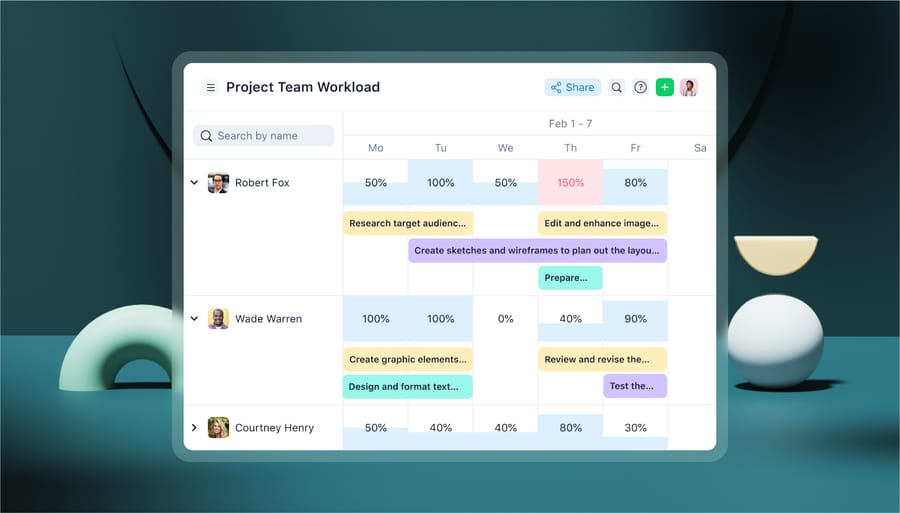
- Real-time workload and capacity views. Wrike’s Workload view shows you, person by person, how booked each member of your team is across the week, sprint, or quarter. Over-allocations show up visually before they affect a deadline, which gives you a chance to redistribute work. You can filter by team, role, or skill, and reassign tasks directly from the view itself.
- Time tracking and timesheets. In Wrike, you can track time in the same space where your team is working on their tasks. This data is added straight to your timesheets, which then feed back into your real-time capacity planning. For agencies and services teams, this is what makes it possible to compare planned vs. actual time on a project without having to reconcile the data manually.
- Roles, billing rates, and Datahub reporting. You can assign roles and billing rates to each team member, then use Datahub – Wrike’s reporting layer – to build custom utilization dashboards that connect resource usage to financial outcomes. That covers views like revenue per resource, billable vs. non-billable hours, and project margin by team.
- Work Intelligence AI® for workload balancing. Wrike’s Work Intelligence® adds an additional layer of AI to help meet your resource needs. It surfaces workload balancing recommendations when someone is over-allocated, flags resourcing risks as project scope shifts, and can streamline reassignments based on availability and skill match.
- Integrations. Wrike connects with 400+ apps, including Slack, Microsoft Teams, Microsoft Office, Tableau, Power BI, Salesforce, and Workato. Workload Views and time tracking are included in Team and Business plans, while the more advanced resource and capacity planning features (along with DataHub) are available on the Pinnacle and Apex tiers.
Patrick C., VP of Strategy in Marketing and Advertising, recently said:
“Wrike really changed how we collaborated and boosted our productivity. It gave us a central place to share information and see projects as they progress. The ability to generate Gantt charts and allocate tasks is game-changing.”
Originally posted on Capterra.
Wrike pricing
- Free plan for essential task management
- Team plan: $10/user/month
- Business plan: $25/user/month
- Pinnacle plan: Custom enterprise pricing available
- Apex: Custom enterprise pricing available.
2. monday.com: Flexible work and workload views
Best for: SMBs and mid-size teams, particularly in marketing and operations.
monday.com is a flexible work management platform that’s highly customizable. This means teams can adapt the overviews and workspaces they have in the software to a wide range of different project workflows and industries. Though it can take some time upfront to build the ideal solution, this configurability is also a strength for many small and mid-size teams.
monday.com’s key resource management features
For resource management, monday.com includes:
-
- Workload view. Workload view (included with the Pro plan) is one of monday.com’s most useful features for resource management. The view shows team capacity in real time, with color-coded indicators for who’s over or under their booked hours, and managers can rebalance assignments by reassigning tasks directly from inside the view.
- AI capabilities. monday.com’s Autofill with AI suggests the best person for a task based on defined roles and expertise, while Portfolio Risk Insights (available within the portfolio management solution) scans project boards to flag potential bottlenecks and resourcing risks before they affect delivery.
- Integrations. By connecting with tools like Slack, Microsoft Teams, Gmail, Outlook, Google Drive, Zoom, and Jira, monday.com helps teams centralize more aspects of their work and streamline team collaboration on their projects.
monday.com pricing
- Free plan for up to two users
- Basic plan: $9/user/month
- Standard plan: $12/user/month
- Pro plan: $19/user/month
- Enterprise pricing available.
3. Asana: Workload and capacity views for projects and portfolios
Best for: Small to mid-sized teams in marketing, design, and technology.
Asana is a widely used project management platform known for its flexible dashboard interfaces and customizable automation rules, which make it a good option for general project management. It also includes specific resource management tools, which we’ll look at in detail here.
One trade-off worth knowing about is that Asana’s advanced scheduling controls are more limited than a dedicated Gantt tool. The Timeline view supports critical path highlighting, but only finish-to-start dependencies are available, which can be a constraint for complex projects. But for teams running projects in boards or timeline views, Asana can still be a strong choice.
Asana’s key resource management features
To help teams plan resources and balance workloads effectively, Asana includes:
- Workload view and native time tracking, both of which are part of the Advanced plan. The Workload view shows each person’s task load relative to their set capacity, with bars you can drag and drop to rebalance assignments between team members.
- Portfolio Workload for teams running multiple projects concurrently. This aggregates resource data across projects, so you can see capacity at a portfolio level rather than one project at a time.
- An AI layer known as Smart Chat, which lets you ask natural-language questions and pull insights directly from the platform.
- Over 270 app integrations, including Slack, Microsoft Teams, Google Workspace, Salesforce, and Tableau.
Asana pricing
- Free plan for up to two users
- Starter plan: $10.99/user/month
- Advanced plan: $24.99/user/month
- Custom enterprise pricing available.
4. Float: Visual scheduling and resource management
Best for: Advertising agencies, consultancies, and professional services teams.
Float is a dedicated resource scheduling tool built for professional services teams who need a clean, visual way to manage who is working on what and when. Although it doesn’t include native task management, it works well alongside a separate project management platform. The narrow focus can also be a strength in this case, as onboarding is generally faster and simpler than with a new, full-service project and resource management tool.
Float’s key resource management features
For resource management, Float offers:
- Drag-and-drop timeline scheduling and adjustments through the resource scheduling tool.
- Team capacity tracking to keep workloads balanced and ensure the right resources are assigned to the right people. Float’s capacity overviews are set up to help spot conflicts and overbookings, and they show available time in far more detail than a spreadsheet.
- Time off management, with approved time off and holidays automatically factored into each person’s availability.
- Project estimates and actuals tracking with margin reports (available on the Pro plan) that link the schedule directly to budget performance. This can be useful for agencies that want to spot margin slip while there’s still time to course correct.
- Integrations including Slack, Basecamp, Jira, Asana, Trello, Wrike, Monday.com, Salesforce, Google Calendar, and Outlook, with broader connections available through Zapier.
Float pricing
- Starter plan: $7/user/month
- Pro plan: $12/user/month
- Custom enterprise pricing available.
5. Resource Guru: Simple booking and resource management setup
Best for: Small and medium teams at agencies and consultancies.
Resource Guru is a straightforward scheduling tool focused on making resource booking fast and conflict-free. Like Float, Resource Guru has no built-in project management or task tracking, so it functions as a scheduling layer that sits alongside other tools rather than replacing them. Its core selling point is simplicity. The tool requires almost no setup or training, and bookings can be made and rescheduled in seconds. For example, a built-in clash management feature flags scheduling conflicts the moment they happen, so you don’t have to comb through the calendar to catch them.
Resource Guru’s key resource management features
Resource Guru provides:
- A scheduling calendar to balance your team’s availability
- Capacity charts with color-coded heatmaps to spot over- and under-utilization
- Leave and time-off tracking to identify clashes and potential risks to your projects and approval workflows.
- Integrations with Slack, Google Calendar, and Outlook, with a Zapier integration that opens up connections to thousands of other apps.
Resource Guru pricing
- Grasshopper plan: $4.16/user/month
- Blackbelt plan: $6.65/user/month
- Master Plan: $10/user/month.
6. ClickUp: All-in-one work management with capacity views
Best for: Teams of all sizes that want a unified work management platform with strong automation capability.
ClickUp is an all-in-one work management platform that bundles tasks, documents, chat, whiteboards, Gantt charts, and native time tracking into a single product, which makes it attractive to teams looking to consolidate their stack rather than pay for several specialist tools. Like some of the other big names on this list, there can be a steeper learning curve with this tool, but once it’s set up and customized to your needs, there are many benefits to running workflows and tracking project progress across multiple teams.
ClickUp’s key resource management features
In terms of resource management tools, ClickUp offers:
- Workload views (on Business and Enterprise plans), which let teams visualize their workload across day, week, or month, and show the team’s readiness for new tasks by either capacity or availability.
- Capacity dashboards, which also include customizable capacity limits for each team member. Capacity is measured in terms of the estimated time a task will take, Sprint points, or other custom fields that are relevant to your project.
- Over 1,000 integrations through the ClickUp marketplace.
ClickUp pricing
- Free starter plan
- Unlimited plan: $7/user/month
- Business plan: $12/user/month
- Custom enterprise pricing available.
7. Teamwork.com: Project and resource management for client services
Best for: Agencies, consultancies, and other client service organizations.
Teamwork.com is a project management platform built specifically for client services teams, with built-in time tracking, billing, and client-level reporting as standard. The product was designed around the rhythms of agency and consultancy work, which shows in how it handles retainers, client permissions, and billable utilization. Teamwork.com is less suited to product teams or internal project management, where the client-billing focus adds complexity you don’t need.
Teamwork.com’s key resource management features
To help balance team resources and ensure timely project delivery, this tool includes:
- AI-driven capacity and utilization views, which show exactly how each team member is being used and can help to set individual targets for productivity. These tools can also be used to analyze past utilization and forecast for future projects, which makes planning more accurate.
- Time budgets and retainers to help manage ongoing client work and stay on top of fluctuating budgets. This includes dashboards that give you visibility of the entire lifespan of the retainer contract.
- Integrations with tools like HubSpot, QuickBooks, Slack, Google Workspace, Zapier, and Microsoft Office 365, among others.
Teamwork.com pricing
- Basics plan: $9.99/user/month
- Accelerate plan: $24.99/user/month
- Custom Optimize plan available
8. Smartsheet: Spreadsheet-style PM with resource management features
Best for: SMB to large enterprise teams across industries, particularly those with spreadsheet-heavy workflows.
Smartsheet uses a spreadsheet-style interface combined with project management features, including Gantt views, dashboards, and automated workflows. The familiar grid layout makes it an easy transition for teams used to running their work in Excel. It also holds enterprise compliance certifications, including ISO 27001, ISO 27018, and PCI, which makes it a common pick in regulated industries.
Smartsheet’s key resource management features
For resource management specifically, Smartsheet offers a dedicated Resource Management module, which is available as a paid add-on on Business and Enterprise plans. The module adds
- Capacity planning tools
- Skill and role matching
- Placeholder resource planning for staffing projects before specific people are assigned
- Utilization reporting that goes beyond what the base platform provides on its own.
Smartsheet pricing
- Pro plan: $9/user/month
- Business plan: $19/user/month
- Custom enterprise pricing available
- Custom Advanced Work Management pricing available.
9. Microsoft Project: Traditional Gantt scheduling at enterprise level
Best for: Large enterprises and PMOs in engineering, IT, and construction.
Microsoft Project is one of the most established project and portfolio management tools available, built around traditional Gantt-based scheduling with deep resource management capabilities. It has been the default at large engineering and construction firms for decades, and that depth shows in its scheduling features. In terms of trade-offs, the learning curve is steep compared to lighter modern tools, Agile workflow support is limited, and per-seat costs add up quickly at enterprise scale.
Microsoft Project’s key resource management features
Plan 3 covers detailed scheduling and resource allocation, with the desktop client, advanced scheduling, timesheets, and Power BI reporting. Project also offers enterprise resource capacity planning, demand management, and portfolio analysis and optimization, which are aimed at large-scale PMOs managing many concurrent projects against strategic priorities.
MS Project integrates natively with the Microsoft 365 ecosystem, including Teams, SharePoint, and Power BI, making it a natural choice for organizations already standardized on Microsoft infrastructure.
Microsoft Project pricing
- Plan 1: $10/user/month
- Plan 3: $30/user/month
10. Kantata: PSA and resource management platform for professional services
Best for: Mid to large professional services firms in consulting, IT services, and creative agencies.
Kantata (formerly Mavenlink) is a professional services automation platform that combines resource management with project financial management in a single system. It’s designed for organizations where billable hours, project margins, and client delivery are the core business. Although it can be complex to configure your workflows in the platform, established firms will see the benefits in time.
Kantata’s key resource management features
For resource management, the core capabilities include:
- Resource allocation, which is based on Kantata’s visibility into each team member’s skills and the roles that will be needed for upcoming projects.
- Utilization tracking, which can color-code a team’s capacity and availability and display the real-time data across a range of dashboards to inform your project management decisions.
- Project budget management software, which combines time and task tracking data to make it simpler to record the resources spent on projects and tasks, and identify issues that could lead to project overruns.
- Revenue forecasting, again displayed in the same piece of software as the team capacity tracking, so you can easily see how staffing decisions will affect the project’s potential margin.
Kantata pricing
Kantata’s pricing is quote-based and not published publicly.
11. Jira Advanced Roadmaps: Resource management for Agile Jira teams
Best for: Agile software development teams and IT organizations running on Atlassian infrastructure.
Jira Advanced Roadmaps (also branded as Jira Plans) is a planning layer included in Jira Premium and Enterprise that brings resource management into the Jira environment, so teams that are already running Agile projects there don’t need to leave the tool to plan capacity. This approach works well for teams that want resource management inside the tool where work is tracked, but its applicability is limited outside Agile software contexts. If your projects don’t already live in Jira, the rest of the platform won’t carry its weight.
Jira’s key resource management features
This feature of Jira enables:
- Sprint or time-period capacity mapping, when sprints are turned on in team-managed spaces and work items use story points, hours, or days as their estimation units.
- Cross-project dependency management, one of a number of tools available when teams use Jira for projects in multiple spaces.
- Scenario plans that let you model the impact of scope or timeline changes in a sandbox before committing them to the live plan.
- Tempo’s Capacity Planner (formerly Tempo Planner), available as a separate Atlassian Marketplace add-on, extends this with more granular skill and role planning and what-if modeling for multi-project resource allocation.
Jira pricing
- Free plan for up to ten users
- Standard plan: $7.91/user/month
- Premium plan: $14.54/user/month
- Custom enterprise pricing available
12. Hub Planner: Focused scheduling and timesheets
Best for: Small and mid-size businesses that need dedicated resource scheduling.
Hub Planner is a resource scheduling and timesheet tool that covers the core of resource management without the overhead of a full project management platform. Feature depth is more limited than the larger enterprise tools in this list, but for teams that only need scheduling and timesheets rather than full project management, that’s not a flaw. It now operates under the Milient Software brand, but the product itself remains focused on what it has always done well.
Hub Planner’s key resource management features
Hub Planner includes:
- Role and skill tagging for matching people to projects. Teams can customize filters for effective task allocation, including skills, availability, and capacity.
- Integrated timesheets, to compare scheduled time to actual. These features also include timesheet submission and approval workflow management.
- Customizable utilization reports and dashboards, which can be built quickly from a library of pre-formatted templates.
- Integrations with Slack, Google Calendar, Outlook, and Zapier which opens up thousands of other apps.
Hub Planner pricing
- Plug and Play plan: $7/resource/month
- Premium plan: $18/resource/month
- Business Leader plan: $54/resource/month.
13. Adobe Workfront: Enterprise work management with Creative Cloud integration
Best for: Large enterprises, particularly in marketing, financial services, and IT.
Adobe Workfront is an enterprise work management platform built for large organizations managing complex, high-volume portfolios of work. Many creative organizations choose this platform because of its integrations with the Adobe Creative Cloud, which means teams can include embedded Workfront panels in tools like InDesign, Illustrator, Premiere, and After Effects. Workfront covers project management, resource scheduling and capacity planning, predictive analytics, and automated workflows, with strong governance and audit trail capabilities suited to regulated industries.
Adobe Workfront’s key resource management features
For resource management specifically, it includes:
- Resource planner, which helps teams budget project time and resources according to the team’s scheduled availability.
- Scenario planner, a high-level planning tool that manages resources across multiple projects to help you maximize resource availability (requires an additional license).
- Workload balancer, which schedules or reassigns tasks based on availability and the number of hours needed to complete a task.
- Utilization reports, which analyze budgeted, planned, and actual resource allocation across projects to help you better understand a project’s costs and revenue.
Beyond that, it connects with Jira, Salesforce, Microsoft Office, and Slack through Workfront Fusion, its low-code automation engine that handles connections to 100+ business applications.
Adobe Workfront pricing
Pricing is enterprise-only with no published per-seat rates.
Capacity planning, portfolio management, and integration capabilities: What to evaluate
With this many options on the market, it’s worth being clear about what actually separates the tools that handle light scheduling from the ones that can support serious project resource management.
Three feature areas tend to do most of the differentiating: capacity planning, portfolio management, and integration capabilities. We’ll look at each of those in detail now.
Capacity planning
Capacity planning is the ability to view team availability against total demand across all active and upcoming projects (not just within a single project) at the same time.
There are a lot of different ways to represent this – from using work hours to show a team’s capacity as a percentage, to using burndown charts that show the planned effort vs. the way the project is actually playing out. But what matters in practice is whether the tool can flag over-allocation across the whole team before it causes delays.

A lot of platforms will show you that one project is on track. Where the simpler tools tend to fall down is in tracking capacity and resource loading across multiple projects, and consolidating that data to show whether an individual team member is buried under tasks. Take a marketing team running five concurrent campaigns, for example. A senior copywriter with one or two tasks for each project might look fine, but across all five, they’re booked for 60 hours in a 40-hour week.
Look for views that aggregate workload across projects, capacity ceilings per person or role, and conflict flags that appear the moment a booking creates them instead of after the deadline has passed.
Portfolio management
Portfolio management extends visibility to every project a company is currently running. It lets managers see how resources are distributed across the full portfolio of work, and make trade-off decisions about prioritization and staffing at that higher level.

This is where the conversation shifts from, “Is this project staffed?” to, “Are we staffing the right projects?”
Take a consulting firm taking on a major new client mid-quarter, for example. Without portfolio visibility, the partner running staffing pulls senior consultants off whatever projects look pausable, hopes for the best, and finds out three weeks later that the projects pulled from were the highest-margin work in the pipeline. With a portfolio view, you can see margins, deadlines, and capacity together, so that trade-off becomes a deliberate, informed decision.
Look for tools with portfolio dashboards that compare workload, margin, or strategic value across projects, scenario tools for modeling reassignments before you commit, and reporting that helps leadership make the call when demand outstrips capacity.
Integration capabilities
Integration capabilities determine how well the tool connects to the rest of your stack – like your finance and billing tools, human resources systems, time tracking, and communication platforms.
When evaluating this area, check not just the list of available integrations but how deep they go. Take an agency that bills clients by the hour: it might need its time tracking tool to push approved timesheets into both its accounting platform and its project management system, so a single time entry updates a client invoice, a project margin forecast, and a utilization report at once. A “Slack integration” that just sends a notification when someone clocks in can’t solve that problem, but a proper two-way sync between systems will.
When you’re looking for resource and capacity management tools, ask specifically about which direction data flows, how often it syncs, and whether the integration is native or routed through a third-party automation layer like Zapier.
How to choose project management software that helps you identify resource constraints
The right project management software for your team won’t be the one with the most features; it will be the one that matches the way you already work and gives you the level of oversight you need to improve your resource allocation, resource utilization, and resource forecasting for future projects. With everything we’ve discussed so far in mind, here are the questions worth taking into the final evaluation:
- Does it show capacity at the team level, not just task by task? A tool that lists tasks against names is doing project management, not resource management. You want a view that takes account of commitments across all active and upcoming work, so you can see total demand on each person against their actual capacity.
- Can it identify resource constraints before they become delivery problems? Look for alerts, conflict flags, and capacity warnings that fire the moment a booking creates the problem. Reporting is useful for retrospectives, but it doesn’t help you address a resource availability problem as soon as it emerges.
- Does it support the planning model your team actually uses? Some teams run on Scrum Sprints, some on fixed deadlines, and some on tickets and rolling intake. A tool that forces you to plan in a way your team doesn’t already work won’t be widely adopted, so match the planning model to your reality, not the other way around.
- How complex is implementation, and what onboarding support does the vendor provide? Enterprise tools often deliver real value but require months of configuration and change management. Lighter tools can be live in a week but may not scale with you. Ask vendors specifically how their customers in similar situations got to value, how long it took, and what implementation support is included.
Why teams choose Wrike for resource management
No single tool on this list is the right answer for every team. The right choice depends on three things in particular: the size of your team, how tightly your resource management needs to connect to project execution and financial reporting, and how much implementation complexity your organization can manage.
Wrike is a good fit for teams that need real resource management built into project execution, rather than bolted on through a separate tool or unlocked only at enterprise tiers.
With Wrike, workload and capacity views, time tracking, roles and billing rates, and reporting all live in the same workspace as the projects themselves, which makes it possible to flag over-allocation, model the impact of new work, and tie utilization back to project outcomes without reconciling data across systems.
Start a free trial of Wrike or book a demo to see what resource management looks like inside the platform.