Scrum vs. Waterfall: Which approach is right for your team?

Scrum and Waterfall are well-known project management frameworks built around very different assumptions. Understanding what makes them different will help you choose the best fit for your projects.
Scrum is a framework for complex work that uses short cycles, defined accountabilities, and regular adaptation. It assumes requirements will evolve as a project progresses. Waterfall is a sequential approach where work moves through planned phases. It assumes the project can be fully planned before work begins, with stable requirements and phases.
Neither methodology is automatically the “better” choice. Instead, you need to find the best approach for your team based on how stable your requirements are at the start, what the deliverables are, and how much change you expect.
To explore the pros, cons, and best fit in detail, this guide covers:
- The key differences between Scrum and Waterfall project management
- The types of projects each method is suitable for
- How to make the call and find the best methodology for your team.
Wrike is an all-in-one work management platform, where you can adapt your team’s workspace to run Scrum sprints, Waterfall projects, and everything in between. Try Wrike for free.
Key takeaways:
- The difference between Scrum and Waterfall is that Scrum is iterative (teams work in short sprints to refine a product), while Waterfall is linear (teams complete phases in a set order).
- Scrum works best for digital products, software development, and projects with changing requirements. Waterfall is best for fixed-scope projects, including construction, manufacturing, and projects in regulated industries.
- Applying Waterfall to a project with changing requirements can mean problems surface late, when they’re expensive to fix. Using Scrum without an engaged Product Owner can mean your deliverables don’t meet the actual business needs.
- Many organizations work with both methodologies. Often, high-level planning is managed with Waterfall while product development is handled in Scrum.
What is the difference between Scrum and Waterfall?
The fundamental differences between the Scrum and Waterfall project management methodologies are structural.
Scrum is iterative and adaptive: teams work in short, repeatable sprints, where planning, building, testing, and reviewing happen continuously throughout the project, typically in 1–4-week cycles that end with a sprint retrospective.
Waterfall is linear and sequential. Each phase must be completed and signed off before the next phase begins, and work only flows in one direction. The full scope of the project is defined upfront, and the team and stakeholders refer to that version of the plan throughout.
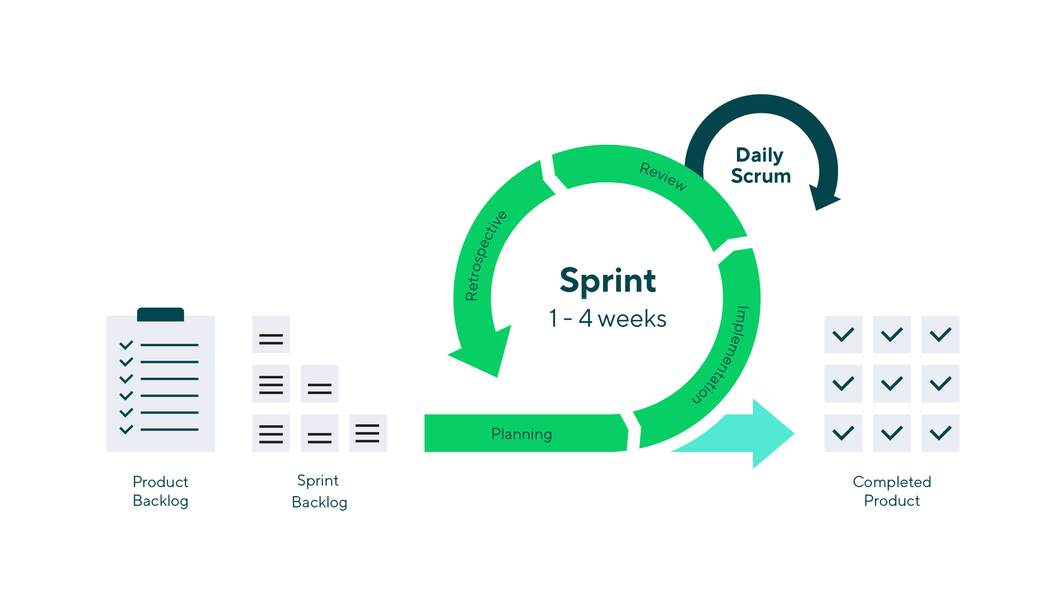
In Scrum, the project plan is a starting point that’s refined during every sprint based on:
- What the team learns
- The stakeholders’ feedback
It’s also worth noting that the Scrum framework is a key part of Agile project management, so it requires teams to define Product Owners and Scrum Masters, set up sprint backlogs, etc., if it’s going to run effectively.
Now, let’s look at the structural differences between Scrum and Waterfall side by side.
Factor | Scrum | Waterfall |
Planning style | Continuous — high-level project roadmap up front, detailed planning within each sprint | Comprehensive upfront — full scope, schedule, and budget defined before work begins |
Delivery model | Iterative — working increments delivered every sprint (1–4 weeks) | Sequential — full product delivered at the end after all phases are complete |
Change management strategy | Expected and accommodated — changes absorbed into future sprints via the backlog | Controlled and costly — changes require formal scope management and can disrupt completed phases |
Team structure | Cross-functional, self-organizing — developers, testers, and designers work together throughout | Specialist-led — different teams or individuals handle different phases in sequence |
Customer/stakeholder involvement | High throughout — sprint reviews create regular feedback opportunities | Front-loaded — stakeholders define requirements at the start and review the final output |
Documentation | Lightweight and purposeful — just enough to support the work being done | Comprehensive and formal — detailed documentation at each phase gate |
Testing approach | Continuous — testing happens within every sprint alongside development | End-loaded — testing occurs as a distinct phase after development is complete |
Risk handling | Risks surface early through frequent delivery and review | Risks often surface late, during testing or after delivery, when they’re expensive to fix |
Reporting and predictability | Progress is measured through working output; timelines are flexible | Progress measured through phase milestones; timelines are predictable if the scope is stable |
Best-fit project | Evolving and complex projects that require high speed and flexibility, such as most software development projects | Well-defined projects that have stable requirements and reliable documentation upfront, such as construction or healthcare projects |
As you can see, it’s not the case that one model is more sophisticated than the other; it’s that they’re optimized for different kinds of work.
Applying the Waterfall model’s linear and sequential framework to a product with evolving requirements will create problems downstream if the situation is better suited to the iterative, adaptive stance of Scrum methodology. The same logic applies in reverse.
Scrum vs. Waterfall: Pros and cons
In the next section of this post, we’ll look at the advantages and disadvantages of Scrum and Waterfall to give you a clear picture of where each approach can create value and where you might encounter friction.
Scrum: Advantages and disadvantages
Scrum's core strength is its ability to keep a team aligned as a project evolves. Teams deliver working output at the end of every sprint and review it with stakeholders. They also have daily stand-ups to review progress, request resources, and reveal problems early in the process.
Imagine a software development team. If there’s a mismatch between the feature the client requested and the feature the team can build, it gets caught after one of the first sprint cycles, and not at a key milestone six months into the project.
That loop of early, continuous feedback (and the ideological focus on ‘working software’ over comprehensive documentation) is the reason why Scrum can be so beneficial for many teams. However, it can also be a demanding way to work, and not every organization can move at this fast, responsive pace.
Scrum pros | Scrum Cons |
Faster feedback — working output reviewed every sprint, not at the end | Hard to predict total cost and timeline upfront, which complicates fixed-price contracting |
Better adaptability — requirements can change between sprints without derailing the project | Requires an active, available Product Owner throughout delivery — not just at the start |
Higher visibility during delivery — stakeholders see progress continuously, not just at milestones | Doesn’t suit teams or organizations that need rigid governance, formal sign-off at each phase, or heavy compliance documentation |
Better fit for evolving products — the product backlog model absorbs new information naturally | Low stakeholder availability is a genuine blocker — Scrum degrades quickly without consistent feedback |
Team empowerment — self-organizing teams develop shared ownership of the product | Scope and budget can drift without disciplined backlog management and a strong Product Owner |
Early risk detection — problems in direction or quality surface fast | Can be disorienting for teams transitioning from structured, phase-based environments |
It’s worth focusing on the stakeholder availability point because it’s the most commonly underestimated risk to successful Scrum projects.
Scrum, and Agile methodologies more generally, assume someone with decision-making authority over the product — the Product Owner — is engaged throughout the project, and not just at kickoff and delivery. Organizations that can’t provide that level of ongoing involvement will find that Scrum sprints produce output that drifts from their actual business needs, which defeats the central purpose of running Scrum in the first place.
To get the full benefits of Scrum project management, project managers need some key features.
- Built-in communication features that keep stakeholders (and any cross-functional teams) in the loop without lengthening Scrum meetings or placing additional administrative responsibilities on the team (Wrike's notifications, reporting software, and sprint dashboard features are invaluable here)
- A detailed backlog system, where the effort for each task can be accurately estimated, backlogged tasks can be prioritized, and tasks can be effectively allocated for the next sprint. In Wrike, this information can be gathered, then routed automatically, through our dynamic request form feature.
- Robust version control features, to ensure teams are always working on the latest iteration within the project or the sprint. In Wrike, you can manage even the most complex projects through a system of shared project folders, each with role-based access permissions, within your team’s workspace.

Waterfall: Advantages and disadvantages
Because the Waterfall approach is so linear, it’s often more predictable than Scrum. In the right context, that predictability has real value. For example:
- When a client needs a fixed price and a fixed delivery date, Waterfall gives a clear, step-by-step roadmap showing how the team will meet the requirements and what they require from the client upfront.
- When a regulatory body requires documented sign-off at each phase, Waterfall ensures those boxes are being checked as the team moves through the project.
- When the project involves physical deliverables that can’t be iterated on, Waterfall takes the team from ideation to delivery and minimizes the chance of scope creep.
The problems start when teams apply that same structure to work where requirements aren’t stable, because Waterfall’s phase-gate model has no good strategy for when you discover that your assumptions were wrong halfway through a project.
Waterfall pros | Waterfall cons |
Strong predictability — milestones, timelines, and budgets defined upfront | Late discovery of problems — testing and validation happen after development is complete |
Easier phase control — clear gates between phases support governance and sign-off | Change is expensive — modifying requirements after a phase is complete can require reworking earlier stages |
Comprehensive documentation — formal records at each stage support compliance, audits, and handoffs | Stakeholders don’t see working output until the end — misalignments can go undetected for months |
Better fit for fixed-scope deliverables — contract, timeline, and deliverables align naturally | Risk of delivering something that no longer matches evolved needs if the project is long |
Works well when downstream dependencies are sequential — construction, manufacturing, regulatory approvals | Assumes requirements are complete and stable upfront — an assumption that frequently proves wrong |
Clear specialist accountability — each phase has defined owners and handoff points | Inflexible to change — a methodology designed for predictability becomes a liability in unpredictable environments |
The testing problem deserves particular attention for software and digital product teams.
In Waterfall, testing happens as a distinct phase after development is complete. This means that if a fundamental problem is found during testing — a misunderstood project requirement, a design flaw, an integration issue — the fix means going back through completed development work.
The later a problem surfaces, the more expensive it is to fix. Scrum distributes testing across every sprint, which surfaces those problems weeks or months earlier when they’re far cheaper to address.
To implement Waterfall project management effectively, teams need:
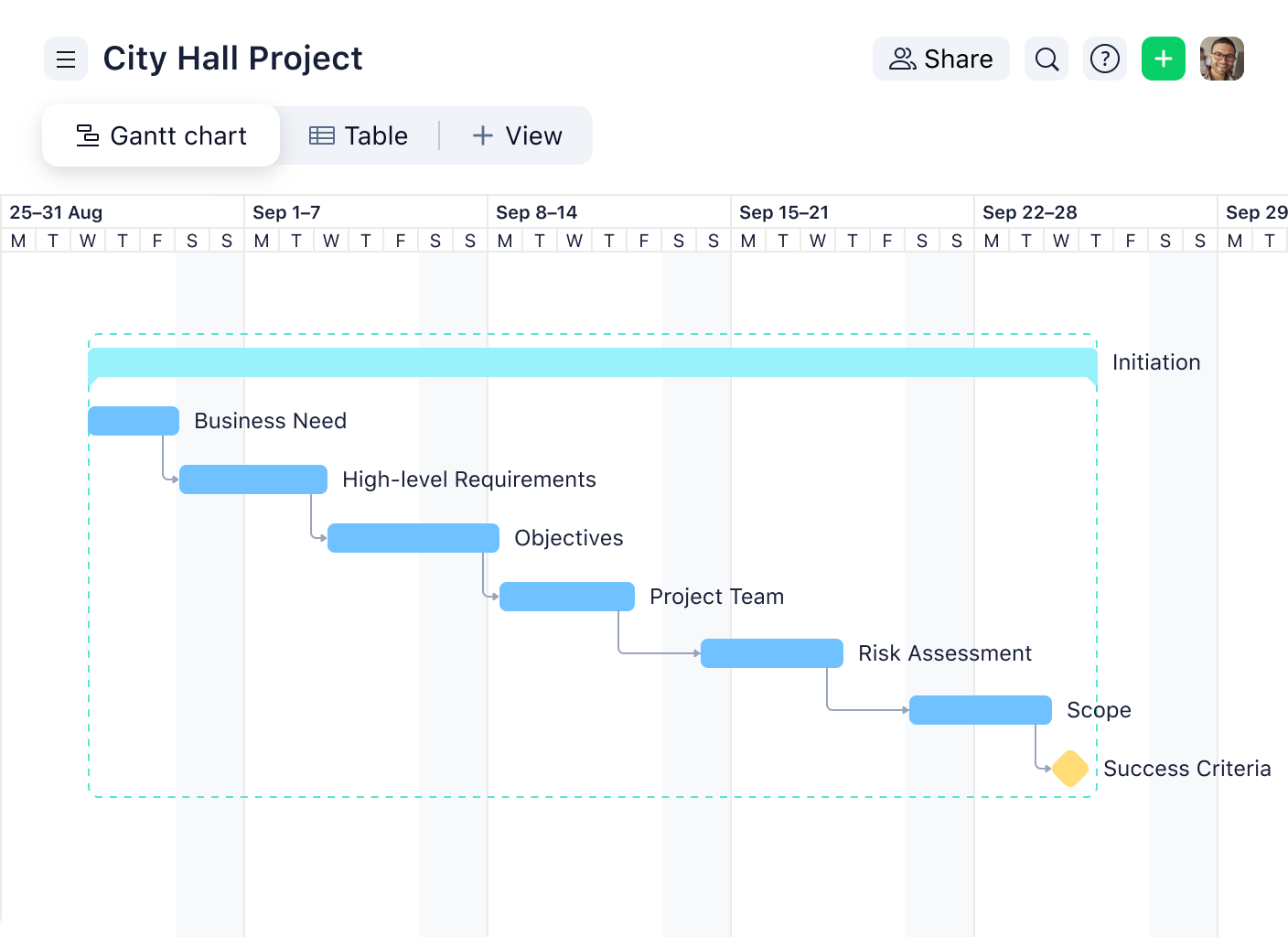
- Project monitoring tools that show whether work is progressing to schedule. For example, while Scrum teams will often use Kanban boards to show how tasks are moving through their workflow, Waterfall teams might benefit more from using a Gantt chart timeline that shows how their progress is stacking up against the plan (both are available in Wrike).
- Automated workflows that support the detailed documentation required by these projects, for example, routing completed deliverables for approval before a milestone can be marked complete. In Wrike, workflow automations are as simple as when/then triggers.
- Project reporting features, including the option to customize reports to show, for example, the percentage progress, the number of tasks at each workflow stage, the budget, and the tasks at risk.
When should you use Scrum?
Scrum is the right fit when your work is complex enough that you can’t fully define what you’re building before you start work.
In some categories of work, particularly digital products, the real requirements only become clear through the process of building and testing. If you know from experience that your initial assumptions will be wrong regardless of how carefully you completed your requirements gathering, the question becomes whether you discover it early or late. Scrum is designed to make it early, which ultimately reduces the pressure on your schedule, your budget, and your team.
Consider using Scrum when:
- Requirements are likely to evolve. If the project involves new technology, user research that feeds back into design, or a market that’s moving fast enough to change what you’re building, Scrum's iterative model is better placed to absorb that change.
- Frequent feedback creates better outcomes. In some scenarios, product development processes with regular stakeholder input — sprint reviews, user testing, demo sessions — tend to build products that are closer to what users actually need than products revealed for the first time at launch.
- The team can collaborate cross-functionally. Scrum's self-organizing team structure assumes developers, designers, testers, and product thinkers are working together throughout, not handing work off in sequence. Teams that are siloed by function will need to restructure before Scrum works as intended.
- Incremental delivery creates real value. If shipping a working version of part of the product early generates business value — through revenue, user feedback, or market learning — sprint-based delivery can work in your favor.
- The team needs a shared rhythm and delivery structure. Teams that have struggled with scope creep, unclear prioritization, or inconsistent output often find that Scrum's sprint cadence provides the accountability structure they were missing with more linear Waterfall models.
When should you use Waterfall?
Waterfall works best when the conditions that make an Agile approach powerful — evolving requirements, frequent feedback loops, iterative delivery — are absent.
Some projects have stable, well-understood requirements from the start. Some deliverables can’t be broken into meaningful increments. Some regulatory environments (for example, in healthcare or manufacturing) require formal documentation and sign-off that a lightweight, sprint-based process doesn’t naturally produce. In those situations, Waterfall’s structure can be a great fit.
Consider using Waterfall when:
- Requirements are stable and fully understood before work begins. If the client can define exactly what they want, the team can design to that definition, and neither party expects the scope to shift during delivery, Waterfall’s upfront planning model is efficient and transparent.
- Project scope is tightly defined. Projects where the deliverables, timeline, and costs are fixed by a contract are easier to manage with Waterfall because the methodology is built around delivering a defined scope on a defined schedule.
- Heavy governance or sign-off is required. Regulated industries often require formal documentation, phase approvals, and audit trails that Waterfall produces naturally.
- Deliverables break naturally into sequential phases. Industries like construction, infrastructure, and hardware engineering all involve physical or technical dependencies that mean work can only be completed step by step.
- A change to the plan would be expensive. When scope changes mid-project would be expensive (for example, due to contractor commitments, supply chain implications, or regulatory re-approval requirements), Waterfall’s change control mechanisms protect the project in ways Scrum's flexible backlog model doesn’t.
How do you choose between Scrum and Waterfall?
The most useful question to ask at the start of any methodology decision is, “How much do we actually know about what we’re building?” If the answer is, “Almost everything,” Waterfall gives you a reliable path to deliver it. If the answer is, “Enough to begin, but we’ll learn more as we go,” Scrum is almost certainly the better fit.
This checklist can help you work through the practical considerations to decide what approach makes the most sense:
- How likely are requirements to change during the project?
- Do you need frequent user feedback in order to develop your deliverables?
- Is the project scope fixed by contract or industry regulations?
- Can your team deliver incrementally?
- How costly would a late-stage change be?
- Do stakeholders want visibility during delivery or only at milestones?
To recap, this table sums up the key features of both Scrum and Waterfall methodology, to help you identify the best fit based on your requirements.
Factor | Scrum | Waterfall | Best choice |
Requirements clarity | Low to medium upfront — evolves through delivery | High upfront — fully defined before work begins | Use Scrum when requirements are unknown or likely to change |
Tolerance for change | High — changes absorbed into future sprints | Low — changes disrupt completed phases | Use Scrum in changing environments or for evolving products |
Stakeholder availability | High — active involvement throughout delivery | Front-loaded — defined at start, reviewed at end | Use Scrum when engaged stakeholders are available throughout |
Delivery timeline | Flexible and incremental | Fixed and milestone-based | Consider Waterfall for a hard deadline with a fixed budget |
Risk profile | Risks surface early via frequent delivery | Risks surface late, during testing or post-launch | Use Scrum when a project has high uncertainty in requirements |
Team structure | Cross-functional, self-organizing | Specialist-led, sequential handoffs | For multidisciplinary product teams, use Scrum; for specialist phase teams, use Waterfall |
Compliance/documentation | Lightweight — adapted to project needs | Comprehensive — built into phase gates | Use Waterfall when a project has heavy compliance or audit requirements |
Contract type | Time-and-materials, flexible scope | Fixed-price, fixed-scope | For fixed contracts, use Waterfall; for exploratory or evolving work, use Scrum |
It’s also important to acknowledge that sometimes, teams will need to switch between their approaches depending on the project in front of them, and that many companies have departments that take very different approaches to project management.
For organizations running both Scrum and Waterfall projects simultaneously (for example, where product development teams work in sprints alongside operations or delivery teams managing phase-gated work), Wrike supports both models in a single platform.
In fact, Wrike will even support cross-functional work where the different teams involved in a project need to track their work through different workflows, apps, and approval cycles.
How UNSW Sydney breaks down silos and improves cross-division communication with Wrike
UNSW Sydney has more than 59,000 students, a research community of 7,000, and 6,000 members of staff. The challenge for Dave Rorke, Project Officer, and Nancy Peaty, Production and Traffic Manager, was to lead the cross-functional team that managed all the external marketing and communications for the university.
With Wrike, UNSW found a robust system that allowed multiple stakeholders to complete, track, and visualize work in a way that made sense for them, while still centralizing communication and reporting.
Rorke told us, “In our case, we needed a workflow management platform, so Wrike was a brilliant option for us, particularly for the project management side of things. Wrike makes things easier and clearer, which in turn makes things consistent. It enables a lot of simplified interactions between our departments and clients, which is a game changer.”
Within three months of implementing Wrike’s request forms, custom workflows, and real-time dashboards, the team reported a 250% increase in communication within Wrike, leading to smoother projects for the entire cross-functional team.
How House of Design masters visibility and drives efficiency with Wrike
House of Design works in the fields of robotics and industrial automation, which means constant coordination and collaboration between teams in the machine shop, mechanical engineering, and project managers.
When the team experienced rapid growth, they needed to update their project management system to provide more clarity to all these separate teams and set them up for sustainable growth in the future.
With Wrike, their teams use:
- Shared project timelines to keep themselves aligned and enhance communication with their clients
- A centralized communication hub to take conversations out of email threads
- A single source of truth that combines and integrates with the team’s disparate tools
Reflecting on the benefits of Wrike's scalable project management systems, Chad Svedin, Project Manager, notes that Wrike saves approximately 3 hours per employee per week, which translates to over $830,000 in cost savings and increased productivity over three years.
When you know that you won’t have to choose one project management approach for the whole organization, you have the freedom to choose the method that works best for each type of work your company completes.
Use Wrike to implement the best methodology for your team
Deciding between Waterfall and Agile frameworks like Scrum is only half the equation, because you also need a project management platform to support it.
Wrike adapts to the way your team actually works, whether that’s sprints, phase gates, or both running simultaneously in different subteams. Wrike helps you customize your workspace to match your team’s workflows and integrate their preferred tools, so you can actually reap the benefits of the methodology you choose.
With Wrike, you can enjoy:
- Increased oversight and transparency: Gantt charts, Kanban boards, and sprint dashboards give you a clear view of progress at every level
- Smoother communication and collaboration: Built-in notifications and a centralized communication hub keep decisions and feedback in one place
- Automated documentation and approvals: Wrike's rule-based triggers and workflows route deliverables for sign-off and keep formal records at every stage
- Detailed reporting: Customizable reports, snapshots, and dashboards keep stakeholders informed without adding to your team’s administrative load
- Improved scalability: With shared folders, cross-functional workflows, and deep integrations, Wrike grows with your team as projects become more complex
Try Wrike free, or book a demo to see how it can work for your team.
Frequently asked questions (FAQs) about Scrum vs. Waterfall
Neither Scrum nor Waterfall is universally better; they simply have projects they’re better suited to. Scrum works for complex, evolving work where requirements will change during delivery, and stakeholder feedback can be integrated to improve the outcome. Waterfall is better suited to fixed-scope work with stable requirements, sequential physical phases, or heavy compliance and documentation needs.
Yes — hybrid approaches are common and often practical. Sometimes called “Water-Scrum-Fall,” these models use Waterfall-style planning and contracting at the program level while Scrum teams deliver iteratively within the defined phases. An organization might define high-level requirements and budget in a Waterfall phase, run Scrum sprints to build the product, and use a Waterfall-style release and documentation phase at the end. The hybrid works when each methodology is applied to the part of the project it fits best, rather than forcing one framework onto the entire lifecycle.
Use Scrum when requirements are likely to evolve during delivery, when regular stakeholder feedback will improve the product, and when incremental delivery creates value before the project is complete. If the team is building something where early assumptions will inevitably be tested and refined (like a digital product, a new service, or a technology platform), Scrum's iterative model surfaces and incorporates that learning faster and more cheaply than a phase-locked Waterfall plan.
For most software development work, Scrum is a better fit. Software requirements evolve as teams build and test, user needs become clearer through use rather than specification, and the cost of late changes in a Waterfall process is high. That said, some software projects, particularly those with strict regulatory requirements, fixed contracts, or very well-defined scope, have been delivered successfully using Waterfall. The Scrum methodology has become the dominant approach in software development, not because Waterfall can’t work, but because the iterative model handles the nature of software work better in most cases.
Waterfall is generally better for fixed-scope projects. When a contract defines exactly what will be delivered, by when, and for how much, Waterfall’s upfront planning and phase-gate structure align naturally with those constraints. Scrum's backlog model is designed to absorb change and evolving requirements — both of which are liabilities, not assets, in a fixed-scope engagement. Teams working on fixed-scope projects who want to use iterative methods should consider whether the contract structure allows for it, and whether the scope is genuinely stable enough that sprint-based delivery won’t create tension between the methodology and the commitment.