

28 Best Workflow Management Software Available in 2026

When I first took my role at Wrike, I used to swear by a slick Google sheet for organizing my to-do list. It was a habit I picked up from a previous role, and my trusty spreadsheet went everywhere with me because I didn’t know any better.
And it worked. Until it didn’t. As soon as I started to work on projects with multiple stakeholders, complex dependencies, and workflows that needed approval, my color-coding started to break down. The truth was, I didn’t need more columns. I needed one centralized solution that could keep up as things got more complex.
In this guide, I’ve compiled 28 workflow management platforms to help you find the right fit for your team.
I’ve covered a range of different solutions, including traditional end-to-end project and workflow management platforms like Wrike, no-code automation tools like Zapier, and workspaces like Notion. You’ll also get a breakdown of the key features to look for so you know how to evaluate each option.
Key takeaways
- Workflow management software provides the structure modern teams need to automate recurring processes, collaborate across departments, and scale operations.
- Workflow management software is distinct from project management software, which is built around project timelines rather than recurring processes.
- The best workflow management platforms offer code-free workflow building, automated approvals, real-time notifications, and strong app integrations.
- Key features to look for include custom workflows, advanced reporting, and automation tools that reduce manual effort across your team.
- Wrike offers standout features like custom automations, cross-tagging, and approval workflows, making it the best option for teams with complex needs.
Table of contents
- What is workflow management software?
- Key features and considerations when choosing a workflow management software
- 28 best workflow management software platforms reviewed
- Benefits of workflow management tools
- Workflow software vs. project management software
- Why Wrike is still the best workflow software in 2026
Tools covered
What is workflow management software?
Workflow management software is a type of management software that helps teams plan, track, and execute their work using defined workflows. It provides a structure for recurring tasks, approvals, content reviews, client onboarding, and other business processes that need consistency, collaboration, and visibility.
The right workflow management solution helps teams:
- Automate repetitive tasks
- Assign tasks and track ownership
- Build and share custom workflows
- Route work automatically based on rules or triggers
- Integrate with project management tools and communication apps
- Support workflow automation to reduce delays and manual input
The best systems give teams flexibility to create workflows that reflect how your team actually works, whether that involves marketing approvals, operations reviews, or employee onboarding.
As we dive into features, benefits, and tools, I’ll also touch on how workflow management software fits into a broader automation strategy and why the difference between workflow software and project management software matters more than it might seem.
Key features and considerations when choosing a workflow management software
The right workflow management software should be able to organize tasks while supporting how your team actually works. That includes the way work gets assigned and tracked, how approvals move through your process, and how well the platform fits into your existing tech stack.
Before you evaluate any platform, consider these key features:
Easy setup and fast onboarding
If your team needs weeks of training just to get started, your tool is likely going to slow down your workflows. The best tools are built for fast adoption, with no-code workflow builders, prebuilt templates, and easy-to-navigate interfaces.
The goal of any workflow management platform should be to integrate seamlessly into your daily processes without having your team spend more time configuring settings than they do actually working.
Request and approval tracking
Managing requests from different teams or departments can quickly get too complicated without a structured system. You should look for a workflow management platform that allows you to track requests, reviews, and approvals for different types of content like graphics, articles, and landing pages in a standardized way.
With this approach, you can route requests to the right people and track where each one stands in the approval process without requesting manual updates from other team members.
Dashboards with multiple views
Depending on your role in the organization, you’ll have different priorities and need access to different information. For instance, a project manager needs a high-level view of everything in progress, while a designer is more focused on their assignments for the day.
A good platform gives you both, including customizable views that provide a complete overview of everything, from high-level capacity and progress tracking down to individual task status and upcoming deadlines.
Real-time workflow visibility
Keeping everyone aligned on project status is one of the biggest challenges that managers face. That’s because work is usually scattered across various systems, so it’s common for deadlines to be missed or for project updates to go unnoticed.
The right workflow management tool gives your entire team a live view of where each task stands and what’s coming up next. This eliminates the need for status meetings and keeps projects moving without the constant back-and-forth.
Consistency and compliance controls
Even the most visible workflow breaks down if your team isn’t following the same process every time. That could include inconsistent handoffs, skipped approval steps, and unclear ownership, leading to delays or incorrect delivery.
This is especially true in highly regulated industries, where poor workflow management can become a liability to the organization. The best workflow platforms let you standardize how work is passed along, enforce required approvals, and set role-based permissions that keep every output accurate, compliant, and on-brand regardless of who’s handling it.
The 5 top workflow management tools for different use cases
| Wrike | Complex, cross-functional teams | Custom workflows, AI automation, dashboards | $10/user/month |
| Trello | Individuals and small teams | Timeline view, rule-based automations | $5/user/month |
| Jira | Technical teams using the Agile methodology | Agile planning, bug tracking, velocity charts | $9/user/month |
| Zapier | App-to-app automation | Multi-step zaps, 6,000+ integrations | $19.99/month |
| Smartsheet | Spreadsheet-based planning | Grid view, resource tracking, approvals | $9/user/month |
28 best workflow management software platforms reviewed
Finding the right workflow management software depends on your team size, industry, and how complex your processes are. To give you a well-rounded view of what’s available, we’ve reviewed 28 platforms, including end-to-end project and workflow management platforms (like Wrike), developer-focused solutions (like Jira), and lightweight options for smaller teams and freelancers (like Trello).
Each tool has been evaluated on its core features, integrations, pricing, and real-world usability. This detailed list should include an option for you, regardless of whether you’re a solo operator looking to streamline processes and cut down on manual work or an enterprise team managing workflows across departments.
1. Wrike: The best all-around workflow management tool
Wrike is a powerful workflow management platform used by teams that need visibility, structure, and scalability. It supports everything from document workflows to task management, helping teams run complex initiatives without losing track of the details.
Used by 20,000 companies across the world, Wrike is an intuitive, scalable way to design, action, and evaluate your workflows. It supports everything from document workflow automation to task management, helping teams run complex initiatives without losing track of the details.
Our take
Top of the list for a reason, Wrike is excellent when it comes to project management and workflow automation. In my role, I’ve used Wrike extensively across campaigns, internal operations, and executive reporting. What stands out most is how well Wrike scales as your workflows grow more complex. There’s nothing that I’ve done in my day-to-day that’s been too complex for Wrike to handle, even as my tangled workflows navigate through multiple approvers, various teams, intricate dependencies, and shifting deliverables.
At one point, I was managing dozens of requests from legal, brand, and digital at the same time. With Wrike, I could build a structured intake system using custom request forms, automatically assign tasks based on the request type, and route each item to the right stakeholder — all without writing a single line of code. Sure, it may present a learning curve for new users, but it’s not as complex as you might imagine given its functionality.
It’s the only tool I’ve used that handles both the chaos of daily task management and the nuance of multi-step business processes with real-time accountability.
Key features
- Multiple project views: Kanban boards, Gantt chart view, calendar, Table views
- Custom fields and workflows to match team-specific processes
- Built-in proofing and approvals for content, design, and document review
- AI-driven automation to assign tasks, predict delays, and optimize timelines
- Time tracking, workload management, and capacity planning
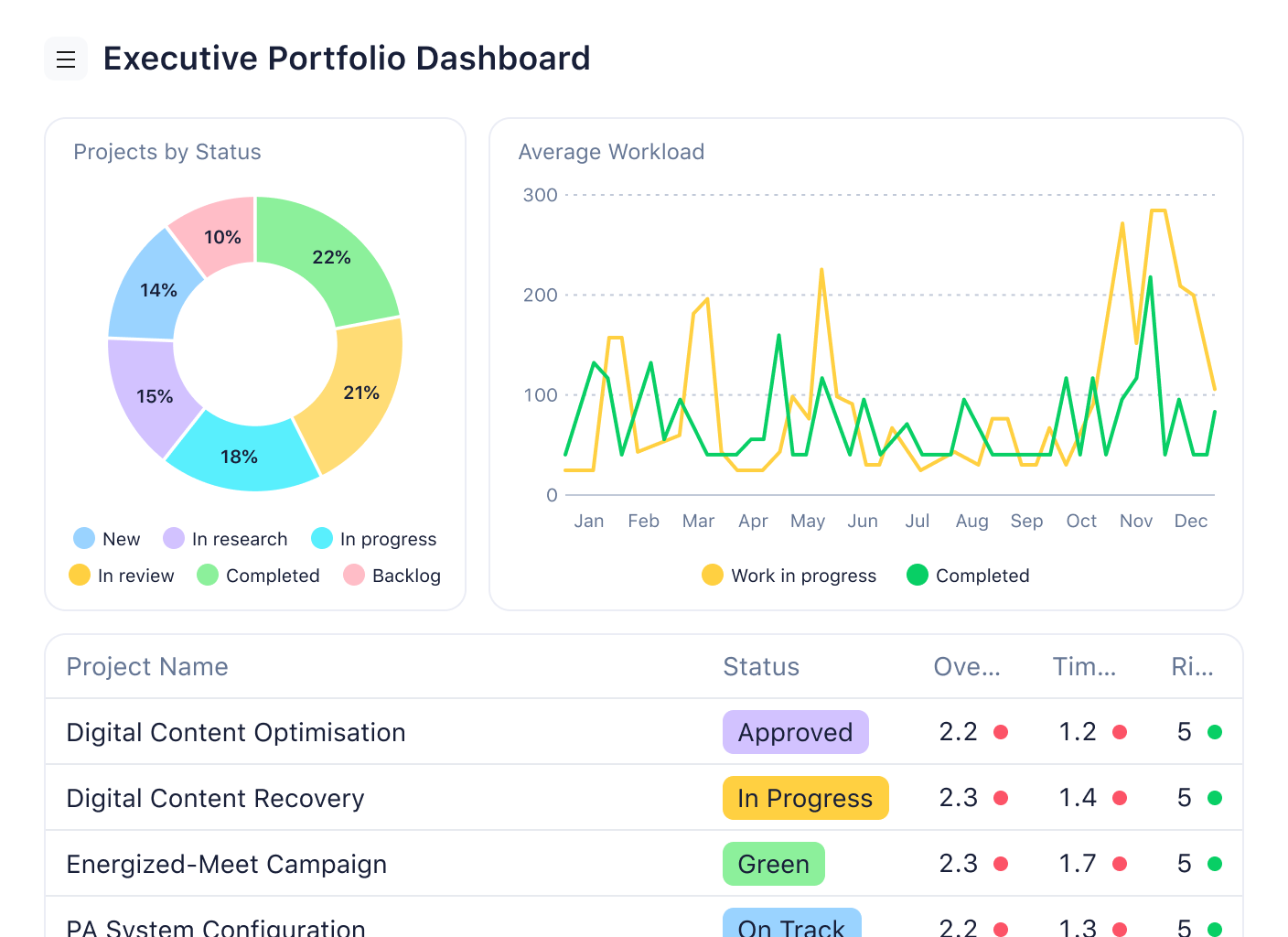
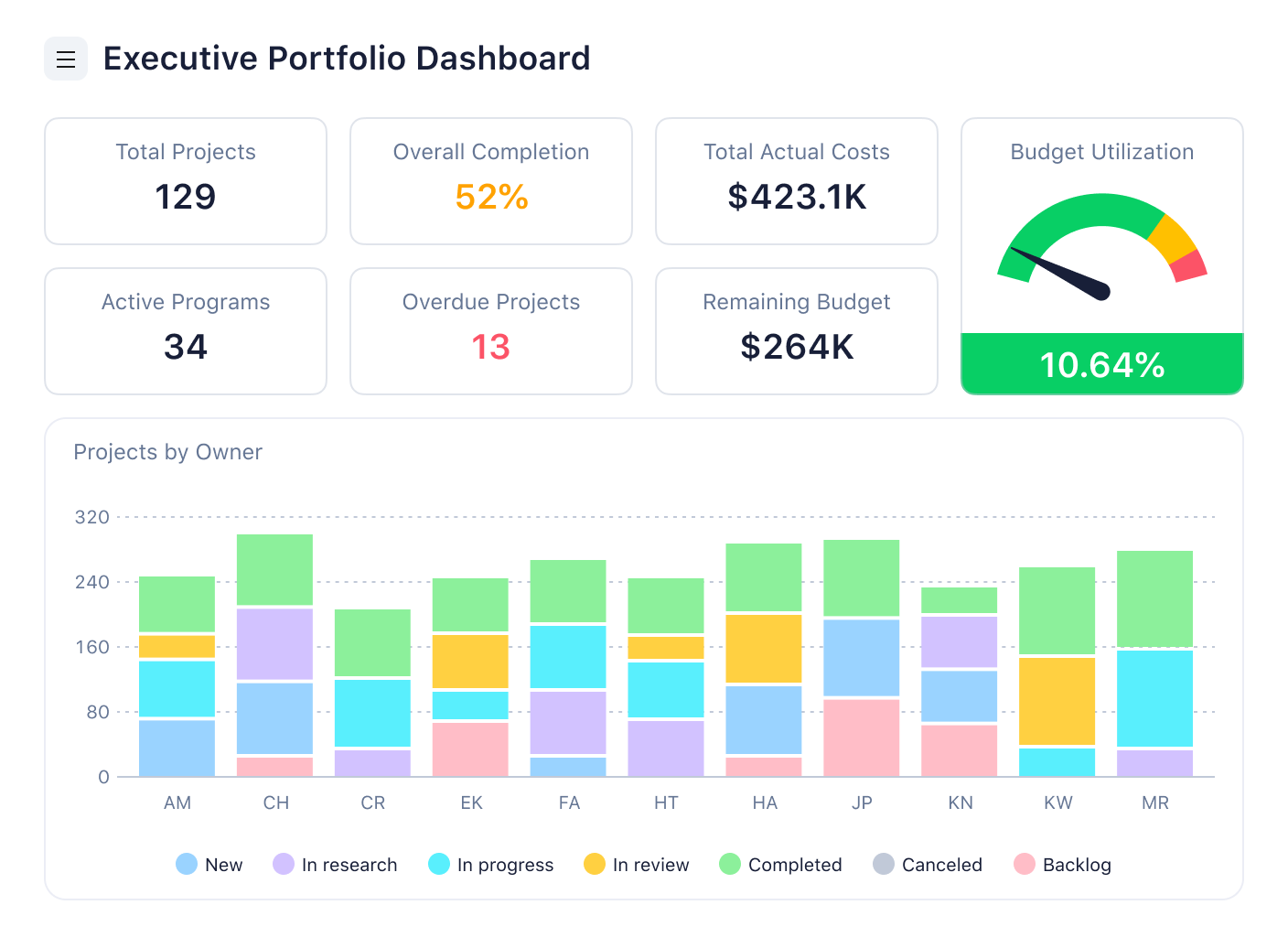
- Live dashboards and executive reporting for real-time insights
Here are just some of the ways these features can benefit your team’s workflows, projects, and overall productivity:
Simple and effective communication with @mentions, comments, and snapshots
With Wrike, the features you use to discuss your work are directly connected to the tools you use to complete it — in one central, secure workspace.
At any point from intake to the final edits, you can easily ask a question, get a response, or jump in wherever you see the need for a fresh pair of eyes.
For example, once a task (like a new article for a creative team to tackle) is created, Wrike effortlessly — even automatically — delegates it to a team member with the right level of authority, capacity, and skills. As they begin to work on it — researching, drafting, and sending it for review — it moves through distinct workflow stages, which you can customize to reflect your standard process.
Whenever the task changes status, Wrike notifies the necessary team members and displays the task in their personal dashboard. This is especially useful for keeping management in the loop or speeding up your proofing process. Then, when a discussion is needed, the team can collaborate with comment threads and @mentions to tag the people responsible for the changes.
Plus, if you want to share an update on your project process, you can effortlessly create a snapshot of a dashboard, Gantt chart, or report to send to the person who needs to see it.
Industry-leading automation and AI features for more efficient workflows
With Wrike, you can automate workflows from start to finish with our cutting-edge Work Intelligence® features. This secure, powerful AI solution has a host of benefits for your workflow management and the way your team works together, including:
- Generative AI and editing features that turn notes into an actionable sequence of tasks and subtasks for your approval
- Automatic discussion summaries to keep your team in the loop without parsing pages of information
- Smart risk prediction based on historical patterns, task complexity, and the capacity of your team
- AI mobile features to issue voice commands and keep up to date with your workflow progress on the go
Work Intelligence also monitors your workflows and offers AI workflow automation suggestions, where a new automation rule could take care of a manual task in your process.
Build a culture of continuous improvement with detailed workflow tracking
When you build your workflows in Wrike, you can meticulously track every aspect of your work and use the data to compile detailed reports on your team’s performance in just a few clicks.
These reports are based on real-time data about your team’s capacity, the time you’re tracking, the length of time a task has spent at a certain workflow status, and the task dependencies that are part of your workflow. When you have this information in good time, it’s easier to reallocate tasks and resources and remove the roadblocks that are putting your outcomes at risk.
Integrations
Wrike connects with more than 400 tools, including Microsoft Teams, Google Drive, Salesforce, Slack, Jira, Adobe Creative Cloud, and Outlook, with additional flexibility through Zapier and Excel/Google Sheets sync.
Pros
- Fully customizable workflows across teams
- Real-time dashboards
- Built-in proofing and approvals
- AI tools to automate workflows
- Flexible automation builder with no coding required
- Form-based intake system with custom fields
- Detailed time tracking and workload management
- Templates for rapid workflow setup
- Supports cross-department collaboration at scale
- Deep reporting tools for analytics
- Strong version control and document management
- Scales easily for complex or regulated environments
Cons
- Could take time to learn
Price
Free version available. Paid plans start at $10/user/month with access to custom workflows, analytics, and integrations.
2. Asana
Asana is a widely used workflow management software known for its user-friendly design and intuitive experience. It helps teams manage tasks, track progress, and maintain visibility without the need for a complex setup. No matter if you’re organizing content calendars or launching campaigns, Asana makes it relatively easy to assign tasks, build custom workflows, and collaborate in real time.
Our take
I’ve recommended Asana to several early-stage clients because it’s so quick to adopt. You can build a basic workflow system in under an hour, and the intuitive interface means your team won’t need much onboarding. I especially like using the Timeline and Board views to organize tasks across campaigns, and the unicorn animations make progress tracking more fun than it should be.
Key features
- Task management with assignees, deadlines, and dependencies
- Multiple views: List, Calendar, Timeline, and Kanban boards
- No-code workflow builder for automated workflows and rule-based triggers
- Shared inboxes and threaded comments for team collaboration
Integrations
Connects with Slack, Google Drive, Microsoft Teams, Salesforce, Dropbox, and Jira, plus time-tracking tools like Harvest and Everhour, with automation via Zapier.
Pros
- Simple setup and customizable workflows
- Great for cross-functional transparency
- Strong mobile/web apps with fast updates
Cons
- Less robust native time tracking requires using custom fields or a third-party integration
- Resource management may not be as robust as some customers require; for example, capacity plans and workload are not connected at the moment
Price
The free plan supports up to 2 users. Premium starts at $10.99/user/month (annual) while their advanced is $24.99/user/month (annual).
3. Monday.com
Monday.com is a flexible workflow management platform built for teams that want visual planning and structured task execution. With customizable boards, automation recipes, and cross-functional visibility, it’s designed to help departments collaborate more efficiently, especially in marketing, ops, and customer success workflows.
Our take
I’ve used Monday.com with marketing and ops teams who needed something visual but still powerful. Its templates made it easy to get started, and once we dialed in the board structure, the automations helped eliminate a ton of manual status updates.
One thing to keep in mind: It works best when you invest a bit of time upfront in customizing columns, views, and automation rules. Otherwise, it can feel a bit generic out of the box. Keep that in mind if you’re looking for a workflow management software that your team can jump into right away.
Key features
- Customizable boards for workflow building (Kanban, timeline, table, calendar)
- Automation recipes for task handoffs, reminders, and approvals
- Item dependencies and status tracking across workflows
- Workdocs for real-time collaboration inside your workflows
- Dashboard views for high-level progress and bottleneck monitoring
Integrations
Monday connects with Slack, Microsoft Teams, Zoom, Google Drive, Dropbox, HubSpot, and Outlook — plus hundreds of other apps via Zapier and its own integration center.
Pros
- Visually intuitive interface makes adoption quick
- Automations reduce follow-ups and repetitive admin work
- Great templates for marketing, HR, IT, and sales workflows
Cons
- Customization can be overwhelming at first (time-intensive and expensive)
- Some advanced features are locked behind higher-tier pricing
Price
A free plan is available with basic features for individuals. Paid plans start at $9/user/month (billed annually, with minimum seat requirements). The Pro plan ($19/user/month) unlocks advanced automations, time tracking, and formula columns.
4. Smartsheet
Smartsheet is a spreadsheet-style workflow management platform that brings structure to collaborative work. If you’re loath to give up your Excel files, this is the workflow software for you.
It’s especially strong in operational workflows, project tracking, and cross-functional planning, where teams already rely on Excel or Google Sheets. With automation, permissions, and reporting baked in, it’s a solid choice for teams that need rigor without rebuilding everything from scratch.
Our take
Smartsheet felt like a natural fit when I was working with teams that lived in spreadsheets, but when we moved away from Excel and wanted more visuality, we quickly outgrew it.
The grid layout made it easy for finance, ops, and planning teams to adopt, while the automation rules helped us eliminate repetitive update chases. That said, it can feel a little rigid for teams that prefer more visual or flexible layouts like Kanban or boards.
Key features
- Grid-based interface with support for Gantt, calendar, and card views
- Automated alerts, task routing, and update requests
- Built-in forms for intake and approvals
- Dashboards for real-time performance tracking
- Resource management tools for team planning
Integrations
Smartsheet integrates with Microsoft Teams, Salesforce, Slack, Google Workspace, Jira, and DocuSign — plus broader connectivity via Zapier and Data Shuttle for syncing large datasets. I’ve used it to streamline intake forms from other platforms into actionable workflows inside Smartsheet.
Pros
- Familiar spreadsheet interface with added power
- Strong automation for process-heavy teams
- Great for operations, finance, and resource planning
Cons
- Not as intuitive for creative or Agile teams
- Limited views mean that it’s difficult to use for those who prefer Kanban boards or visual workflows
- Some automations require trial-and-error to fine-tune, which adds time and complexity
Price
No free plan, but they offer a free trial. Paid plans start at $9/user/month (Pro) and $19/user/month (Business) when billed annually. Enterprise and Advanced tiers offer SSO, governance, and premium workflow tools.
Ready to optimize your workflows?
5. ClickUp
ClickUp is a robust workflow management platform designed for teams that want everything in one place. It combines task management, docs, time tracking, goals, and even chat. Known for its flexibility, it’s ideal for fast-moving companies managing workflows across departments.
Our take
ClickUp gave us the most freedom in customer workflows down to the smallest detail. I liked how we could link documents, tasks, and sprint boards into one workspace. Once we set naming conventions and permissions, it became a powerhouse for managing associated tasks and cross-functional goals. That said, it took a few weeks of setup to really get it right.
Key features
- All-in-one platform for tasks, docs, time, and chat
- Advanced workflow creation with drag-and-drop UI
- Highly customizable fields, statuses, and templates
- Built-in automation for repetitive steps
Integrations
Connects with Slack, Google Drive, GitHub, HubSpot, Dropbox, Zoom, and OneDrive, with broader automation support through Zapier.
Pros
- Incredibly feature-rich and cost-effective
- Adaptable to nearly any workflow or team size
- Solid for process improvements and OKR tracking
Cons
- Steeper learning curve
- Interface can feel cluttered with too many options
Price
Free Forever plan includes unlimited users and tasks. Paid tiers start at $7/user/month when billed annually.
6. Hive
Hive is a collaborative workflow management system that supports multiple views, real-time messaging, and task automation. Built with flexibility in mind, Hive suits teams that need dynamic workflows and shared visibility.
Our take
We’ve used Hive in multi-department projects where visibility and fast communication matter. Switching between Gantt, Kanban, and calendar views helps keep everyone aligned, and the built-in chat keeps updates flowing without needing an external messaging app.
Key features
- Custom workflows with drag-and-drop task cards
- Project layouts: Gantt, Kanban, calendar, table
- Time tracking and task assignments
- Built-in chat and team collaboration tools
- Workflow automation and templating
Integrations
It integrates over 1,000 tools via Zapier, plus native options for Zoom, Google Workspace, QuickBooks, and more. Designed to plug into your existing ecosystem.
Pros
- Strong workflow customization and automation features
- Helps project managers manage tasks and timelines across views
- Keeps teams on the same page with built-in chat
Cons
- Interface can feel crowded with lots of views and tools
- Limited critical project management features
- Heavy reliance on third-party services
- Steep learning curve for non-technical users
Price
Free plan available for up to 10 users. Following that, the starter plan starts at $5/user/month annually. An enterprise plan is also available for additional flexibility, support, and security needs.
7. ProofHub
ProofHub is a centralized workflow management solution built to handle task assignments, document workflows, and project timelines. It brings together workflow tools, like boards, calendars, discussions, and time tracking, into one structured platform.
Our take
ProofHub is ideal for client-heavy projects where file management and collaborative approvals are essential. It helps reduce repetitive tasks and keeps discussions tied to the work. It may not offer deep workflow automation features, but its flat pricing and broad feature set make it appealing for teams managing multiple workflow processes.
Key features
- Task management with tables, Kanban boards, and Gantt views
- Built-in time tracking, calendar, and timesheets
- Customizable templates for recurring workflows
Integrations
Connects with Google Drive, FreshBooks, and Outlook. It’s more limited compared to other workflow management systems, but it supports basic file sharing and team notifications.
Pros
- Flat-rate pricing supports unlimited users
- Good for managing workflow and document management in client work
- Helps automate manual tasks with built-in tools
Cons
- No free plan available
- Limited integrations restrict automation flexibility
- Not suited for customized, complex processes
Price
Essential starts at $45/month (billed annually), while Ultimate Control is $89/month (billed annually). Both tiers include unlimited users.
8. Trello
Trello is a visual workflow management tool built around Kanban-style boards. Each board represents a project or process, where tasks are managed as cards that move across columns like “To Do,” “Doing,” and “Done.” It’s easy to use and well-suited for teams managing simple or recurring workflows. Trello supports card-level details like checklists, attachments, and comments, and includes Butler automation to simplify repetitive actions.
Our take
Trello is one of the most intuitive tools we’ve worked with. It’s perfect for personal task boards, lightweight content calendars, or quick project tracking. The drag-and-drop interface is fast, tactile, and requires almost no training.
When we need something lightweight that still lets the whole team organize tasks and visualize progress, Trello always delivers. That said, once you scale beyond a few boards or need cross-board views, it starts to feel limited.
Key features
- Kanban boards with drag-and-drop task movement
- Custom fields, checklists, labels, and due dates
- Butler automation for repetitive tasks
- Power-Ups (calendar, Gantt, time tracking)
Integrations
Trello integrates with tools like Google Drive, Slack, GitHub, Jira, and Dropbox. Power-Ups extend functionality and allow Trello to slot into larger workflows.
Pros
- Instant, real-time updates
- Ideal for visual task management
- Free plan is robust
Cons
- Limited reporting features
- Challenging for non-technical users
- Scaling requires multiple boards, which can be hard to manage
Price
Free plan available (includes unlimited cards and members). Paid plans start at $5/user/month (Standard) and go up to $10/user/month (Premium) with additional Power-Ups and views.
9. ProProfs Project
ProProfs Project is a lightweight workflow management solution designed to simplify task tracking, team coordination, and deadline management. It’s built for smaller teams looking to manage workflows with clarity.
Our Take
ProProfs Project is helpful for keeping straightforward workflows on track. It’s not packed with advanced automation built in, but the user interface is clean, and task management is easy to pick up. It’s great for teams that need to organize tasks and timelines without the distraction of unnecessary complexity.
Key features
- Task tracking and assignments with built-in prioritization
- Time tracking for projects and individual tasks
- Gantt chart visualization for schedules
- Comment threads and file attachments within tasks
- Progress dashboards for basic workflow insights
Integrations
Includes integration with Google Drive, Dropbox, and Zapier. Limited beyond file sharing, but functional enough for simpler workflows.
Pros
- Easy-to-use user interface with minimal learning curve
- Strong for basic task management and time tracking
- Affordable pricing tiers for small teams
Cons
- Fewer workflow tools and automations than other platforms
- Limited integrations and workflow customization options
Price
They have a free plan for up to 5 users and a business plan for $39.97/month when billed annually.
10. Jira
Jira is a robust workflow and issue tracking platform built for development and technical teams. Created by Atlassian, it’s designed around Agile methodologies and supports detailed issue tracking, backlog management, sprint planning, and workflow customization. Jira’s depth makes it ideal for complex workflows, especially in software development.
Our take
Jira is our go-to when we need granular control over task states, dependencies, or Agile sprints. It excels in environments where traceability and workflow discipline matter. While its interface isn’t as friendly for casual users, Jira’s strength is in precision. For projects with QA steps, release stages, or heavy cross-functional collaboration, it’s unbeatable.
Key features
- Custom issue types and visual workflow editor
- Scrum and Kanban boards
- Advanced backlog and sprint planning
- Detailed filters and search (JQL)
- Burndown charts and Agile reports
Integrations
Jira integrates natively with Confluence, Bitbucket, GitHub, and dozens of CI/CD tools. It also connects with Slack, Microsoft Teams, Google Workspace, and more. API and marketplace apps expand Jira’s reach.
Pros
- Ideal for technical teams
- Deep configuration options
- Excellent reporting and traceability
Cons
- Steep learning curve
- Can feel complex for non-dev teams
- May not meet advanced resource capacity planning and financial forecasting needs
Price
Free for up to 10 users. For a team of 10 on monthly billing, standard paid plans start at $9.05/user/month (Standard) and $18.30/user/month (Premium). Enterprise pricing is available for large-scale needs or self-hosting.
11. Backlog
Backlog blends workflow management with development features like version control and bug tracking. It’s tailored for technical teams who want task tracking alongside code collaboration and product documentation.
Our take
We’ve used Backlog in dev-heavy workflows where teams need more than checklists. Its ability to manage issues, track bugs, and integrate with repositories like Git makes it useful for streamlining development-related processes.
Key features
- Project and task management with status updates
- Built-in Git and SVN version control
- Bug tracking with prioritization and custom fields
- Wiki system for documentation
- Gantt charts for timeline visibility
Integrations
Works with GitHub, Slack, and Redmine. Integrations help route issue updates and connect commits to workflow tasks.
Pros
- Integrated version control keeps all versions managed and accessible
- Combines issue tracking, repos, and wikis
- Straightforward user interface for mixed-technical teams
Cons
- Not ideal for non-dev teams with broader use cases
- Custom workflow creation and automation are limited
- Mobile app lacks features from the desktop version
Price
Free plan available for up to 10 users. Starter is $35/month. Standard is $100/month. Premium is $175/month with unlimited users and projects, and an enterprise level is also available to unlock advanced security features.
12. Freshservice
Freshservice is workflow software built for IT teams looking to reduce manual work and improve operational efficiency. It has easy automation for internal requests, approvals, ticket routing, and more.
Our take
This one works well for service teams who want structured ticket routing, change management, and automated workflows. It’s flexible enough to adapt to Agile or hybrid work setups, and it’s great if you’re trying to automate repetitive tasks without technical overhead.
Key features
- Visual workflow builder for ticket automation
- SLA tracking and escalation rules
- IT project templates for Agile and Waterfall teams
- Freddy AI for customer self-service
- Employee onboarding workflows
Integrations
Integrates with tools like Google Workspace, Microsoft Teams, Jira, and Azure AD, with Zapier support for connecting to additional third-party tools.
Pros
- Solid for managing automated tasks across IT workflows
- Clean user interface and layout
- Handles approvals and internal requests efficiently
Cons
- Limited customization options
- Some users report slow response times from support
Price
Starter starts at $19 per agent/month, Growth is $49, and Pro is $99, all billed annually. The Enterprise tier is customizable.
13. Qntrl
Qntrl is low-code workflow software that helps teams control task flow, visibility, and handoffs. It emphasizes governance and structured automation, making it a useful option for compliance-heavy orgs.
Our take
Qntrl works well when your team needs layered permissions and clear audit trails. The builder is visual and flexible, especially for creating workflows that align with compliance standards. It’s most helpful for teams using Zoho tools or managing internal requests.
Key features
- Custom forms with logic and approvals
- If-then automations and routing
- Process visibility across dashboards
- Role-based access and in-app notifications
Integrations
Supports integration with Zoho apps, along with REST API access, Webhooks, and Zapier for broader connectivity.
Pros
- Helpful for process control and visibility
- Easy to automate approvals and task routing
- Useful no-code builder for building out workflows
Cons
- Dashboards can’t be customized much
- Some users mention that the interface feels dated
Price
Standard is $15/month/user, and Enterprise is $30/month/user on the annual plan. Large enterprises can get custom quotes.
14. Nintex
Nintex is an AI-powered workflow management system built for complex process automation. It helps large organizations automate manual tasks, streamline workflows, and manage documents across multiple departments using low-code tools.
Our take
When we needed to automate enterprise workflows with strict rules and approval paths, Nintex was the platform we relied on. It’s best suited for technical teams with a high volume of structured business processes. The platform excels at automating repetitive workflows with precision.
Key features
- Drag-and-drop process builder for workflow creation
- Document automation, routing, and e-signatures
- Support for workflow file management across systems
Integrations
Integrates with SharePoint, Microsoft 365, Salesforce, Box, and more. Nintex connects well with internal tools through its API and automation capabilities.
Pros
- Ideal for technical teams handling regulated business processes
- Deep configuration options and customizable workflows
- Excellent reporting and traceability for multi-step workflows
Cons
- Steep learning curve for non-technical users
- Can feel complex for smaller teams or non-dev environments
- High cost for advanced feature add-ons
Price
For exact pricing, reach out to their team directly.
15. ProcessMaker
ProcessMaker is a low-code workflow automation platform that helps teams model, automate, and optimize workflows. It’s especially useful for industries where audit trails, task ownership, and workflow creation need to be precise.
Our take
ProcessMaker helps streamline cross-departmental workflows. The visual workflow manager makes it easy to map complex processes. Once everything was configured, the AI-powered automation engine could reduce bottlenecks and handle repetitive tasks without manual intervention.
Key features
- Low-code workflow builder for layered workflows
- Automation features that link forms, data, and approvals
- Strong collaboration tools and customizable templates
Integrations
Works with enterprise systems like SAP, Salesforce, and Microsoft. API access allows for automation and integration across business applications.
Pros
- Built for managing complex business processes
- Custom workflows reduce manual effort and human error
- Supports extensive document management and audit control
Cons
- Requires time and resources to implement effectively
- Limited customizations for workflow tools
Price
You can start with a free trial. Plans are tiered across standard, professional, and enterprise levels. For exact pricing, reach out to their team directly, but starting pricing for Standard is $3,000/month.
16. Process Street
Process Street is a no-code workflow software designed to help teams optimize processes through structured checklists, SOPs, and automations. It’s well-suited for recurring tasks and standardized operations across departments.
Our take
Process Street makes workflow management refreshingly clear. It can be used to create drag-and-drop checklists that guide teams through structured workflows, especially for client onboarding and internal audits. It keeps everyone on the same page without requiring technical setup.
Key features
- Drag-and-drop checklist builder
- Conditional logic to customize steps dynamically
- Collaborative task assignments with due dates
- Embeddable media and document uploads
- Workflow audit trails for compliance tracking
Integrations
Process Street integrates with over 5,000 apps through Zapier, Power Automate, and native connectors. You can link it with Google Workspace, Salesforce, Dropbox, and more to route data and automate updates.
Pros
- Friendly user interface for building and running workflows
- Helps project managers handle repetitive tasks efficiently
- Strong library of templates and SOP tracking
- Supports real-time collaboration and status visibility
Cons
- Advanced workflows may require a learning curve
- No offline access
- Higher-tier pricing can be a stretch for smaller teams
Price
For exact pricing, reach out to their team directly.
17. Pipefy
Pipefy is one of the best workflow management software tools for operations teams. It provides a low-code interface to help you organize, automate, and manage business processes without needing dev resources.
Our take
Pipefy makes it easy to start small — a hiring process here, an invoice workflow there — and scale up fast. It’s clean, flexible, and ideal for teams who want reliable workflow software without overbuilding.
Key features
- Workflow templates for HR, finance, and support
- Drag-and-drop workflow creation
- Automations, email triggers, and custom forms
- SLA tracking and approval routing
Integrations
Connects with Salesforce, Google Sheets, Slack, DocuSign, and Zendesk, with additional flexibility through Zapier and an open API.
Pros
- Plug-and-play templates are easy to use
- Great visual workflow creation tools
- Helps manage repetitive tasks clearly and reliably
Cons
- Limited advanced project planning, resource management, and reporting capabilities
- Less mature integration ecosystem that can limit automations and connectivity within enterprise organizations
Price
Free plan available for up to 10 users. Business and Enterprise quotes are available upon request.
18. Airtable
Airtable is a highly flexible, no-code workflow and application platform built for business users. Originally known for its spreadsheet-style database, the platform has recently relaunched as an AI-native system that combines visual project management, app development, and generative AI capabilities in one environment.
Our take
With the launch of AI agent Omni, a reusable App Library, and HyperDB for managing large external datasets, Airtable is now designed for teams building and scaling internal apps with enterprise-grade AI functionality.
Airtable balances ease of use with power, making it a solid option for teams that need both flexibility and automation. While it may not offer the deep customization of open-source systems, it’s a strong fit for companies prioritizing accessibility, scale, and speed.
Key features
- AI agent (Omni) for building and editing apps through natural language
- Prebuilt app templates for common use cases
- Automation for workflows and task routing
- Real-time collaboration and permissions control
- Sandbox environment for testing
- Custom branding and workspace views
Integrations
Connects with hundreds of third-party apps, including Slack, Jira, Salesforce, and Google Workspace. Supports integrations with data platforms like Databricks and Snowflake through HyperDB.
Pros
- AI is deeply embedded across the platform, not just added on
- Strong customization and flexibility
- Easy for cross-functional teams to stay on the same page
Cons
- Mobile app isn’t as strong as the desktop version
- Difficult learning curve for some users
Price
Free plan available for up to 5 editors. Team starts at $20/user/month, while Business is $45/user/month, billed annually. Enterprise pricing is custom.
19. Notion
Since acquiring Automate.io, Notion helping teams automate workflows between cloud apps and bring them all together under infinitely flexible, beautiful interfaces.
Notion’s workflow management tools are designed to build bots that handle tasks across platforms like CRMs, forms, spreadsheets, and marketing apps — all through a visual interface that can be built by anyone.
Our take
This tool is a good pick for SMBs that want a fast way to streamline tasks between their core tools. It’s like a simplified alternative to more technical options. You can build multi-step automations without digging through menus and put them altogether in dynamic documents and interfaces — wherever you need your data.
Key features
- Multi-step bots with delay and branching
- Drag-and-drop interface for workflow creation
- Scheduling and conditional workflows
- 200+ prebuilt app connectors
- Beautiful interfaces that make presenting data easy
Integrations
Integrates with Salesforce, Google Workspace, and HubSpot, plus tools like Slack, Trello, Asana, and Shopify. Zapier expands compatibility even further.
Pros
- Straightforward UI
- Makes it easy to build automated workflows across apps
- Good support and onboarding help
Cons
- Some lag in more complex workflows
- Limited versioning and logging
Price
Notion has a free plan, with Plus at $10 and Business at $20, both per user per month. Enterprise companies can get a quote.
20. Quixy
Quixy is a no-code, AI-powered platform that helps teams build automated workflows and internal tools. Designed for business users, it includes logic paths, validations, and conditional routing — without needing dev time.
Our take
We’ve seen Quixy shine when teams want more than basic workflow management. You can create forms, rules, and even lightweight internal apps using its visual builder. There’s a learning curve, but once you’re set up, it helps keep teams on the same page without developer dependency.
Key features
- Visual builder for apps and workflows
- Parallel and sequential logic paths
- Built-in validations, rules engine, and approvals
- Support for barcode/QR scanning, image capture, and rich data inputs
Integrations
Connects with Google Workspace and Dropbox, with support for REST APIs, Webhooks, and additional integrations via Zapier.
Pros
- Strong automation for building workflows without code
- Useful for field data capture and approvals
- Flexible for unique business processes
Cons
- Requires some ramp-up time to build more complex flows
- Limited support documentation in certain areas
Price
They have tiered plans based on the number of apps, workflows, and users. Contact their team for a quote.
21. Bit.ai
Bit.ai is a modern management tool designed for collaborative document creation. It supports team knowledge bases, client deliverables, and SOP workflows through smart documents and real-time collaboration.
Our take
We’ve used Bit to handle internal SOPs and streamline onboarding. It’s easy to create workflows around shared documents and keep teams aligned. The ability to embed content and monitor document engagement helped us handle repetitive documentation tasks more efficiently.
Key features
- Interactive document editor with workflow templates
- Task management features are built into content sharing
- Document analytics for performance tracking
Integrations
Integrates with over 100 tools, including Google Drive, Airtable, YouTube, and more. Works well for embedding and referencing across workflow tools.
Pros
- Clean user interface that supports document-heavy workflows
- Great for internal communication and content handoff
- Tracks user activity on shared documents
Cons
- Limited workflow automation compared to other platforms
- Some collaboration features require upgrading to paid plans
- Not ideal for managing sophisticated workflows
Price
Free version available. Pro starts at $8/user/month. Business is $15/user/month and includes branding and advanced team collaboration features.
22. Simple Admation
Simple Admation is workflow software designed to streamline creative production for diverse teams where compliance and control matter. It brings together project briefs, asset approvals, resource planning, and real-time collaboration (plus audit trails) in one system.
Our take
Simple Admation focuses on marketing workflows, offering built-in tools for managing briefs, revisions, approvals, and campaign timelines. It’s particularly well-suited for high-volume teams juggling multiple deliverables and stakeholders, and for businesses navigating complex regulatory environments (like healthcare and financial services).
The UI feels more traditional compared to newer platforms, but the feature depth — especially for feedback, compliance, and resource use — is hard to beat.
Key features
- Campaign tracking dashboard and project scheduling
- Version control and annotated feedback tools
- Approval paths and review tracking
- Built-in task templates
- Resource allocation across campaigns
Integrations
Connects with Adobe Creative Suite and Microsoft Outlook. Offers custom integrations for cloud storage and document handling.
Pros
- Built for creative and marketing workflows
- Strong approvals and review feedback workflows
- Keeps campaigns and assets on the same page
Cons
- UI is dated compared to modern workflow software
- Custom reports gated behind enterprise plans
Price
Custom pricing only. No free plan available.
23. VOGSY
VOGSY is a workflow software platform for professional services businesses. It handles project quoting, time tracking, and delivery in one system, with native support for Google Workspace users.
Our take
We liked how VOGSY simplifies the handoff between quoting, work, and billing. Its workflow software design leans into G Suite for collaboration. It’s great if your business is client-facing and you want fewer silos.
Key features
- End-to-end task management and timeline tracking
- Profitability tracking and quoting
- Real-time Gantt views and status updates
- Team workload and capacity forecasting
Integrations
Integrates with a variety of tools, including Google Workspace, Salesforce, and HubSpot, along with accounting platforms like QuickBooks and Xero.
Pros
- Clean user interface and easy for Google-first teams
- Streamlined client workflows
- Connects sales, delivery, and billing on the same page
Cons
- Learning curve for non-Google users
- Requires team buy-in to replace legacy tools
Price
They have a tiered system based on user type, starting at $14/user/month up to $56/user/month for super users.
24. beSlick
beSlick is workflow software designed for small and mid-sized teams looking to document and streamline recurring tasks. It’s known for its structured approach to building repeatable workflows and making process improvement easier over time.
Our take
We’ve seen beSlick work best in teams trying to get consistent results across recurring work. It focuses on process clarity, not feature bloat. You can build automated workflows quickly and track feedback in one place. It’s especially helpful for teams who want to stay on the same page with checklists, SOPs, and task handoffs.
Key features
- Customizable templates for recurring workflow creation
- Central dashboard with visibility across task statuses
- Logic-based steps, dependencies, and required approvals
- Built-in feedback collection and reporting
- Analytics to highlight blockers and inefficiencies
Integrations
It works with Google Calendar and Microsoft 365, and it allows access to over 2,000 additional apps through Zapier.
Pros
- Simple block editor for workflows
- Makes it easier to handle repetitive tasks and standardize execution
- Responsive customer support
Cons
- Doesn’t include built-in time tracking
- Limited flexibility for large-scale teams
Price
beSlick has a Free Forever plan for up to three users and offers a 14-day free trial of their standard offering.
25. Zapier
I’ll be honest. I debated whether or not to include Zapier in this review because it might not be considered workflow software in the same sense as the others. Instead, Zapier is a powerful automation platform that connects thousands of apps to help teams streamline workflows without code.
Instead of managing tasks in one tool, Zapier lets you build automations that push data, trigger actions, or create updates across your tech stack. It’s the go-to for stitching tools together in a workflow, but it lacks the project management functionality of many other software solutions on this list.
Our take
Zapier is a vital piece of any workflow puzzle, helping you tie together disconnected tools when you need fast wins without dev support.
For example, we used it to automatically create Wrike tasks from Typeform submissions, send Slack updates from new CRM records, and archive files from email attachments into Google Drive. It’s not a full workflow tool on its own, but it’s essential when you’re trying to automate across platforms. That’s why it’s earned the coveted bronze position here in our list of the top workflow software.
The bottom line: Zapier is a non-negotiable when it comes to automating workflows and integrating software across your tech stack. It’s definitely got a place in your team alongside your main task and workflow management tools, even if it isn’t your main task management solution.
Key features
- “Zaps” (automations) that connect 6,000+ tools via triggers and actions
- Multi-step workflows with branching logic and filters
- Conditional rules, delays, and scheduling
- Autogenerates tasks, messages, calendar events, and database updates
- Shared folders and team permissions for cross-functional use
Integrations
Zapier integrates with most major apps — including Google Workspace, Slack, Salesforce, Airtable, Asana, Trello, HubSpot, and Wrike. If your platform has an API, Zapier probably connects with it. It’s become a go-to bridge when two critical tools don’t natively talk to each other.
Pros
- Extremely wide integration library
- No-code workflow builder that’s intuitive and fast
- Scales from simple task automations to complex, multi-step flows
Cons
- No project management interface, so it complements but doesn’t replace workflow software
- Teams using a high volume of automation may need to purchase additional usage credits
Price
Free tier includes 100 tasks/month. Paid plans start at $19.99/month (Starter) with multi-step workflows and up to 750 tasks/month. Professional plans with advanced logic and 2,000+ tasks/month start at $69/month.


26. Weekdone (formerly Team Compass)
Weekdone is a lean workflow management tool built for clarity and alignment. It streamlines workflow building around weekly planning, team check-ins, and goal tracking. It’s ideal for remote and hybrid teams managing light but recurring business processes.
Our take
Weekdone is great for creating workflows without overwhelming your team. It’s built for check-ins, not task overload, keeping everyone on the same page. While it doesn’t support complex workflows or workflow automation, it excels at visibility and accountability.
Key features
- Weekly planning tied to team goals
- Progress tracking and employee sentiment updates
- Lightweight task management and 1:1 feedback tools
Integrations
Weekdone integrates with Slack and email for update notifications. While limited compared to larger workflow management platforms, the core functions work well for small Agile teams.
Pros
- Simplifies repetitive tasks like weekly check-ins
- Boosts team transparency and alignment
- Easy to handle workflows without extra overhead
Cons
- Lacking in integrations and has a poor mobile interface
- Not ideal to streamline workflows for large teams (100+)
- Limited scalability for complex workflow systems
Price
Free for up to 3 users. $1,080 annually for 10 users or $90 monthly.
27. Shift
Shift is a multi-app workflow software platform for people managing emails, calendars, and collaboration tools. It’s designed to centralize daily workflows and reduce tab overload.
Our take
Shift is less about process creation and more about simplifying your day-to-day workspace. If your job means toggling between inboxes, messages, and calendars, it helps keep your browser (and brain) under control.
Key features
- Unified access to multiple email accounts
- App support for Slack, WhatsApp, Trello, and more
- Built-in calendar and task view
- Tableless browsing and unified workspace
Integrations
Integrates with Gmail, Outlook, Zoom, Google Drive, and over 1,000 web tools through browser extensions.
Pros
- Consolidates apps into one interface
- Great for solo workflows or hybrid workers
- Stops messages from being missed
Cons
- Not a full workflow software solution for teams
- Can lag with multiple email accounts
Price
Free plan available for up to 2 accounts. Advanced plan is $149/year, while Teams is $149/per user.
28. Fluix
Fluix is workflow software built for field teams. It streamlines inspections, job-site reports, and compliance processes. Its offline capabilities make it ideal for industries like construction, logistics, and utilities.
Our take
If your team works in remote or regulated environments, Fluix checks a lot of boxes. The mobile access, offline mode, and approval routing are a big help in industries where laptops aren’t always an option.
Key features
- Click-to-place workflow builder
- Custom forms and inspection templates
- Approval flows and digital signatures
- Offline access and secure syncing
Integrations
Integrates with Salesforce, Box, and OneDrive, plus supports custom connections through Zapier and REST API.
Pros
- Easy to use offline
- Strong audit trails and compliance workflows
- Field teams stay on the same page with mobile access
Cons
- Primarily designed for field operations and not general project management workflows
- Users may encounter silos due to limited cross-team collaboration capabilities
Price
The Crews plan is $29/user/month. For larger teams, the Operations plan is $49/user/month.
Benefits of workflow management tools
Once you build the right system, everything flows better, improving communication, approvals, and collaboration. I’ve seen teams go from constant follow-ups to clear accountability with just one strong workflow management system. Below are some of the most valuable benefits I’ve seen firsthand.
Streamline workflows
When each task has a defined place and path, you spend less time chasing status updates. Workflow software lets you map, standardize, and repeat the processes that matter. That clarity supports better task assignments, faster execution, and more stable delivery across teams.
Automated notifications
Having alerts built into your workflow management software means fewer delays and missed steps. I’ve used automated notifications to flag stalled reviews, send reminders, and confirm approvals without an extra meeting or manual nudge.
Automation tools reduce manual work
Routine steps eat up time. With the right automation tools, your team can focus on the work that requires context, not the repetitive parts. Whether it’s routing tasks, assigning ownership, or sending status updates, smart automations help reduce manual tasks and keep progress moving.
Handle complex workflows with less friction
If your work crosses multiple departments, tools, or decision makers, you need a system that adapts without overcomplicating things. Tools like Process Street help manage complex workflows by providing structure you can modify as your needs change. I’ve used it to roll out processes across large teams with minimal confusion.
Improve collaboration and task clarity
Clear workflows support better team collaboration. When tasks, steps, and approvals are visible, it’s easier for everyone to stay aligned. You can track responsibilities, reduce human error, and make collaboration part of the process.
Reporting tools support process improvements
Data shows you what’s working and what needs to change. Built-in reporting tools and data analytics give you visibility into performance over time. I use this data to spot patterns, refine processes, and improve workflow creation without needing a separate analytics platform.
Workflow software vs. project management software
When I first started comparing tools, I assumed workflow management software and project management tools did the same thing. This is not the case.
They solve different problems, and knowing the difference can save you a lot of time and rework.
Project management software
Project management software focuses on timelines, deliverables, and planning. It’s where teams build schedules, assign resources, and track progress across milestones.
These tools are great for scoping and alignment, but they often fall short on day-to-day workflow processes like approvals, handoffs, or repeated tasks that require automation and structure.
Workflow management software
Workflow software is designed to manage repeatable business processes or the step-by-step work that happens every day. It’s how you manage handoffs, simplify reviews, or standardize how things move through a system.
The best workflow management tools support:
- Automated workflows with task routing and logic
- Custom paths for recurring efforts like employee onboarding or asset reviews
- Tools to automate repetitive tasks and reduce human error
- Options to tailor workflows across teams and use cases
- Clear rules and workflow automation software features that keep processes consistent
Instead of tracking what needs to happen, workflow software focuses on how it happens. I’ve used it to streamline work across departments by automating approvals and task movement, without losing visibility or control.
Hint: You might need both!
If you’re managing timelines, budgets, and cross-functional goals, project management software gives you the overview. However, if your team runs on repeatable work, like producing content, onboarding clients, or reviewing legal documents, you’ll need a workflow management solution to support the actual execution.
The good news is that many platforms today bridge both sides. A strong workflow management platform offers task views, automation, and support for advanced workflows, while also connecting to the broader ecosystem of project software, collaboration tools, and document management systems.
It’s not about picking one tool over another. It’s about choosing the system that fits your team’s day-to-day and knowing when to scale up. For teams coordinating multiple connected systems rather than a single process, workflow orchestration software sits a layer above this — sequencing automated tasks across tools so everything runs as one managed flow.
Why Wrike is still the best workflow software in 2026
After comparing 28 of the top workflow tools, Wrike still comes out ahead.
It offers what teams actually need: powerful automation, flexible structure, custom workflow creation, and real-time visibility across functions. Whether you’re managing campaigns, onboarding new hires, or routing internal requests, Wrike adapts to your team.