


Key takeaways:
- Agencies that rely on a scattered mix of tools struggle to track projects effectively, making a switch to an all-in-one platform the best way to centralize workflows, reporting, and client communications.
- The ideal agency project tracking tool combines workflow overviews, schedule visualization, custom dashboards, communication features, and automation.
- The article reviews 11 project tracking tools suited to different agency needs, including Wrike for complex cross-team work, AgencyAnalytics for marketing reporting, Filestage for approval tracking, and Bonsai for full agency business management.
As an agency grows to take on more projects or clients, it’s not uncommon to end up with a stack of different project management and tracking tools.
You might start with a messaging app like Slack to move internal communications out of email, add a Kanban tool to visualize a workflow, and throw in some shared drives or Excel spreadsheets at the request of a stakeholder. The trouble is, when you scatter your projects across so many separate tools, it becomes almost impossible to track your progress effectively — especially when you’re managing projects for multiple clients.
The best option is often to switch to an all-in-one tool for agency project tracking. Full-service solutions (like our platform, Wrike) combine:
- Project and workflow overviews, so your whole team can view the upcoming tasks and their status in a centralized location.
- Schedule visualization, like agency calendars and Gantt chart timelines, to see how your progress stacks up against the project plan
- Project dashboards and reporting features, so you can monitor KPIs at a glance and save time compiling reports and updates for your team and external stakeholders
- Communication tools that show how projects are being discussed and track who’s responsible for tasks at every stage
- Project tracking automations, to keep the momentum behind your work and alert you to risks as they emerge
In this post, we look at agency tools that do all of the above, so you can find a platform that streamlines your project tracking, improves communication with your clients, and informs your decision-making at every stage of your projects.
What is an all-in-one project tracking tool?
An all-in-one project tracking tool is a centralized software platform that brings together everything an agency needs to oversee its client projects (and often its agency operations) in one shared space. Rather than juggling separate tools, your team works from a single source of truth.
Typically, all-in-one tools combine workflow management, project monitoring, and reporting tools, so your team can track projects from end to end without switching between different programs.
The best tools go a step further by giving you a dedicated dashboard or workspace for each client you work with. This keeps sensitive information private (for example, about a client’s budget, or their particular targets for engagement), while still giving team members a bird’s-eye view of the metrics that matter for the agency as a whole.
Agencies that use all-in-one project tracking platforms see benefits across the board:
- Time savings: When your project plans, communications, and reporting all live in one place, tasks like generating client updates or preparing for status meetings take a fraction of the time. For example, using Wrike, digital marketing agency Jellyfish saves 3–5 hours per week on individual workload, and has reduced the time spent on client summaries by 95%.
- Reduced errors: Manual processes are one of the most common sources of mistakes in project tracking, and all-in-one tools reduce errors significantly by automating many of those tasks. All-in-one tools also tend to update in real-time, so your team is always working from or presenting the most up-to-date project information.
- Increased accountability: Project tracking software typically includes tools for task delegation and accountability tracking. Task ownership is kept front-and-center during every phase of your project, so everyone knows who’s responsible for what and how decisions are being made.
- Scalability: A mix of task management and tracking tools might hold up in a small agency, but it tends to collapse as a project portfolio grows. All-in-one platforms are built to handle complexity and grow with you. Wrike even connects the different departments within a larger agency — like the print, digital, and TV specialists at advertising agency Ogilvy Australia — so you can deliver and report on far-reaching campaigns without friction.
- Improved client experience: When you optimize your project tracking process, there are fewer misunderstandings and a faster turnaround, and it’s easier for you to increase the visibility the clients have over their projects. Over time, this adds up to increased trust and stronger client relationships.
11 all-in-one project tracking tools for your agency
Below, we’ve rounded up the key features of 11 project tracking tools commonly used by agencies.
Our selection is based on years of experience working with hundreds of agencies specializing in marketing, creative and design work, PR, and more.
Rather than a generic roundup of project management tools, this list reflects the specific tracking functionality that can make a measurable difference to the way agencies monitor their projects, build their relationships with their clients, and respond to project issues as they arise.
The tools discussed below are:
- Wrike: Our all-in-one project tracking tool with custom dashboards, advanced reporting, and built-in communication tools for effortless project monitoring
- AgencyAnalytics: A reporting tool built specifically for marketing agencies
- Notion: A collaborative and highly flexible project documentation tool
- Basecamp: A stripped-back centralization tool for small teams and their clients
- Hive: A project tracking tool that combines multiple views and customization options
- Filestage: An approval tracking system for agencies that handle large numbers of deliverables
- Screendragon: A workflow automation and tracking system for marketers
- Planable: A project tracking and scheduling tool for content teams
- Vista Social: A project management and tracking tool with specialist features for social media teams
- Bonsai: A business management system for agencies, including project tracking and reporting
- IntelligenceBank: A platform to power marketing operations.
1. Wrike: the best all-in-one tracking tool for complex projects, agency work, and cross-team collaboration
Wrike is a complete work management tool that can be used for every aspect of your work as an agency — from project intake to final reporting, and from the individual milestones in a client campaign to your overarching goals for the agency as a whole.
Project tracking is one of many areas where Wrike excels.
Because our platform centralizes all the data connected to your projects — combining project timelines, time tracking, communications, asset development, documentation, and more — teams that work in Wrike have real-time, 360° visibility of their work.
From this central source of truth, you can view the most important metrics in custom dashboards and reports, and use this information to uncover insights, inform your decisions, and keep your clients in the loop.
Plus, because Wrike is built to scale to enterprise project management, you can trust that your project tracking system is robust, scalable, and capable of handling as many projects and clients as you need to.
Let’s look at some of Wrike’s key project tracking features in more detail.
Granular project tracking from day one
Reliable project tracking begins at intake, and Wrike’s features give you full visibility from that point on. Once a project or task is added to your workspace, your team can follow it every step of the way until it’s signed off and delivered, because everything in Wrike is connected.
Agencies can set up customized dynamic request forms to capture exactly the information they need when new work comes in. These forms are customizable, which means you can tailor them to the types of tasks your team regularly takes on.

A web content agency, for example, might set up separate forms for interviews, long-form articles, and landing pages, while a PR agency could set up forms to match the process their individual clients prefer to follow. Wrike captures budget, milestones, and due dates upfront and feeds them straight to your workspace, setting you up for accurate project tracking before the work has even begun.
Crucially, request forms can also add those new work items to your project automatically, initiating workflows tailored to your repeatable tasks through Wrike’s custom item type feature. This means you can start working (and tracking your work) without the need for a team member to manually add the project work item to the team space.

From there, you can track tasks through their workflow in a space that suits your agency’s structure — whether that’s organized by team, project, or client. Wrike’s automations and cross-tagging features mean that when a task changes status, its risk level shifts, or a design asset is updated, those changes are reflected everywhere — keeping your whole team aligned throughout the project.
Custom overviews for your projects
We’ve already touched on how Wrike’s interconnected tasks and workspaces make project tracking more relevant and more accurate. It’s also important to note just how customizable Wrike’s project overviews are.
Agencies often end up using a mix of tools because they work on different types of tasks for different clients, and they can’t all follow the same workflow structure. A social media team managing their own internal content alongside both videos and static images for a client, for example, can’t fit each of these processes into a single Kanban board (or accurately estimate the time each task will take) without missing out some crucial workflow stages for some of their tasks.
With Wrike, you can tailor your project overviews to the work at hand. For example, your agency team can track a project simultaneously in:
- Custom dashboards: Project dashboards are built from widgets that filter and display your project data in the most useful format for your team — like counters for expense tracking, bar graphs breaking down tasks by team member, or pie charts tracking completed, in-progress, and backlogged tasks.
- Team calendar and capacity views: These week-by-week calendar views show you what’s coming up across your projects, who’s oversubscribed, and where you may need to rebalance resources to keep things on track.
- Kanban boards: Wrike’s automated Kanban boards can be set up with custom columns that reflect your team’s specific workflow — including multiple rounds of development or complex stakeholder approval workflows. This feature is particularly useful for agencies delivering batches of content in Agile sprints.
- Gantt charts: These charts map the critical path to project completion and show dependencies between tasks and milestones. Crucially, Gantt chart dependencies are automated in Wrike. You designate dependent tasks with a simple drag and drop, then, if an early task is delayed, dependent tasks reschedule automatically (with automated notifications if this change puts a milestone at risk).
- Individual team member dashboards: Alongside your team or project overviews, Wrike helps you set up personal dashboards for all your team members. These dashboards can give each team member what they need to work on, how their tasks are progressing, any approvals they’re responsible for, and how their work contributes to the bigger picture.

By adjusting access roles and permissions, you can also use these views to build a client portal to give clients direct access to their project metrics. This reduces the need for routine update meetings, increases transparency in client management, and means that when you do meet, the conversation is more focused and productive.
Communications tools to keep work moving
Project tracking is one thing, but Wrike goes a step further by keeping the conversations around that work in the same platform where the work is being tracked.
This might sound like a small detail, but it has a significant impact on the accuracy of your project tracking. When discussions happen inside Wrike rather than in personal inboxes or separate messaging tools, nothing gets siloed, and your project record stays complete. Agencies have reported reducing their reliance on internal email by 90–95% after starting to track progress in Wrike, and the Marketing Architects agency cut its average response time from a full day down to just 20 minutes.
Wrike’s communication features include:
- Comments and comment summaries to keep task-level discussions attached to the work they’re about, with AI-generated summaries so team members can catch up quickly.
- @ mentions to bring the right people into a conversation at the right moment, without the need for a separate message or meeting.
- Automated notifications and reminders to keep your team informed of progress and deadlines without manually chasing the updates.
- Document and asset markup tools so your team can give feedback directly on your docs — including pixel-accurate annotations on visual assets through integrations with tools like Adobe Creative Cloud, which is particularly valuable in use cases like creative agencies managing multiple rounds of amendments.
- Wrike Whiteboard, a visual collaboration tool to gather new ideas for your projects and record your initial discussions and notes.
- Email integrations to keep client communications connected to the relevant project, so external conversations don’t fall outside your project tracking system.

Together, these communication features close the gaps that can appear when project tracking and communication happen in separate places. They keep your team informed, your records accurate, and accountability clearly visible throughout the project lifecycle — which is often just as important as tracking progress itself.
Effortless reporting
Project progress tracking is only useful if it helps you act on what you’re seeing — and that’s where Wrike’s reporting and risk management features come in. Together, they give agencies the oversight they need to keep projects on schedule and help them uncover insights to help future projects run more smoothly.
Wrike’s project monitoring and reporting works by filtering live data to surface the metrics that matter most to your team or your clients — for example, budget utilization, task completion rates, or billable hours by client.
Reports are fully customizable, and can be generated either on demand or on a set schedule — for example, every Monday morning to start the week with a clear picture of where things stand, or at the end of the week to send clients a consistent, professional progress update and compare performance week on week.
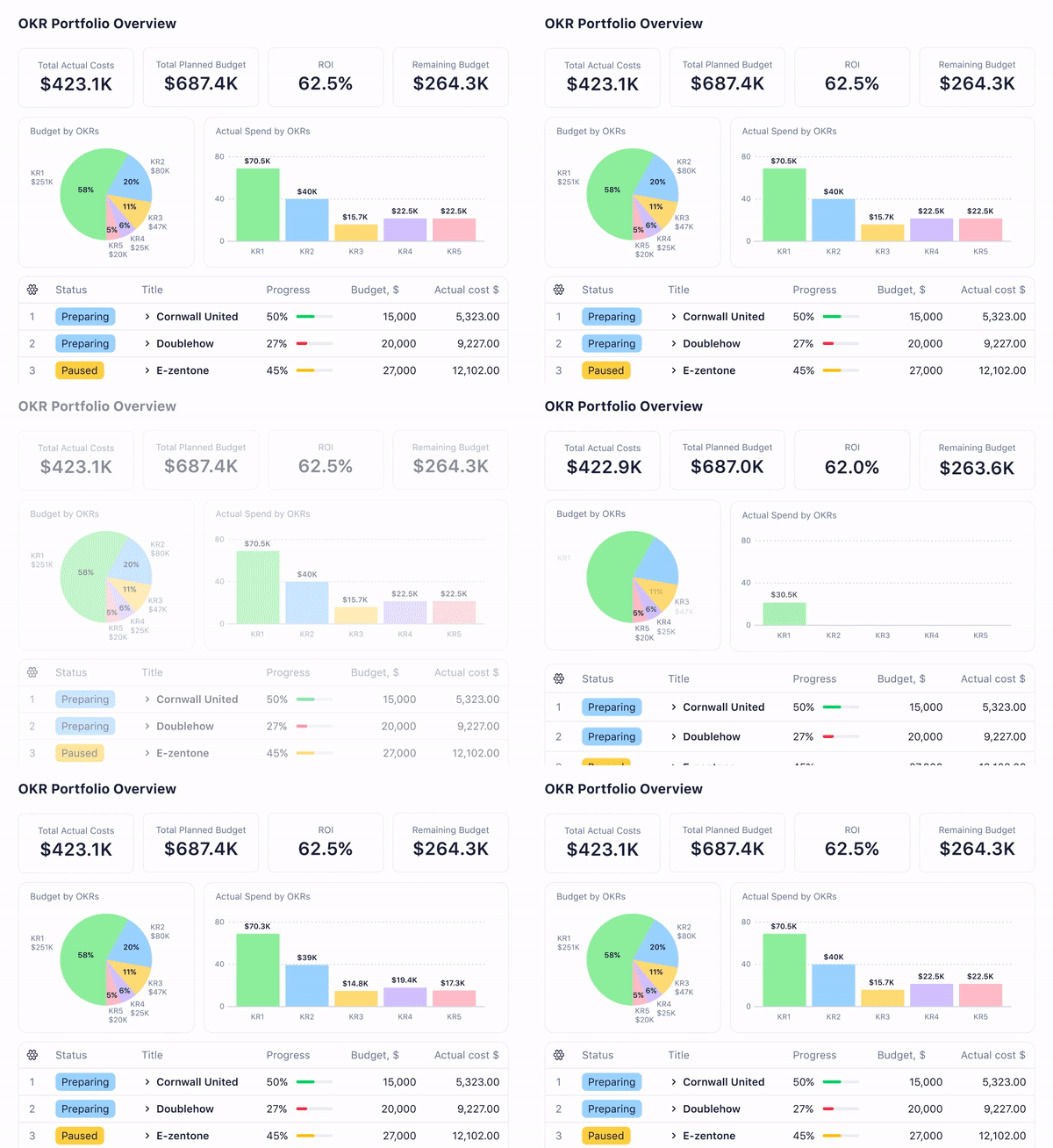
Alongside reporting, Wrike includes AI-powered risk management tools that help you respond proactively to the issues you discover as you track your project.
Rather than waiting for a deadline to be missed, Wrike monitors factors like team capacity, task ownership, historical performance, and task complexity to flag issues before they become problems. When a task is at medium risk or a bottleneck is starting to develop, your team is alerted in time to respond — whether that means reassigning work, adjusting a timeline, or having an early conversation with a client.

This is what separates effective project tracking from simply monitoring progress. Instead of firefighting, your team is making informed decisions with enough time and resources to act on them — keeping projects on track, clients confident, and your team working at a sustainable pace.
Seamless integrations for more scalability
With over 400 integrations with the tools your agency uses every day, Wrike can become a central hub for truly accurate project tracking.

Popular integrations for project tracking and reporting include:
- Financial tools for more accurate budget tracking. Wrike’s QuickBooks integration, for example, pulls the time you track in Wrike into invoices and keeps your project budget dashboard up to date automatically.
- CRM tools, including Salesforce, so you can manage your pipeline and client relationships in the same platform where you track and deliver your work.
- Communication tools like Slack and Microsoft Teams, so whether your team prefers to work in Wrike or your clients are used to a particular platform, everyone stays connected without anything falling outside your tracking system.
The real value of these integrations is that they bring more of your project data into Wrike. The more information flows into the platform, the more accurate and complete your tracking becomes — and the more confident you can be in the decisions you’re making.
Integrations also future-proof your setup. Rather than replacing your entire tech stack when your agency grows — which often requires a steep learning curve at a time when your team is already busy — you can add and adjust tools around Wrike. This is exactly the kind of scalability agencies are looking for when they make the move to an all-in-one platform.
Making that move is also easier than it might sound. Wrike imports data from Excel and Microsoft Project, so your existing information isn’t left behind. We’ve also developed a library of ready-made project management templates. With these templates, your workspace can be up and running quickly, with tools for your workflows, dashboards, and team collaboration already in place.

To find out more about what Wrike can do for your agency, start a free trial or get in touch with our team today.
2. AgencyAnalytics: Reporting tool for marketing agencies
AgencyAnalytics is designed to make it faster for agencies to create reports for their clients.
By using AI-powered content summaries and templates for the key elements of reports and dashboards, this tool helps agencies bring key insights together and present them in a user-friendly, professional way. This can be considered project tracking software, as it updates clients regularly on their projects, and helps teams to compare how metrics are developing over time.
This software includes tools to manage each client separately and to generate dashboards that cover portfolios of projects. This helps people in agencies to build stronger relationships with clients, and even improve client retention, without adding more repetitive tasks to their team’s workload.
AgencyAnalytics can be used for agencies specializing in SEO, social, paid, and e-commerce. For example, the SEO tools are designed to generate reports that track keyword rankings, share link-building success, clarify data relating to SEO goals to clients who are not specialists in the area, and prove the impact SEO campaigns are having on business growth.
Agency Analytics pricing:
- Freelancer plan: $59.00 per month when billed annually, for up to 5 clients
- Agency plan: $179.00 per month when billed annually, for up to 10 clients
- Agency Pro plan: $349.00 per month when billed annually, for up to 15 clients
- Custom Enterprise pricing available.
3. Notion: Documentation tool for increased collaboration
Notion is a project automation tool that can be used to track projects. The project management and tracking features are designed to be highly collaborative and to improve visibility on project progress, even when working with different departments or with external clients.
In Notion, you can track projects in a custom personal dashboard that brings in information from across the Notion workspace. This gives an overview of goals, tasks, to-dos, and things to consider, which show dependencies within the project lifecycle where a second team is waiting for the first to complete their work.
If agencies work in sprints, Notion also has custom views and task automations designed to allocate tasks and view them in a way that makes sense for Agile resource management, capacity planning, and scheduling.
Notion pricing:
- Free plan for individuals
- Plus plan: $10.00 per member per month
- Business plan: $20.00 per member per month
- Custom Enterprise pricing available.
4. Basecamp: Project management software for small businesses
Basecamp is a project management tool designed with smaller businesses in mind. It’s designed to be simpler than enterprise project management platforms, so the features and workspaces are quite stripped back. However, what it offers is a shared, transparent workspace where project discussions, timelines, and deliverables can be accessed and tracked, which is invaluable for smaller creative teams and their clients.
Teams in small agencies can use Basecamp to track their ongoing projects, their to-do lists, and their weekly calendar. This means they can always see what’s due next and how the process is flowing. These metrics are all brought together on a project page, and agencies can make pages for as many different projects as they need to track.
Basecamp also includes reporting software to highlight overdue tasks, timesheets, accountability, and a summary of the latest project activity. These are designed to be simple and easy to read, so, in contrast to tracking project progress in a spreadsheet or as a series of percentages, it’s easy to see the steps forward.
Basecamp pricing:
- Free plan for one project at a time
- Plus plan: $15 per user per month
- Pro Unlimited plan: $299 per month when billed annually.
5. Hive: Collaborative workflow management system with multiple views
Hive is a project management system that includes features like dashboards and time tracking.
Agencies can use Hive to manage projects from end to end, and the platform includes some features and templates specifically for marketing campaigns. When campaigns are in motion, teams can track the actions taken on tasks, task dependencies, and the milestones in their projects. Campaign tasks can also be assigned to team members, so accountability is clear throughout the project.
Hive also integrates with QuickBooks, so the time tracked in the project management platform can be synced to make invoices more accurate and effectively track a project’s budget.
Hive pricing:
- Free plan for up to 10 workspace members
- Teams plan: $12.00 per user per month
- Custom Enterprise pricing available.
6. Filestage: Online proofing software to manage approvals
Filestage specializes in proofing software for marketing assets. Teams use the software to submit new assets, pass them through fixed workflow stages, and record the feedback and approval decisions in real time.
Alongside standardizing and automating the approval process itself, Filestage includes analytics software to track how the review and approval process is performing. For example, teams can track time and set up dashboards with graphs to show how long it takes to complete projects, how long the review itself is taking, how many ongoing projects are being managed, and how many versions of each file are created before the asset is approved.
With these tools, teams can identify opportunities to improve their project processes and shave time off this stage of their work, as well as reduce the number of emails it takes to get a project over the line.
Filestage pricing:
- Free plan for one active project and 10 team members
- Starter plan: $199.00 per month
- Business plan: $329.00 per month
- Custom Enterprise pricing available.
7. Screendragon: Workflow automation tool for marketing agencies
Screendragon is a workflow automation tool designed specifically for marketing teams and agencies.
When it comes to project tracking, Screendragon visualizes the agency’s workload effectively, with color coding, custom statuses, and visualizations like Kanban boards and Gantt charts.
These dashboards can also be used for time and budget tracking, and teams can generate performance reports with the latest insights on project progress, project budgets, and team performance. These reports can also include information from external, integrated tools, like DAM systems, CRMs, and financial management tools.
Screendragon pricing:
- Contact customer service for custom per-user per-month pricing.
8. Planable: Project tracking and planning tools for content teams
Planable is a social media management platform with project tracking features. It’s designed to include team collaboration tools and has some specific features for agencies. This includes content planning, tools to collect and action feedback, approval workflows, and scheduling.
When social media management tasks are completed within Planable, teams can generate reports from the data that help with project tracking. For example, each client or team can have a dedicated, organized workspace to share resources, track versions of their assets, and consolidate feedback.
Planable is also set up to help teams collaborate privately and then share the results with their clients. Agency workflows remain internal, and content and reports can be kept hidden until they’re ready to share.
Planable pricing
- Free plan available
- Basic plan: $33.00 per workspace per month
- Pro plan: $49.00 per workspace per month
- Custom Enterprise pricing available.
9. Vista Social: Campaign tracking for multiple social profiles
Vista Social is a social media management platform for agencies known for its ease of use.
The analytics tools included with this platform generate customizable reports to show how projects or campaigns are performing. This includes real-time dashboards showing metrics like follower numbers, engagement, reviews, and overall sentiment, broken down and color-coded by channel. This helps agencies to track their work and keep their clients up to date.
The review report feature on this platform includes more sites that matter to businesses than social media alone. It can also be used to track and analyze reviews on sites like Google Business, Yelp, and TrustPilot.
As well as tracking campaign performance, Vista Social can measure and report on team performance (for example, how quickly team members respond to messages) and competitor performance.
Vista Social pricing:
- Professional plan: $64.00 per month when billed annually
- Advanced plan: $120.00 per month when billed annually
- Scale plan: $304.00 per month when billed annually
- Custom Enterprise pricing available.
10. Bonsai: Business management software for agencies
Bonsai provides business software designed specifically for agencies. It’s designed both to set up spaces for each client or project and to consolidate the metrics your team needs to see to understand overall performance and make agency management decisions.
This platform is designed to view projects from multiple angles, for example, with task tracking, Gantt chart timeline tracking, budget tracking, time sheets, and resource planning features. The reports it generates are designed to replace spreadsheets and connect insights, and they allow agencies to track their revenue, costs, billable hours, and project health in one tool.
As a robust professional services platform, Bonsai’s project tracking features are fairly exhaustive here. It offers dashboard features, profitability tracking, financial performance reports, and client performance insights, too.
Bonsai pricing:
- Basic plan: $9.00 per user per month when billed annually
- Essentials plan: $19.00 per user per month when billed annually
- Premium plan: $29.00 per user per month when billed annually
- Elite plan: $49.00 per user per month when billed annually.
11. IntelligenceBank: Marketing operations platform with project tracking features
IntelligenceBank is a tool to help content teams get approvals for their deliverables, especially in workflows where multiple teams — like legal and compliance — need to weigh in. It includes features for digital asset management, automated marketing compliance, and tracking the marketing workflows the team uses every day.
When it comes to agency project tracking, IntelligenceBank has both reporting and dashboard features, which help agencies monitor their portfolio in a way that gives them day-to-day visibility, insights to improve their approach, and proof of their performance on client work. Teams regularly use these features to measure key project tracking metrics like time to approval, overdue tasks and workflows, brief status, and download requests.
IntelligenceBank also offers risk management tools tailored to content, web, advertising, and social media projects.
IntelligenceBank pricing:
- Custom pricing available, with DAM, brand management, marketing work, and marketing compliance packages.
Choose Wrike as your all-in-one agency project tracking tool
In this guide, we’ve shared 11 different options for tools that can help you track your agency projects from multiple angles. Wrike stands out as a completely scalable, all-in-one solution that agencies can use to track both the results their work sees for their clients and the metrics that inform the decisions they take for their company.
If you’re looking for a robust solution that can be tailored to your team, choose Wrike. Start a free trial now or book a demo to find out more.
Frequently asked questions (FAQs) about agency project tracking
What are the best practices in agency project tracking?
Effective agency project tracking starts with clear processes: defining task ownership, setting realistic milestones, and keeping communication centralized so nothing gets lost across tools. Regularly reviewing project health — rather than waiting until something goes wrong — helps teams catch issues early. Using a dedicated platform to automate repetitive tasks and standardize workflows across clients also goes a long way toward keeping projects on track.
How can project progress be tracked effectively?
The most effective approach combines up-to-date visibility with regular check-ins. A good project tracking tool will give your team a live view of task status, deadlines, and bottlenecks, while automated updates reduce the need for manual reporting. Pairing this with consistent reviews for your team and your clients — whether that’s daily standups or weekly status updates — means nothing slips through the cracks.
What’s the best project tracking software for agencies?
Wrike is one of the best project tracking tools for agencies due to its flexibility, client-facing features, and robust reporting capabilities. It’s particularly well-suited to teams managing multiple clients simultaneously, offering secure workspaces with permission-based access controls, real-time dashboards, and automation tools that scale as your agency grows.
How can agencies track complex projects?
Complex projects require a tool that can handle input from multiple stakeholders and subteams without losing clarity. Look for software that supports dependencies between tasks, allows you to break large projects into phases or workstreams, and gives both your team and your clients visibility into progress — perhaps even through a secure client portal. Automation and reporting features are especially valuable as they reduce the number of repetitive manual tasks that can build up as projects grow in scope.