

Key takeaways:
- The right Trello alternative depends entirely on your team type. For example, developers are often better served by Jira, Linear, or Shortcut, while agencies tend to lean toward Hive, Teamwork, or Wrike.
- Free and open-source options are viable, too, with tools like Focalboard, WeKan, and Taiga offering real functionality without subscription costs.
- Most tools specialize rather than generalize, with Miro excelling at planning but not execution, Notion working best for documentation-adjacent teams, and Airtable suiting data-heavy workflows despite its steep learning curve.
Trello was built for simplicity, and it delivers on that. But simplicity has a ceiling. Managing high-volume work across many teams can become cluttered in Trello, though Workspace views aim to address this by aggregating board data.
While Trello provides high-level workload visualization via its Dashboard view, it lacks the deep resource heatmaps and automated capacity balancing found in other enterprise-grade tools.
So, what’s the best alternative to Trello? Which project management tool should you use instead? In this guide, we share 26 alternatives to Trello to help you find the right collaboration tool for your needs. We show you how their features work compared to Trello and what you can expect when using them.
Trello alternatives at a glance
Here’s a bite-sized breakdown of the 26 Trello alternatives, including price, key features, and what each is best suited for.
|
Best for |
Starting price (per user/month, billed annually) |
|
|
Wrike |
Complex projects |
$10 |
|
Asana |
Scaling teams |
$10.99 |
|
ClickUp |
Broad functionality |
$7 |
|
Jira |
Development teams |
$7.91 |
|
Monday.com |
Use case templates |
$9 |
|
Notion |
Documentation-heavy teams |
$10 |
|
Airtable |
Database-style PM |
$20 |
|
Basecamp |
Remote teams |
$15/user or $299/month flat |
|
Hive |
Creative agencies |
$5 |
|
Smartsheet |
Spreadsheet users |
$9 |
|
Proofhub |
Flat-fee teams |
$45/month |
|
Workfront (Adobe) |
Enterprise marketing |
Contact sales |
|
Shortcut |
Agile development teams |
$8.50 |
|
Linear |
Fast-moving devs |
$10 |
|
ZohoProjects |
SMB teams |
$4 |
|
Miro |
Visual planning |
$8 |
|
Klaxoon |
Dynamic collaboration |
$24.90 |
|
Todoist |
Personal tasks |
$5 |
|
Teamwork.com |
Client projects |
$10.99 |
|
Microsoft Planner |
Microsoft 365 users |
Free with Microsoft 365 or Planner Plan 1 starting at $10 |
|
KanbanFlow |
Simple Kanban |
Free or $5 |
|
WeKan |
Self-hosted Kanban |
Free (if self-hosted) |
|
Focalboard |
Open source PM |
Free (if self-hosted) |
|
Baserow |
Custom databases |
Free (if self-hosted) |
|
Taiga |
Agile open source |
Free (if self-hosted) |
|
Vikunja |
Lightweight tasks |
Free (if self-hosted) |
Note: Several tools in the table above offer free tiers, but we’ve listed them here because their core value is in their paid plans, which is where the features that make them a genuine Trello alternative live.
Paid Trello alternatives
You’ve seen the table, now let’s get into what these tools actually look like when you’re using them every day. Here are all the paid Trello alternatives.
Wrike: Best for complex projects
Wrike is our scalable and robust project management platform. Teams often switch from Trello to Wrike when they’re looking for a tool that can handle larger or more complex projects.

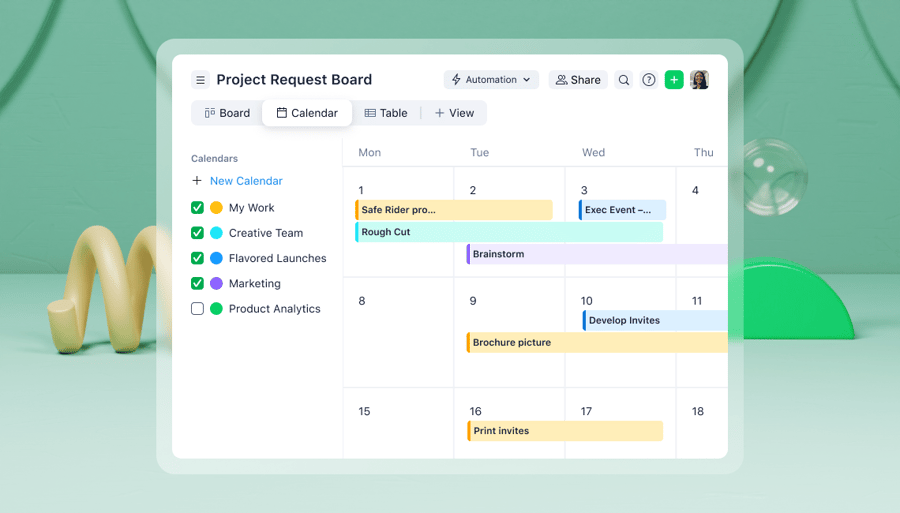
What really sets Wrike apart from other project management solutions is its customization. Compared to Trello, Wrike does much more than just Kanban boards (although we have those too).
Instead, no matter how you want to work, Wrike lets you track and see your projects in a way that makes sense for you. Plus, it lets you scale up to manage unlimited projects in one platform, without things getting cluttered.
- Wrike has its own intuitive Kanban board view: Track project progress by changing task statuses, just like in Trello. Wrike offers Kanban if that makes sense for you, while letting you chat about entire projects (not just individual tasks).
- Wrike gives you a deeper view of task dependencies with customizable Gantt charts: When Kanban isn’t enough, switch over to Wrike’s Gantt Chart view. This gives you a complete understanding of task dependencies, milestones, and due dates. While Trello is primarily a task management tool, Wrike gives you insight into your entire project.
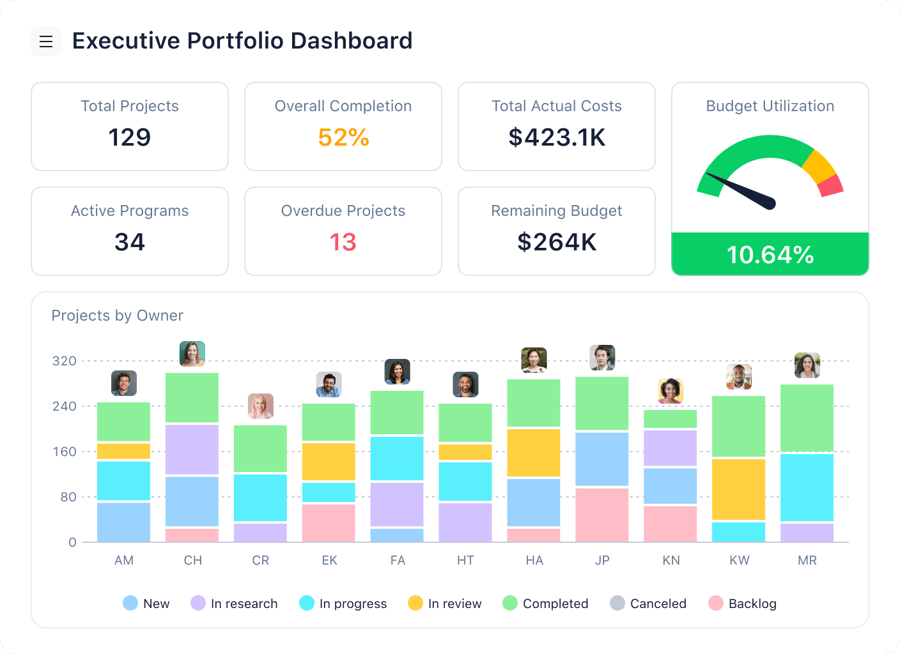
- Wrike provides user-friendly, personalized dashboards for every single colleague: Every team member has their own workflows and to-do lists. With Wrike’s dashboards, they can immediately get visibility on their own priorities, checklists, notifications, tasks, and subtasks, within the context of your whole organization’s work.
Why choose Wrike over Trello? Wrike offers greater governance, power, and oversight than Trello, making it suitable for teams that need robust reporting and structure.
Asana: Best for scaling teams
Asana is one of the best-known project management platforms, designed to help team collaboration by organizing work in a single connected space. It’s used by millions of people worldwide and has 300+ ready-made integrations.
Where Asana particularly shines is in cross-functional work. Portfolio views let managers track progress across multiple projects simultaneously, and goal tracking ties day-to-day tasks to company objectives. Both are available on the Advanced plan.
Good fit if your team needs:
- Automated workflows and dependency tracking across complex projects
- Customizable intake forms that route and assign work automatically
- Portfolio and goal tracking across multiple teams
Not the right call if you need:
- Native time tracking without upgrading to Advanced
- Advanced reporting and workload management on a starter budget
- A simpler interface for teams managing high task volumes
Ultimately, many users choose Wrike over Asana and Trello because it offers a less cluttered user experience, increased visibility, and more powerful work management features.
Asana’s paid plans start at $10.99 per user per month, billed annually, or $13.49 per user per month billed monthly.
ClickUp: Best broad functionality
Another of the most popular project planning tools, ClickUp is often cited as a strong option for Kanban board software. It has solutions for many different use cases, offering automations, chat tools, templates, and more.
When comparing ClickUp to other work management platforms, many users focus on proofing and approval capabilities. Trello allows users to add proofs to boards via a plug-in called PageProof, and ClickUp lets users mark changes or leave comments on specific file types.
Good fit if your team needs:
- An all-in-one workspace with tasks, docs, chat, and whiteboards
- 15+ project views, including Gantt, Mind Map, and workload
- Extensive workflow and dashboard customization
Not the right call if you need:
- A simple tool with a low learning curve
- Reliable performance on large projects
ClickUp offers a “free forever” plan with basic features such as Kanban boards. It also has three paid plans starting at $7 per user per month (billed annually).
Jira: Best for development teams
Jira Software, Jira Core, and Jira Work Management are all tools that help businesses and organizations manage their work and collaborate with colleagues. While Trello is aimed at all kinds of teams, Jira is primarily for software developers and Agile project management.
Many people don’t realize that Trello and Jira are actually owned by the same company, the Atlassian Group, which provides similar functionality across many of its products. Both use a Kanban board as their main project view, but the level of complexity differs significantly: Trello is easier to use, but Jira offers much more context into project and task details.
Good fit if your team needs:
- Scrum and Kanban workflows that are built around sprints and epics
- Deep integration with development tools like GitHub and Bitbucket
- Advanced Agile reporting, including velocity charts and burndowns
Not the right call if you need:
- A tool for non-technical or cross-functional teams
- A straightforward setup without significant configuration
- Built-in time tracking or resource management
Monday.com: Best use case templates
If you’re looking for a Kanban tool, Monday.com will probably appear on your radar. It’s one of the better-known work management solutions on the market. It has a wide range of features such as dashboards, automations, Gantt charts, and Kanban boards.
Where Trello and Monday.com differ is in the range of their offering. Monday.com includes more work management capabilities, such as resource management, in addition to the task management features Trello provides. It also offers a large number of ready-made templates for a variety of use cases.
While Trello’s views, templates, and budgeting plugins help users visualize and organize their resourcing, Monday.com’s features offer greater configurability, including time tracking and a column for assigning project tasks to people.
Good fit if your team needs:
- Visually intuitive boards with 27+ views, including Gantt and timeline
- Highly customizable workflows with minimal technical setup
- Strong integrations across common business tools
Not the right call if you need:
- Predictable pricing at scale (seats are sold in blocks, not individually)
- Native timesheets or advanced time tracking
- Automation without hitting limits on lower-tier plans
For a complete resource management solution, compare Wrike’s offering to Monday.com’s.
Notion: Best for documentation-heavy teams
Notion is not a traditional project management tool, but a lot of teams use it as one. The appeal is that your tasks and context live in the same place. Instead of managing a board in one tab and your documentation in another, Notion pulls them together through pages and databases that you can shape into Kanban boards, project timelines, wikis, or whatever structure your team needs.
Unfortunately, Notion does not come with a ready-made project management structure, so your experience depends entirely on how well your system is designed. Teams that invest time in getting that right tend to love it.
Reporting and workload visibility are limited compared to dedicated PM tools. If complex, multi-stakeholder projects are the norm for your team, Notion might frustrate you. If documentation and project tracking carry equal weight and you want both without paying for two tools, it is worth serious consideration.
Good fit if your team needs:
- Kanban boards, timelines, and wikis in one place
- A single tool for both project tracking and documentation
- Flexibility to build your own workflow structure
Not the right call if you need:
- Reporting and workload visibility across complex projects
- Resource planning or multi-stakeholder tracking
- A plug-and-play PM platform that needs minimal setup
Pricing starts at $10 per user per month, with a free tier for individuals.
Airtable: Best for database-style PM
Airtable looks like a spreadsheet but behaves like a database. Where Trello organizes work into cards, Airtable organizes work into structured records with fields, relationships, and views. You can connect a task to a client record, link it to a budget line, attach a file, and then view everything as a Kanban board, calendar, or gallery, depending on what you need.
Teams that track work with many variables often find Airtable maps better for their workflow than a traditional PM tool. This way, you’re not forcing your data into someone else’s structure.
The tradeoff is complexity. Airtable rewards teams that think carefully about how their data connects, and less technical team members can struggle with the interface. Collaboration features are functional but not a particular strength. Where Airtable wins is data integrity and flexibility for teams that treat projects like datasets.
Good fit if your team needs:
- Relational data across projects, clients, and budgets
- Flexible views, including Kanban, calendar, and gallery
- A tool that reflects how your data actually connects
Not the right call if you need:
- A gentle learning curve for less technical team members
- Deep collaboration features like approvals and workflow automation
Pricing starts at $20 per user per month, with a limited free tier for individuals.
Basecamp: Best for simple visuals
Basecamp started life as a design firm, and even though it has evolved into a work management and collaboration platform, it still has a nice, clean look that stays true to its roots.
It prides itself on rejecting complexity in favor of simplicity, and this will appeal to teams that have limited requirements. Those anticipating growth or expansion may need alternatives to scale.
In terms of features, Trello and Basecamp are quite similar, but what Basecamp doesn’t do, though, is provide a Gantt chart view, which you might need if you’re looking to scale up the complexity of your projects.
Good fit if your team needs:
- A flat monthly fee covering unlimited users and projects
- Centralized communication with message boards, chat, and file sharing
- A low-maintenance tool for remote or async teams
Not the right call if you need:
- Task dependencies, subtasks, or Gantt charts
- Built-in time tracking without a paid add-on
- Advanced reporting or workload visibility
Basecamp offers good-value plans, starting at $15 per user per month, or the Pro Unlimited plan at $299 per month billed annually, covering unlimited users at a fixed price.
Hive: Best for creative agencies
Hive is one of the few project management tools built from the start with agency workflows in mind. It covers the full project lifecycle without requiring a stack of add-ons. For agencies juggling multiple clients and deadlines simultaneously, that consolidation matters.
The interface provides a range of views, including Kanban, Gantt, calendar, and table views, as well as a team resourcing view that shows capacity across your whole team at a glance.
Good fit if your team needs:
- Capacity and resourcing visibility across multiple projects
- Native time tracking tied directly to tasks
- Multiple project views without switching tools
- Built-in team messaging and collaborative documents
Not the right call if you need:
- Predictable pricing at scale (add-ons push costs up quickly)
- Enterprise-grade reporting and analytics
- A simple setup with minimal configuration
Pricing starts at $5 per user per month on the Starter plan, with a free tier available for small teams. Factor in add-on costs before committing, as the base plan is intentionally lean, and some core features like team resourcing and custom dashboards are add-ons.
Smartsheet: Best for spreadsheet users
If you’ve been managing your work via spreadsheets, you may be drawn to Smartsheet when looking for a Trello alternative.
Much like Trello, Smartsheet’s cloud-based project management software helps team members visualize and organize their work. It offers a tabular user interface that will be familiar to teams who lean on Excel or similar tools.
A key feature that differentiates Trello from Smartsheet is native analytics. Trello offers plugins that can help with insights and reporting. But Smartsheet has built-in features that let users analyze and create custom reports by grouping and filtering data.
Good fit if your team needs:
- Spreadsheet-style tracking with Gantt and automation built in
- Strong reporting for operations or PMO teams
- Cross-functional visibility with real-time updates
Not the right call if you need:
- Native time tracking without a separate paid add-on
- A gentle learning curve for non-technical users
- Predictable pricing as your team scales
Proofhub: Best for flat-fee teams
Most project management tools charge per user, which means costs scale fast as your team grows. ProofHub takes a different approach with a flat monthly fee that covers unlimited users, making it one of the more budget-predictable options on this list. For agencies or teams that bring in a lot of freelancers and contractors, that pricing model alone is worth paying attention to.
This tool covers the core bases well. You get Kanban boards, Gantt charts, time tracking, discussions, and file management in one place. The proofing and approval features are where ProofHub truly stands out, though, as you can annotate files directly, collect feedback, and move assets through an approval workflow without leaving the platform. For creative teams that spend a lot of time in review cycles, that is a real time saver.
The tradeoffs are real, though. ProofHub does not offer budgeting tools, which limits its usefulness for teams that need to track project costs alongside tasks. Reporting is functional but basic compared to tools like Wrike or Smartsheet. And the interface, while clean, has not evolved as quickly as some competitors.
Good fit if your team needs:
- Flat-fee pricing with no per-user costs
- Built-in proofing and file annotation
- A straightforward tool without a steep learning curve
- Unlimited users on a fixed budget
Not the right call if you need:
- Budget and cost tracking at the project level
- Advanced reporting and analytics
- Deep workflow automation
Pricing starts at $45 per month flat on the Essential plan, with the Ultimate Control plan at $89 per month covering unlimited projects and all features.
Important note: Proofhub Ultimate Control starts at $89/month, but only for the first 3 months, then scales to $135/month afterwards.
Workfront: Best for Adobe users
Workfront is bound to pop up when you’re reviewing Trello alternatives. Owned by the creative powerhouse Adobe, Workfront project management software is designed to help organizations manage projects, tasks, resources, and people.
Unfortunately, Workfront doesn’t list its prices, which can make it difficult to compare with other providers. It also doesn’t offer a free plan if you’re looking for a Kanban board to try out.
The biggest contrast between the two is that Workfront is designed for enterprise-sized organizations, while Trello is often favored by smaller teams and startups. As a result, Workfront has a formal, business-like interface, which some users might find somewhat complex and clunky.
Another key differentiator is built-in proofing and approval features, which Workfront offers, but Trello lacks completely. However, Trello offers more integrations than Workfront.
Flexibility is something that will stand out when comparing Trello vs. Workfront vs. Wrike, for example.
Shortcut: Best for Agile software teams
Shortcut was built specifically for software teams, and it shows. The entire structure is organized around stories, epics, and milestones rather than generic tasks and cards. When your whole team thinks in sprints and backlogs, working in a tool that reflects that vocabulary reduces friction in a way that generic project management tools simply do not.
The interface is fast and clean. You get Kanban boards, sprint planning, roadmaps, and burndown charts without the bloat that comes with trying to serve every type of team at once. Shortcut stays in its lane, and that focus is both its biggest strength and its clearest limitation.
Good fit if your team needs:
- Agile workflows built around stories, epics, and milestones
- Sprint planning and backlog management
- A focused tool without features your dev team will never use
- Clean GitHub, GitLab, and Slack integrations
Not the right call if you need:
- A tool that works easily across both technical and non-technical teams
- Native resource planning or time tracking
- Cross-departmental project visibility
Pricing starts at $8.50 per user per month, with a free plan available for teams of up to 10 users.
Linear: Best for fast-moving developers
Linear has built a reputation among product and engineering teams for one reason above almost anything else: speed. The interface is keyboard-first, loads instantly, and gets out of your way. If you have ever felt like your project management tool slows you down more than it helps, Linear is the antidote.
Like Shortcut, Linear is built around issues, cycles, and projects rather than generic tasks. But where Shortcut leans into Agile frameworks, Linear leans into simplicity and velocity. Cycles replace sprints but carry less overhead. Roadmaps are visual and easy to update. Everything syncs with GitHub, keeping code changes and project status in sync without manual updates.
Good fit if your team needs:
- A keyboard-driven, fast interface with minimal friction
- Issue tracking tied directly to code and pull requests
- Clean roadmaps and cycle planning for product teams
- A tool that the engineering team will actually adopt and use
Not the right call if you need:
- Support for non-technical teams or cross-functional projects
- Native time tracking or resource management
- Advanced reporting beyond cycle and project metrics
Pricing starts at $10 per user per month on the Standard plan, with a free plan available for small teams of up to 250 members with limited features.
Zoho Projects: Best for SMB teams (small and medium-sized businesses)
Zoho Projects comes from a company that has spent decades building workplace software, and that experience shows in how well it fits into an existing tech stack. If your team already uses Zoho CRM, Zoho Desk, or any other part of the Zoho ecosystem, Projects slots in without friction.
For SMBs that want a capable tool without enterprise pricing, it is one of the more sensible options on this list.
The core features cover everything a small or mid-sized team needs. Gantt charts, task dependencies, time tracking, and basic reporting are all included. The interface is clean, and the learning curve is gentle, which matters when you do not have a dedicated operations person to onboard everyone.
Where it falls short is complexity. Zoho Projects handles straightforward project structures well, but when projects get layered, the tool starts to show its limits. Automation is basic compared to Wrike or Asana, and reporting lacks the depth that growing teams eventually need.
Good fit if your team needs:
- A simple, affordable tool for straightforward project tracking
- Tight integration with the broader Zoho app ecosystem
- Gantt charts and time tracking without a steep learning curve
- Predictable pricing for small teams
Not the right call if you need:
- Advanced automation and workflow customization
- Deep reporting across complex, multi-team projects
- Enterprise-grade scalability
Pricing starts at $4.60 per user per month, with a free plan available for up to five users.
Miro: Best for visual planning
Miro is not a project management tool in the conventional sense, but it earns its place on this list because a significant number of teams use it exactly the way they use Trello — as a visual space to organize ideas, plan projects, and map out workflows. The difference is that Miro gives you an infinite canvas rather than a structured board, which offers much greater creative flexibility.
Where Miro shines is in the early stages of a project. Brainstorming sessions, sprint planning workshops, customer journey mapping, and product roadmaps are all strengths of Miro. The real-time collaboration is genuinely good, and the template library covers enough ground that most teams can get started without building everything from scratch.
The limitation is follow-through. Miro is excellent for planning and ideation, but does not handle task execution well. There are no deadlines, no assignees in the traditional sense, and no workload views. Most teams end up using Miro alongside another tool rather than instead of one.
Good fit if your team needs:
- A collaborative space for brainstorming and visual planning
- Real-time whiteboarding across distributed teams
- Roadmapping and sprint planning workshops
- Flexible canvas-based layouts beyond rigid board structures
Not the right call if you need:
- Task tracking, deadlines, and assignees
- Reporting or workload visibility
- A single tool to cover planning and execution
Pricing starts at $8 per user per month on the Starter plan, with a free tier available for up to three boards.
Klaxoon: Best for visual collaboration and workshops
Klaxoon is part of the Wrike family, and understanding what it does explains why. Wrike handles project execution, while Klaxoon takes care of the front end of projects that most tools ignore, like kickoff workshops, brainstorming sessions, and retrospectives. So together, they cover the full journey from idea to delivery.
Klaxoon is built around an infinite whiteboard and eight collaboration tools, including surveys, polling, quizzes, and automated reporting. The automated session reports mean decisions are captured without anyone having to write them up afterward.
It is not a project management tool in the conventional sense, but where Klaxoon earns its place is bridging the gap between collaborative thinking and structured execution, particularly when paired with Wrike.
Good fit if your team needs:
- Structured workshops and brainstorming for remote and hybrid teams
- Polling, surveys, and quizzes that are built into the meeting experience
- Automated reports that capture session outputs without manual effort
Not the right call if you need:
- Day-to-day task tracking and project management
- A standalone Trello replacement for execution workflows
- Budget or resource planning
For teams already on Wrike, Klaxoon covers the part of project work that a task board was never designed for. Although it is now part of the Wrike ecosystem, it requires separate seat licenses for full access to its workshop tools. Pricing starts at $24.90 per month with a free plan available.
Todoist: Best for personal tasks
Todoist is the simplest tool on this list by a considerable margin, and that is entirely the point. It is a task manager first, built for individuals and very small teams who want a clean, fast way to capture and organize work without the overhead of a full project management platform.
The interface is minimal. You add tasks, set due dates, assign priorities, and organize everything into projects. There is a Kanban board view if you want it, but most Todoist users stick to the List view because that is where the tool feels most natural.
For personal productivity and individual work tracking, it’s hard to beat. Where it may break down is in collaboration. Todoist supports task comments and shared projects, but it is not built for teams that need to coordinate across complex workflows.
Good fit if your team needs:
- A fast, minimal tool for personal task management
- Simple shared task lists for very small teams
- Clean mobile and desktop apps with reliable sync
- Recurring tasks and priority-based organization
Not the right call if you need:
- Team collaboration across complex projects
- Gantt charts, timelines, or dependency tracking
- Reporting or workload management
Pricing starts at $4 per user per month on the Pro plan, with a genuinely usable free tier for individuals.
Teamwork.com: Best for client projects
Teamwork.com is built around managing client-facing work. Where tools like Asana or Monday.com are designed for internal team coordination, Teamwork.com adds a layer specifically for client visibility, billing, and communication. For agencies, consultancies, and any team that delivers work on behalf of external stakeholders, that distinction makes a real difference.
You get project templates, task management, Gantt charts, and time tracking, along with client user access, invoicing, retainer tracking, and a client portal where stakeholders can review progress without a full account. That last feature is something most tools on this list simply do not offer.
Reporting is strong relative to similarly priced tools, and time tracking ties directly to billing, saving teams that invoice by the hour a meaningful amount of administrative work.
Good fit if your team needs:
- Client portals and external stakeholder access
- Time tracking connected to invoicing and billing
- Retainer and budget management per project
- A tool built around delivering work to clients
Not the right call if you need:
- A simple internal task tracker without client-facing complexity
- Advanced automation and workflow customization
- Enterprise-scale resource planning
Pricing starts at $10.99 per user per month, with a free plan for up to 5 users across 3 projects.
Microsoft Planner: Best for Microsoft users
If your team already pays for Microsoft 365, you have Planner whether you know it or not. It comes bundled with every Microsoft 365 Business subscription, which makes it the most frictionless free option on this list.
Planner is a straightforward Kanban tool. You create plans, add tasks, assign them to team members, set due dates, and track progress across a board view or a simple chart. It integrates cleanly with Teams, Outlook, and SharePoint, so work stays connected to the conversations and documents your team already uses daily.
The limitations, however, are real. The version of Planner that is included in Microsoft 365 has no Gantt charts, no time tracking, no advanced reporting, and no automation to speak of. It is built for simple task coordination, not complex project management.
While standard Planner tasks are simple, Microsoft’s premium Planner plans offer Gantt views and advanced resource management, which start at $10/user.
Good fit if your team needs:
- A free task management tool within an existing Microsoft 365 subscription
- Kanban boards that connect directly to Teams and Outlook
- A simple, low-friction way to assign and track tasks
Not the right call if you need:
- Gantt charts, time tracking, or workload visibility in the free plan
- A tool that handles complex workflows without the features being gated behind paid tiers.
Free and open-source Trello alternatives
Not every team needs to pay for a project management tool, and in some cases, the free or open-source options are genuinely the better choice. Here are the tools worth considering if budget is a constraint or data control is a priority.
KanbanFlow: Best for no-frills Kanban
KanbanFlow does one thing and does it well. The free plan has no card limits and no board limits, so for individuals or small teams that want a clean Kanban board and nothing else, that is genuinely rare.
The interface is minimal by design. You get unlimited boards, tasks, WIP limits, and a built-in Pomodoro timer for time tracking, which is a combination that works surprisingly well for teams that run focused, time-boxed work cycles. But there is no project roadmap, no Gantt chart, and no resource planning. KanbanFlow is not trying to be those things.
Good fit if your team needs:
- A genuinely free Kanban board with no card/task limits
- WIP limits for structured workflow management
- Built-in Pomodoro timer for time-boxed tasks
Not the right call if you need:
- Reporting, timelines, or cross-project visibility on the free plan
- Team collaboration beyond basic task assignment
- Anything beyond a simple board structure
Free plan covers full core functionality. A premium plan at $5 per user per month adds time tracking reports and integrations.
WeKan: Best self-hosted Kanban
WeKan is the closest open-source equivalent to Trello in terms of look and feel. If you have used Trello, Wekan’s interface will feel immediately familiar. The difference is that you run it on your own server, which means your data stays entirely under your control.
It is actively maintained, supports multiple users and teams, and covers the basics well, including labels, due dates, checklists, and card attachments. For organizations in regulated industries or those with strict data residency requirements, the self-hosted model is often a requirement rather than a preference.
Good fit if your team needs:
- Full data control with on-premise hosting
- A Trello-like interface without the subscription cost
- Basic Kanban for teams with the technical capacity to self-host
Not the right call if you need:
- A polished, cloud-hosted experience with no setup
- Advanced reporting or workflow automation
- Dedicated support or SLA guarantees
Free and open-source. Hosting and infrastructure costs depend on your setup.
Focalboard: Best for open-source project management
Focalboard was built by the Mattermost team as an open-source alternative to Trello, Asana, and Notion. What sets it apart from other open-source tools on this list is its range of views. Beyond Kanban, you get table, gallery, and calendar views built in, which give you more ways to look at the same work without switching tools.
It can be self-hosted or run as a standalone desktop app, making it accessible even for teams without dedicated infrastructure. The interface is clean and modern, and the learning curve is low. Mattermost users get the deepest integration, but Focalboard also works independently of the broader Mattermost platform.
Good fit if your team needs:
- Multiple project views, including Kanban, table, and calendar
- A modern open-source tool with active development
- Self-hosted or standalone desktop deployment
Not the right call if you need:
- Enterprise-grade reporting or resource management
- A cloud-hosted solution with no setup required
- Deep integrations outside the Mattermost ecosystem
Free and open-source. Available as a standalone app or self-hosted instance.
Baserow: Best for custom databases
Baserow sits in similar territory to Airtable, but with one critical difference: you can self-host it. It is a no-code database platform that lets teams build their own project-tracking structures from scratch, with Kanban, table, gallery, and calendar views available on top of that database foundation.
For teams that need to track work with relational data, Baserow offers a level of flexibility that traditional Kanban tools simply cannot match. The open-source version gives you full access to the codebase, which matters for teams that want to customize or integrate deeply.
Good fit if your team needs:
- A self-hostable, open-source alternative to Trello
- Custom database structures for complex tracking workflows
- Flexible views across Kanban, table, calendar, and gallery
Not the right call if you need:
- A simple board for everyday task tracking
- Built-in project management workflows out of the box
- A low-setup tool for non-technical teams
Free and open-source for self-hosted deployments. Cloud plans start at $5 per user per month.
Taiga: Best for Agile open source
Taiga is built specifically for Agile teams, and that focus shows throughout the product. You get both Scrum and Kanban workflows, backlog management, sprint planning, and burndown charts, all in an open-source package you can self-host or use via their cloud offering. For software and product teams that want Agile tooling without paying for Jira, Taiga is one of the most complete options available.
The interface is clean, and the Agile structure is genuine rather than cosmetic. Issues, epics, user stories, and sprints are all first-class concepts in Taiga. Plus, the community is active, and the product has been maintained consistently since 2014.
Good fit if your team needs:
- Full Scrum and Kanban support with backlog management
- Open-source Agile tooling with self-hosting options
- Sprint planning and burndown charts without a paid license
Not the right call if you need:
- A tool that works equally well for non-technical teams
- Advanced reporting beyond sprint and project metrics
- Enterprise support and SLA guarantees
Free and open-source for self-hosted use. Cloud plans start at $5 per user per month.
Vikunja: Best for lightweight tasks
Vikunja is a self-hostable task manager that prioritizes simplicity over feature depth. It covers the essentials with a clean, straightforward interface that is easy to set up and use. For individuals or small teams that want open-source task management, it hits a sweet spot that few tools in this category match.
The Gantt view is worth calling out specifically, as most lightweight open-source tools skip it entirely. Vikunja includes it as a standard feature, which adds meaningful planning capability without complicating the rest of the experience.
Good fit if your team needs:
- A lightweight, self-hosted task manager with multiple views
- Gantt charts in an open-source tool without complexity
- Simple individual or small team task tracking
Not the right call if you need:
- Team collaboration features beyond basic task sharing
- Advanced Agile workflows or sprint management
- Enterprise-scale project tracking
Free and open-source. Can be self-hosted or used via their managed paid option.
Wrike: The best all-around Trello alternative
In this guide, we’ve introduced you to 26 possible Trello alternatives. But the TL;DR is: if you’re looking for software that’s highly customizable and that scales as you grow, choose Wrike.
- Wrike is an all-in-one platform that includes time tracking, task lists, and project reporting as standard — with no plugins.
- We offer customizable views, including Kanban, Gantt, and calendar views, as well as personalizable dashboards.
- Choose from 400+ plug-and-play integrations, including GitHub, the Microsoft Suite, and Adobe Creative Cloud. If you need another integration not on that list, we can set that up with our API.
- There are multiple pricing plans (both free and paid) to suit your needs. From a free plan for one team to an Apexplan for global enterprises, Wrike has the plan for you.
- Enjoy easy collaboration designed for small, large, and remote organizations, including industry leaders like Siemens, Walmart Canada, and NVIDIA.
If you want to see for yourself just how powerful Wrike’s platform is, take a two-week free trial today.